
gjaffkjplmcnjonnmoagianaeacjfipj
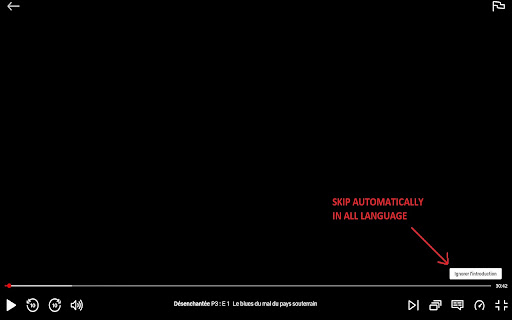
Automatically skip Netflix, Prime Video and Disney plus intros, recaps, and next episode prompts. Automatically skip Intro, Recaps and Next episode for Netflix, AppleTV, Prime Video and Disney plus prompts. IMPORTANT: you need to refresh the Netflix, AppleTV, Prime Video or Disney plus page only once after installing the extension. It's not dependent on language. You can check the code here : https://github.com/mfaurel/skipfast You can open an issue or send a pull request if you find any bug. If you want to buy me a coffee, here's my paypal : https://paypal.me/MichaelFaurel

Disney+ AutoSkip
This is an extension that skips the resume and intro of Disney+ videos and jumps to the next episode Disney+ AutoSkip: Enhance Your Binge-Watching Experience! Are you tired of endlessly waiting through intros, recaps, and delays between episodes on Disney+? Say goodbye to interruptions and hello to seamless streaming with Disney+ AutoSkip! This innovative Chrome extension revolutionizes your viewing experience by automating the tedious parts of binge-watching. Key Features: Skip Intros Automatically: No more manual skipping! Disney+ AutoSkip detects and skips intros, letting you dive straight into the action of your favorite series. Bypass Recaps: Already know what happened last time? This extension skips the recaps for you, so you can get straight to the new content. Auto-Play Next Episode: Ready for the next episode without any delays. Disney+ AutoSkip automatically starts the next episode, perfect for uninterrupted marathons. Uninterrupted Full Screen: Solves the Disney+ issue that exits full screen between episodes. The extension forces continuous full screen mode for a visually perfect marathon. User-Friendly Interface: With a simple and intuitive design, Disney+ AutoSkip integrates seamlessly with Disney+, requiring no complex setup. Why Disney+ AutoSkip? Effortless Marathons: Ideal for those epic binge sessions where you just want to keep watching without lifting a finger. Time Saver: Save valuable time by eliminating unnecessary waits. More watching, less waiting! Consistent Experience: Enjoy a smooth and continuous viewing experience every time. How It Works: Install Disney+ AutoSkip from the Chrome Web Store. Enable the Extension and start watching your favorite shows on Disney+. Sit Back and Relax as Disney+ AutoSkip handles the rest! Upgrade your Disney+ experience with Disney+ AutoSkip and enjoy your favorite shows like never before. Download now and make every second of your binge-watching count! Note: Disney+ AutoSkip is designed for personal use to enhance your viewing experience. It is not affiliated with or endorsed by Disney+. Transparency Note: This extension is free to use. To support development, we include a link for voluntary donations and recommendations for services (like VPNs) that may earn us an affiliate commission at no extra cost to you. Thank you for your support!

Netflix™ Extended [QVI]
Extension for Netflix™ to skip intros, recaps, start next movie/episode in faster pace and many more. NETFLIX is a trademark of Netflix, Inc.. This application and its developer are in no way affiliated with Netflix, Inc.. - Clicking on extension icon will open Netflix™ page in new tab - Clicking on extension status icon in a video player, disable/enable all extension features - Extension has options menu which allows you to change extension behaviour, this is accessible via an icon that is shown when hovering on extension status icon or in browser extension management page - Extension adds a coloured icon at video player controls that indicate extension state and show more extension info when hovered upon - Extension will try to automatically recover if it stops working or updates itself - Options can be changed via extension status information bubble options button in browse or video player pages - If configured, extension will auto-disable itself on Kids profile Title screen key bindings: - Press R on browse page or search screen to start a random title excluding disliked titles (can be changed in the configuration) Title screen features: - If configured, extension will try to obtain and show title ratings on title details screen (turned off by default, note that this feature makes internet calls on background to gather these ratings from https://omdbapi.com/ and https://wikidata.org/) - If configured, extension will be hiding all title story description to avoid spoilers - If configured, extension will be hiding all disliked titles - If configured, extension will stop trailers on browse page - Press 'N' in the player if you want to go to the next episode during the current episode (can be changed in the configuration) - Press 'B' in the player if you want to go to the previous episode during the current episode (can be changed in the configuration) - Press 'Escape' in the player to return to browse page (can be changed in the configuration) - Press 'H' in the player to temporarily disable subtitles (can be changed in the configuration) - Press 'Up Arrow' in the player to increase volume (original feature) - Press 'Down Arrow' in the player to decrease volume (original feature) - Press 'M' in the player to mute/unmute (original feature) - Press 'Space/Enter' in the player to play/pause (original feature) - Press 'Right Arrow' in the player to skip forward (original feature) - Press 'Left Arrow' in the player to skip backward (original feature) - Press 'F' in the player to make video full screen (original feature) - Press 'S' in the player to make skip intro or recap, if skip button is shown in UI (original feature) - When current episode ends, either next episode will start as soon as possible or credits will be rolled (can be changed in the configuration) - Extension will delay 10 seconds before starting next episode if previous title and next title are different titles (can be changed in the configuration) - Mouse wheel scroll up/down can adjust player volume (can be changed in the configuration) - If configured, extension will stop playing if previous title of a series and next title are different titles - If configured, extension will stop playing if previous title of a movie and next title are different titles - If video is stuck on loading for longer than 5 seconds, it will be reloaded within next 15 seconds if nothing changes (can be changed in the configuration) - Any Skip Intro or Skip Recap button will be clicked automatically (can be changed in the configuration) - If all skip features are turned off, video player will ask every few episodes if you are still watching, this will be automatically skipped (can be changed in the configuration) - Extension keeps 100 unique entries as history in local browser storage (can be changed in the configuration) - If configured, video will automatically pause, if not in focus and can also automatically start, if focus is regained - If configured, highlight shadow around subtitles to stand out more with possibility to remove subtitles, change subtitles size, color and font as well - If configured, video features like playback speed can be enabled and changed permanently or temporarily while extension is running (Video playback speed, Video aspect ratio (21:9), Video zoom) - Press 'M' in the player to mute/unmute (original feature) - Press 'Space/Enter' in the player to play/pause (original feature) - When current episode ends, next episode will start as soon as possible (can be changed in the configuration) - Hiding extension status icon (can be changed in the configuration) - Support for this feature is very limited as data are obtained from external sources (https://omdbapi.com/ & https://query.wikidata.org/) that are out of reach - Title ratings are turned off by default to prevent unwanted internet calls on background, this can be changed in configuration if wanted - Many ratings may not be available or might be out of date - Due to limited number of calls that we can make to OMDb API daily, it is possible that ratings will stop working because we use this feature too much - Once title rating was obtained, it is stored in local browser storage for some number of days before they get refreshed to reduce number of calls to OMDb API, so we can all enjoy this feature - Currently, OMDb API provides ratings from Internet Movie Database (IMDb), Rotten Tomatoes (RT) and MetaCritic (Meta), if available - If this feature will cause too many problems in the future, it might get removed - If configured, users can define their own API key to make sure they will not share number of calls to this API with other users (Free API keys can be generated here: https://omdbapi.com/apikey.aspx) - At any time Netflix™ can change/update their UI and make this extension not work or misbehave, extension will be updated to work with this new UI once the UI reaches developers and as their updates are not rolled out all at same time this may take a while This extension is part of the Quality Viewership Initiative, a collaborative effort to enhance the understanding of audience engagement. It collects anonymous, aggregated viewing insights to support creators and studios in improving the quality of their content. You can stop sharing your information at any time by switching the toggle on the options page. The software is provided "as is", without a warranty of any kind, express or implied, including but not limited to the warranties of merchantability, fitness for a particular purpose and non-infringement. In no event shall the authors or copyright holders be liable for any claim, damages or other liability, whether in an action of contract, tort or otherwise, arising from, out of or in connection with the software or the use or other dealings in the software.

Disney Plus Utility
Automatically presses the 'Skip Intro' button on Disney Plus. This Chrome extension automatically presses the "Skip Intro" and "Next Episode" buttons on Disney Plus, enhancing your viewing experience by eliminating the need to manually skip intros. With the Sleep Timer functionality you can put on your comfort show and go to sleep without it running the whole night.

Prime Video Skipper: skip intros & recaps [QVI]
Automatically skip intros, recaps, and click next episode button on Amazon Prime Video Extension provides options to automaticaly skip fragments of video. Extension to skip all intros, recaps and fast forward ads when watching Amazon Prime Video series. Save your time, muscles and keyboard buttons! One click to play all series episodes in a row without a single move from the couch. Add PrimeVideoSkipper to your browser to automatically: - Fast forward pre-roll ads - Skip all intros and recaps - Go to the next episode One extension to play all episodes of your favorite series in a row smoothly. All you need to do is to add the extension to your browser, switch on skipping options using toggles and log into your Amazon Prime Video account. You are ready to binge series all night. It is as simple as that! How does it work? Skipper automatically clicks "skip" buttons which appear while watching. Please note that this extension was developed and tested for the English version only. It may not work for other languages or if the "skip" button is not available by default. This extension is part of the Quality Viewership Initiative, a collaborative effort to enhance the understanding of audience engagement. It collects anonymous, aggregated viewing insights to support creators and studios in improving the quality of their content. You can stop sharing your information at any time by switching the toggle on the options page. Disclaimer : Prime Video is a trademark of Amazon.com, Inc.. This website & extension hold no association or affiliation with Amazon Prime Video or any third-party companies.
