
mjanofnaeoiipkoeajefmfpgcnlgiflc

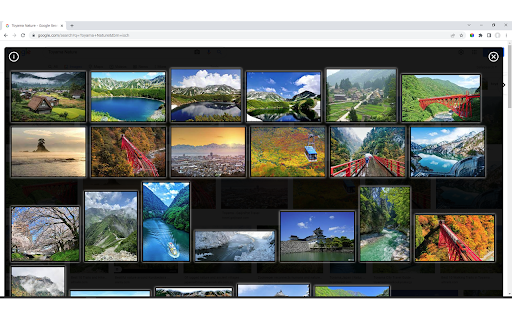

Lists the images displayed on the page in thumbnail format. Lists the images displayed in the page you are viewing in thumbnail format. This allows you to see the image displayed on the page without scrolling to the bottom of the page. Also, by selecting from the option (Search Element), HTML tags such as. Alternatively, you can also get the image called from the attribute of the HTML tag.

ふたば@アプリ としあき(仮) 出張版
ふたばちゃんねるの閲覧をアシストします。スレッドに画像一覧と読み上げ機能を追加します。カタログにキーワード保存型の抽出検索を追加します。 ふたクロと併用可能な拡張機能です 便利な機能が閲覧時に追加されます 【カタログ】 ・保存型のキーワード抽出機能 【スレッド】 ・自動スクロール読み上げ機能 ・グリッド型の画像一覧表示 ・専用の画像ビューワー

Pixiv Fullsize
Pixiv Fullsize is a browser extension that allows you to view fullsize images on Pixiv. Introducing Pixiv Full Height Image Viewer - a Chrome extension designed to revolutionize the way you browse and enjoy artwork on Pixiv. Say goodbye to the limited grid view and embrace the full potential of your favorite artists' creations with our easy-to-use extension. 1. Full Height Image Display: Tired of not being able to see the entire artwork in Pixiv's grid view? Our extension automatically adjusts the grid to display images at their full height, letting you appreciate the complete composition and details of each piece without any hassle. 2. Lightweight and Efficient: We've optimized Pixiv Full Height Image Viewer to be fast and efficient, ensuring that it doesn't slow down your browser or negatively impact your browsing experience. 3. Easy to Install and Use: Pixiv Full Height Image Viewer is simple to install and requires no configuration. Just add the extension to your Chrome browser, and you're ready to enjoy a superior Pixiv browsing experience. Discover a new world of artistic inspiration with Pixiv Full Height

Scroll to next image
Hit Ctrl+Down to scroll the page so the next image is aligned to the top of the window. This extension adds keyboard shortcuts to scroll the page to the next large image (100+ pixel height) on the page. This is useful when looking at a page with a lot of images, because using PgDn or PgUp will rarely line up the images with the top of the window, causing them to get out of sync with the browser window. Notes: Ctrl + down arrow will scroll to the next image. Ctrl + up arrow moves to the previous image. 0.5.0 Re-worked code, because it wasn't working on some newer sites. There's logic to deal with the situation where there are images lined up across, and it was failing. I hope this doesn't break existing sites, but on the ones I tested, it now works the same or better. 0.4.1: New feature/bugfix - the webpage now scrolls down even if there are is a grid of pictures. Before it would go image-by-image, which kept the scroll position the same if there were several images on the same row. Now it keeps checking until your scroll position actually changes. 0.3.0: A small update so that it now works when new images are dynamically added to a page (if there is a "show more images" type link that doesn't refresh the whole page, for example).

Image Collective: Webpage to Gallery
Webpage to image gallery: Filter and view images from any webpage in a sleek gallery, enhancing your productivity ### **Enhance Your Image Viewing Experience!** **v2** - Now you can filter images with dimensions and it can fetch/preload all the images by itself, you do not have to wait for all the images to load first. **Description:** This Chrome extension provides a simple and efficient way to view all the images on the current webpage in a gallery-style format. **Key Features:** - **Filter images**: It can exclude icons or thumbnails and it remembers the filter setting, and the filter is customisable for different sites. - **Arrow Key Navigation**: Easily navigate through images using your keyboard's arrow keys. - **Zoom In/Out**: Get a closer look at images or zoom out for a broader view. - **Gallery and Thumbnail Views**: Choose between different viewing styles to suit your preference. - **Full-Screen Mode**: Enjoy a distraction-free experience by viewing images in full-screen mode. This extension is perfect for anyone who wants to quickly access and enjoy images on a webpage, whether you're reading manga, browsing art, or just looking for inspiration. It's lightweight, fast, and easy to install—no additional setup required. If you're looking for a better way to view images online, give this extension a try!
