
ejgagablamoieidnpjepmhbjnjbidfkj
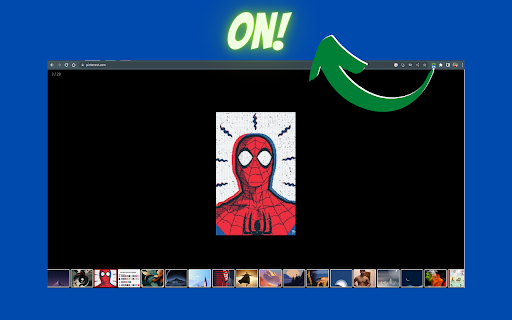
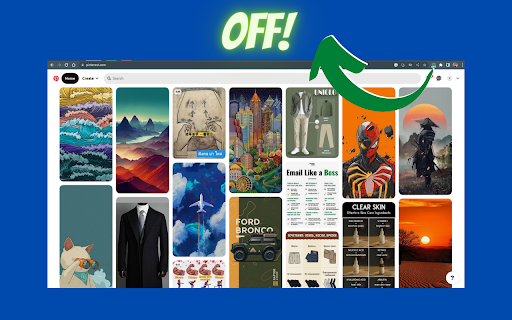
Webpage to image gallery: Filter and view images from any webpage in a sleek gallery, enhancing your productivity ### **Enhance Your Image Viewing Experience!** **v2** - Now you can filter images with dimensions and it can fetch/preload all the images by itself, you do not have to wait for all the images to load first. **Description:** This Chrome extension provides a simple and efficient way to view all the images on the current webpage in a gallery-style format. **Key Features:** - **Filter images**: It can exclude icons or thumbnails and it remembers the filter setting, and the filter is customisable for different sites. - **Arrow Key Navigation**: Easily navigate through images using your keyboard's arrow keys. - **Zoom In/Out**: Get a closer look at images or zoom out for a broader view. - **Gallery and Thumbnail Views**: Choose between different viewing styles to suit your preference. - **Full-Screen Mode**: Enjoy a distraction-free experience by viewing images in full-screen mode. This extension is perfect for anyone who wants to quickly access and enjoy images on a webpage, whether you're reading manga, browsing art, or just looking for inspiration. It's lightweight, fast, and easy to install—no additional setup required. If you're looking for a better way to view images online, give this extension a try!

Photo Slideshow
View all images on the page in a full screen slideshow. Imagine landing on a blog packed with stunning travel photos, a product page overflowing with high-resolution images, or an online portfolio brimming with creative artwork. You want to see every picture at full size without opening new tabs, right-clicking “View image,” or fighting an awkward lightbox that only shows thumbnails. Photo Slideshow removes all that friction. With a single click on the extension icon, it sweeps the current tab for every network-served image, dims the background, and launches a sleek, keyboard-friendly viewer that cycles through the images in gorgeous full screen. Designers & Art Directors Need to confirm that client assets appear crisp on production pages Rapidly cycle through every image at native resolution, checking colour, contrast, and layout without hunting through DOM inspectors Photographers & Visual Artists Want an effortless way to showcase web-hosted portfolios to clients or friends Turns any page—Flickr, 500px, DeviantArt, personal blogs—into a clean, full-screen slideshow for impromptu presentations E-Commerce Shoppers & Reviewers Often frustrated by tiny inline pictures or carousels that hide variants Instantly displays every product angle and lifestyle shot in one place so buyers can zoom through details Educators & Technical Trainers Need to talk students through diagrams or screenshots scattered across a lesson page Keyboard navigation makes it easy to step forward or back while screen-sharing, keeping students’ focus on the visual Accessibility Advocates Prefer keyboard over mouse, rely on predictable controls Simple arrow/space/Esc commands, high-contrast overlay, and zero mouse dependence improve usability for many motor-impaired users Reasons to Install Today Speed – Turn a cluttered page into a clean gallery in under half a second. No external libraries = no extra load time. Focus – The dark overlay eliminates distractions, letting colours pop and details shine. Perfect for UI reviews or mood-board sessions.

PicHarvest - v3 bulk image downloader
Extract and download all images from webpages in selected image format & resolutions. Auto convert image format. Built-in gallery. 📢 Extract and Download bulk images from webpages in selected image format. ✪ No Signup or permission required. ✪ Bulk download all images at once ✪ Auto-convert .webp,.avif,.heic image to png/jpeg format. ✪ Download images in multiple resolutions. ✪ Filter by width,image properties, source, domain. ✪ Specify download location before each download. ✪ Built-in gallery. View Images in date-wise and domain-wise ✪ Option to view in popup window or side panel ✪ Don't open "Ask where to save each file before downloading" dialog ✪ Never show many files warning ✪ Lightweight 40KB ✪ No tracking & no Ads. ImageSaver is a browser extension that lets you easily download any image from any web page, except system pages, the Chrome Store, and the start page. ✅ Built-in gallery View Images in date-wise and domain-wise You can mail us: mediarailhelp@gmail.com

Manga Viewer
A book-like viewer to read separate manga page images posted on SNS like reading a real book. Yet only supports weibo. This extension inserts a book-like viewer, which makes it possible to read separate manga page images posted on SNS like reading a real book. The viewer can be opened with the button displayed whithin a post. Currently only supports weibo.

Tiniest Gallery
Save and organize images, videos, and text snippets. Features: categorization, slideshow, color extraction, and zip download. 🌟🎉✨ Embark on an extraordinary creative journey with the Tiniest Gallery extension! Create your own gallery of stunning images, videos, and text snippets! - Save images, videos, and text snippets from any webpage. 💾 🖼️ 🎥 💬 - Organize your content into different categories. 📁 🗂️ - View your saved gallery in a beautiful, responsive layout. 👀 📸 - Enjoy a fullscreen slideshow of your saved items. 🖥️ 🎠 ✨ - Extract and copy dominant colors from images and videos. 🎨 🌈 - Save HEX codes of palette colors with a simple click. 🎨 💾 - Download your saved content as a zip file. ⬇️ 📦 - Filter your content by type: images, videos, or text snippets. 🔍 🏷️ - Control slideshow duration with an intuitive slider. ⏱️ 🎚️ - Quickly access your gallery through a toolbar icon. 🚀 🔧 🔒 Privacy-focused: No sign-up required, no login needed, and your data is saved only on your computer - never on any external servers! 🖥️ 🔐 The Tiniest Gallery extension is a powerful tool for artists, designers, researchers, and anyone seeking visual inspiration or an organized personal collection. 🎨✨🖌️ Unleash your creativity, organize your inspirations, and discover a world of captivating colors and images - all while maintaining complete control over your data. 🌈✨🎨 Install Tiniest Gallery now and let the magic unfold in fullscreen glory, right on your own device! 🌟🌈🎉💻
