
minjkplhnldhjhfiiakabkjeifcamkna
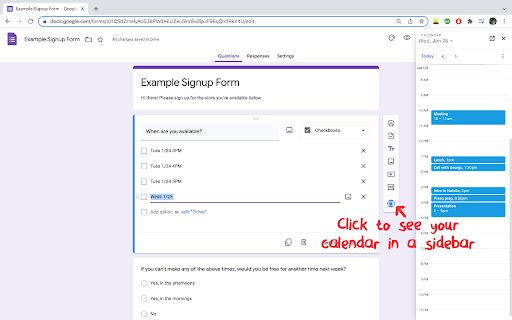
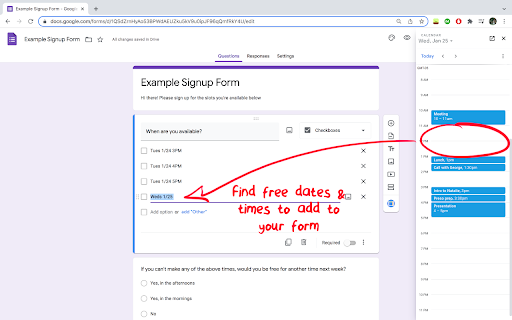
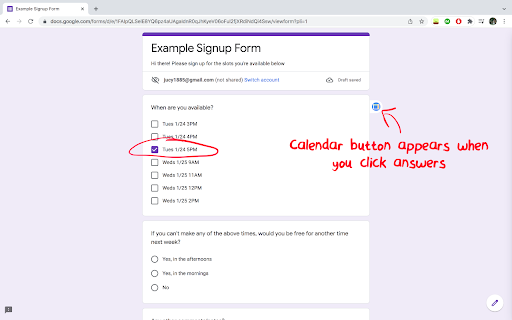
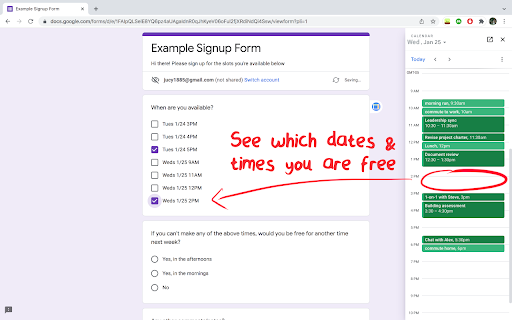
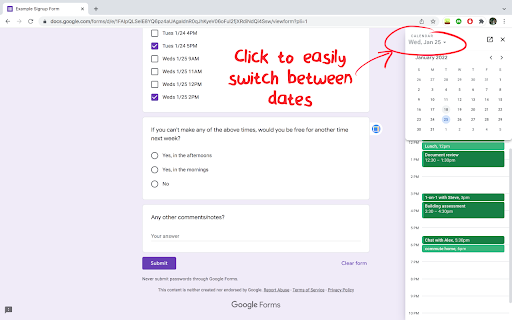
1-click sidebar to see your calendar as you fill out forms A quick, simple way to view your calendar in a sidebar while creating or filling Google Forms. Useful when you need to check which dates & times you are free for signing up for appointment slots on a form! - 1-click access to your calendar when viewing or editing Google Forms - Easily switch between days in the sidebar, or jump to full-screen Calendar - Click’n’drag to even move existing calendar events! NOTES - You must be signed into Google to view your calendar, we show a reminder just in case - This extension doesn’t work on any other sites besides Google Forms urls - You can’t add events to your calendar from the sidebar SECURITY/PRIVACY This Chrome extension is super simple and does not store ANY of your data. It simply embeds the same Google Calendar sidebar that shows up in Gmail, Drive, Docs, etc. and puts it into Forms. You must be signed into a Google account for it to load your calendar, and the extension does not store or maintain permissions to access your calendar. The extension is not affiliated with Google and only works when viewing or editing Google Forms.

Google Tasks enhancer
A chrome extension to enhance Google Tasks experience across Google Workspace. A chrome extension to enhance Google Task usage in Google calendar. Planning to add more features.

Sidebar for Google Tasks
Enhance your productivity with Sidebar for Google Tasks! Our extension provides a convenient way to access, manage, and organize your Google Tasks directly from Chrome's side panel. Key Features: • Quick Access: Open Google Tasks with a single click from your toolbar. • Task Management: Easily add, edit, and delete tasks. • Reminders: Set and receive notifications for your tasks. • Synchronization: Sync tasks across all your devices in real time. • Customization: Personalize your task list with custom colors and labels. • Drag-and-Drop: Reorder tasks with simple drag-and-drop functionality. • Search Functionality: Quickly find tasks with the built-in search feature. • Offline Access: Manage tasks even when you're offline. Why choose Sidebar for Google Tasks? • Efficiency: Save time by accessing your tasks directly from your browser. • User-Friendly: Intuitive interface designed for maximum productivity. • Regular Updates: Frequent updates to ensure compatibility with the latest Google Tasks features. The Sidebar for Google Tasks is perfect for anyone looking to stay organized and productive. Get it now to streamline your task management. Download Google Tasks for Sidebar today and take control of your to-do list! ADS When using the Input Tab in Google Keep, you may encounter ads. These situational ads allow us to develop the product and make it free. — Made with ❤️ by BrowseCraft gang.

Highlight TODAY
Highlight TODAY in your Google Calendar Highlight TODAY in your Google Calendar

Timebar: A world clock and meeting planner for your side panel
Convert time zones, plan meetings & create calendars events from the side panel. Works with Google, Apple, Outlook & more calendars. 🚀 Key Features: ✅ Instantly view current times in multiple cities (global timezones) ✅ Meeting Planner mode to easily find the best time across timezones ✅ Calendar Integration - Create events in Google Calendar, Outlook, Yahoo and more ✅ Time travel slider to preview times in the past or future (±12 hours) ✅ Live updates, with optional seconds display and 12/24-hour format ✅ Easily add, remove, or reorder cities (drag-and-drop interface) ✅ Clear indicators for day/night, working hours, and daylight saving time ✅ Always shows your current local time (customizable name) ✅ Compact mode - hide controls and footer for more city cards ✅ Settings synced across Chrome devices ✅ Clean, modern UI – built for Chrome's side panel 💼 Ideal for: ✅ Remote teams working across time zones ✅ Freelancers or digital nomads juggling global schedules ✅ Event planners scheduling international meetings ✅ Anyone needing a reliable Chrome clock extension or meeting time finder ✅ Travelers and international families checking time differences 🧰 Open the Timebar from the side panel to see current times in all your saved cities. Use the timezone slider to find the best time to connect - like checking when it’s 9 AM in New York and what that means in Tokyo or Sydney. You can also search and add cities quickly, just like you’d do in a typical world time buddy app. 🛡️ Privacy first: Timebar works offline, with no ads and no unnecessary permissions. Just a simple tool that makes global time coordination a breeze. ™️ Disclaimer: All product names, logos, and brands are property of their respective owners. This extension is not affiliated with, endorsed by, or sponsored by Google, Microsoft, Apple, or any other third party.
