
miigmhdkhafhimciejjcogbnlgjiacpe

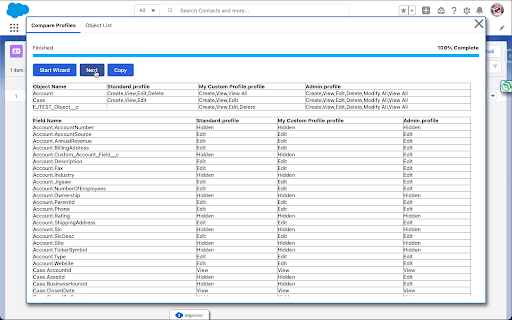
Helps Admins, Developers, and Consultants with Salesforce This free extension's goal is to help Salesforce Admins, Developers, and Consultants be more productive. The main feature is to compare profiles including Field Level Security. 0.0.0.4 - Profiles can be selected. - Objects can be selected. - Object Permissions are also compared. - Using more Lightning Design System for UI elements. 0.0.0.3 - Moved icon into the right side of the screen. - Added tabs to break up functional parts. - Starting to use Lightning Design System for UI elements. - Updated popup panel content. 0.0.0.2 - Copy Result to clipboard so you can paste into Excel. 0.0.0.1 - Compare field level security across profiles. - Get a list of objects.

Salesforce Inspector Reloaded
Productivity tools for Salesforce administrators and developers to inspect data and metadata directly from the Salesforce UI. This extension is based on the original Salesforce inspector extension made by Søren Krabbe. IMPORTANT: If you have any question or facing bugs, please use the GitHub repository : https://github.com/tprouvot/Salesforce-Inspector-reloaded/issues - Analyze Field Usage in Show All Data - Multi Query tabs in Data Export - Download & Deploy Metadata - Security improvements - Field Creator page to bulk create fields from the extension - Event Monitor page to subscribe to Platform Events from the browser - Import / Export configuration from Option page - Customise extension shortcuts - Support SOSL and GraphQL languages - REST Explore page to run any API from the extension without external tool - Load recent records from popup - Customize extension favicon and Sandbox banner - Check QueryPlan on data export - Enable Logs from User tab - Customize settings in Option page - New Org tab - Search for a particular flow, profile or permission set from Shortcut tab - Restrict Salesforce Inspector usage with a default connected app - New "Shortcut" tab to quickly access setup menu - Link to permission sets assignment from User tab And many more !

Weflow
The fastest way to update Salesforce. Manage your pipeline, notes & tasks. Designed for sales teams. Auto-synced to Salesforce. Weflow – The Fastest Way to Log Activities & Update Salesforce Weflow’s Chrome extension enhances your workflow by turning your new tab into a command center for Salesforce. Update your pipeline, take notes, manage tasks, and add records—all synced with your favorite sales CRM. Key Features ✅ Save hours each week updating Salesforce. ✅ Log emails/meetings from Gmail and Calendar to Salesforce. ✅ Manage your pipeline with spreadsheet or kanban views. ✅ Take sales notes and sync them with one click. ✅ Use templates to qualify deals and structure meetings. ✅ Update records in your CRM while writing notes. ✅ Stay on top of deals with an intuitive task manager. ✅ Works out-of-the-box with Salesforce. How It Works 1️⃣ Install the Chrome extension and sign in with your Salesforce account (SSO). 2️⃣ Click on the Weflow icon to open a new tab to access Weflow’s command center. 3️⃣ Use the shortcut CMD+J (Mac) or ALT+J (Windows) to launch global search from LinkedIn, Salesforce, Gmail or the Google Calendar. 4️⃣ View your pipeline, create notes, manage tasks, and update records instantly. 5️⃣ All changes sync automatically with Salesforce. Security & Privacy Weflow is built with security in mind. Your data remains safe with strict security guidelines, automated processes, and third-party audits. About Weflow Our mission is to help revenue teams run a repeatable, efficient, and predictable revenue process - instead of wasting time with non-selling activities, internal meetings, or cleaning CRM data.

Salesforce Inspector Advanced
Productivity tools for Salesforce administrators and developers to inspect data and metadata directly from the Salesforce UI. Salesforce Inspector Advanced - The Ultimate Developer Toolkit for Salesforce Transform your Salesforce development workflow with this comprehensive browser extension designed for developers, admins, and architects. Salesforce Inspector Advanced provides powerful tools to inspect, analyze, and optimize your Salesforce org. 🔍 INSPECT & ANALYZE • Object & Field Inspector: Deep dive into object metadata, field usage analysis, and relationship mapping • Flow Analyzer: Comprehensive flow analysis detecting performance issues, security vulnerabilities, and best practice violations with actionable recommendations • Org Analyzer: Identify unused resources, code quality issues, security vulnerabilities, and migration opportunities across your entire org 💾 DATA MANAGEMENT • Advanced SOQL/SOSL Editor: Intelligent code editor with autocomplete, syntax highlighting, and inline suggestions for fields, objects, and relationships • Data Export: Query and export data with advanced filtering, sorting, column management, and support for GraphQL • Data Import: Bulk import with Bulk API support, hard delete capabilities, and smart field mapping • Inline Editing: Edit records directly in the data export view with bulk update capabilities ⚡ APEX DEVELOPMENT • Apex Runner: Execute anonymous Apex, batch jobs, and queueable classes with real-time log monitoring • Log Viewer: Advanced log analysis with flame charts, profiler, resource tracking (SOQL, DML, callouts), and unit test execution with code coverage • Code Editor: Full-featured editor with syntax highlighting, auto-indentation, and intelligent suggestions for Apex classes and methods 🔧 METADATA & DEPLOYMENT • Metadata Browser: Explore and download metadata with automatic package.xml generation • Metadata Import: Streamlined metadata deployment with relationship handling 🌐 API & INTEGRATION • API Explorer: Test Salesforce APIs with templates, history, and response formatting for REST, Bulk API, Chatter, Reports, and more • Platform Event Manager: Subscribe, monitor, and publish platform events, push topics, and change data capture events 🤖 AI-POWERED FEATURES • AI Flow Analysis: Leverage ChatGPT, Claude, Mistral, or Agentforce to analyze flows and generate SOQL queries • Intelligent Suggestions: Context-aware autocomplete for fields, picklist values, and relationships 🎨 USER EXPERIENCE • Customizable Interface: Custom favicon colors, editable shortcuts, and personalized settings • Quick Access Popup: Fast access to common tasks, user management, and org navigation • Modern UI: Clean, responsive interface with keyboard shortcuts and intuitive navigation 🔒 SECURITY • OAuth 2.0 with PKCE: Secure authentication with support for external connected apps • Security Analysis: Detect SOQL injection vulnerabilities, XSS risks, and access management issues Perfect for developers who need to: • Analyze and optimize Salesforce Flows • Query and manipulate data efficiently • Debug Apex code with advanced log analysis • Manage metadata and deployments • Test APIs and integrations • Identify org health issues and optimization opportunities Whether you're building new features, debugging issues, or maintaining your org, Salesforce Inspector Advanced provides the tools you need to work faster and smarter. https://github.com/dufoli/Salesforce-Inspector-Advanced This extension is based on the original Salesforce inspector extension made by Søren Krabbe and Salesforce inspector reloaded by Thomas Prouvot.

Salesforce Markup Builder
Salesforce Markup Builder is a UI design tool that helps developers, admins and designers quickly create Lightning Web Components. 𝐏𝐮𝐫𝐩𝐨𝐬𝐞 Users can visually create Salesforce user interfaces by simply dragging and dropping components onto the canvas. This makes it easy for anyone, even without coding experience, to build fully functional UI layouts. 𝐊𝐞𝐲 𝐟𝐞𝐚𝐭𝐮𝐫𝐞𝐬 ● 𝘿𝙧𝙖𝙜 𝙖𝙣𝙙 𝘿𝙧𝙤𝙥 𝙐𝙄 𝘽𝙪𝙞𝙡𝙙𝙚𝙧 : Users simply drag and drop the components and create the UI easily. ● 𝙉𝙤-𝘾𝙤𝙙𝙚 𝙐𝙄 𝘾𝙧𝙚𝙖𝙩𝙞𝙤𝙣 : The app empowers users to build Salesforce interfaces without writing any code. ● 𝙀𝙭𝙥𝙤𝙧𝙩 𝙘𝙤𝙢𝙥𝙤𝙣𝙚𝙣𝙩𝙨 𝙩𝙤 𝙇𝙒𝘾 𝙤𝙧 𝙃𝙏𝙈𝙇 𝙬𝙞𝙩𝙝 𝙎𝙇𝘿𝙎 : Once the UI is designed, users can instantly export clean and structured Lightning Web Component (LWC) code. All components come styled with Salesforce Lightning Design System (SLDS) classes to ensure consistency. ● 𝘿𝙤𝙬𝙣𝙡𝙤𝙖𝙙 𝙁𝙪𝙡𝙡 𝘾𝙤𝙢𝙥𝙤𝙣𝙚𝙣𝙩 𝘾𝙤𝙙𝙚 : The generated UI code can be downloaded as a complete package, including .html, .js, .css and .xml files—ready to deploy in Salesforce. ● 𝙍𝙚𝙨𝙥𝙤𝙣𝙨𝙞𝙫𝙚 𝙋𝙧𝙚𝙫𝙞𝙚𝙬 𝙛𝙤𝙧 𝘼𝙡𝙡 𝘿𝙚𝙫𝙞𝙘𝙚𝙨 : Users can preview the UI layout in real time across different screen sizes, including mobile phones, tablets, and desktops. This ensures the design looks great and functions well on every device. ● 𝘾𝙪𝙨𝙩𝙤𝙢 𝘾𝙎𝙎 𝙎𝙪𝙥𝙥𝙤𝙧𝙩 : The app allows users to add their own CSS rules directly within the builder. This gives designers full flexibility to enhance styling for more customized interfaces. 𝐖𝐡𝐨 𝐢𝐭’𝐬 𝐟𝐨𝐫 It's perfect for admins, business users, and developers looking to prototype or create deployable UI quickly. 𝐁𝐞𝐧𝐞𝐟𝐢𝐭𝐬 Users simply drag and drop the components and create the UI easily and see the output visually. no need to deploy code and refresh the page on every change to see the output so it's saving the user's time and improving productivity. 𝐇𝐨𝐰 𝐭𝐨 𝐮𝐬𝐞 Salesforce Markup Builder is located on the top right corner on the browser. Click on the icon and the builder screen is opening and you see on the left side the list of components and on the right side you will see the canvas where you can drag and drop the components from the left sidebar component list. On the builder header right side you will see some buttons (Custom CSS, View Code, Download Code, Preview). ● 𝘾𝙪𝙨𝙩𝙤𝙢 𝘾𝙎𝙎 : On click of this button you will see an editor and in that editor you will write your custom CSS code. ● 𝙑𝙞𝙚𝙬 𝘾𝙤𝙙𝙚 : On click of this button you will see your component code. In the LWC tab you will see your code in lwc components, In the SLDS tab you will see your code in Core SLDS and in the CSS tab you will see your custom CSS. ● 𝘿𝙤𝙬𝙣𝙡𝙤𝙖𝙙 𝘾𝙤𝙙𝙚 : On click of this button you will be able to download your component code in a zip file and in that zip you will see two components one is with LWC code and another one is with SLDS code. And these components will have the .html, .Js, .CSS and .xml files. ● 𝙋𝙧𝙚𝙫𝙞𝙚𝙬 : On click of this button you will see your component preview on Desktop, Tablet and Mobile view. And On click of the component which you drop on canvas you will able to see the property bar in the right side of the app and this property bar is floatable so we are able to move it anywhere in the app and in this bar you will see the properties of the components like if we click on button so we are able to see the button label and variant. 𝐏𝐫𝐢𝐯𝐚𝐜𝐲 ● 𝙉𝙤 𝘿𝙖𝙩𝙖 𝘾𝙤𝙡𝙡𝙚𝙘𝙩𝙞𝙤𝙣 : We do not collect any personal or sensitive user data. ● 𝘾𝙤𝙙𝙚 𝙖𝙣𝙙 𝘾𝙤𝙣𝙩𝙚𝙣𝙩 𝙎𝙚𝙘𝙪𝙧𝙞𝙩𝙮 : Any code exported or downloaded through the app is generated locally and not stored or accessed by us. ● 𝘾𝙤𝙤𝙠𝙞𝙚𝙨 & 𝘼𝙣𝙖𝙡𝙮𝙩𝙞𝙘𝙨 : We do not use cookies or third-party analytics tools within the app. ● 𝙏𝙝𝙞𝙧𝙙-𝙋𝙖𝙧𝙩𝙮 𝘼𝙘𝙘𝙚𝙨𝙨 : We do not share or transfer any data to third parties. Your designs and code remain fully private.
