
fpadpaifohjpgnmbefepobokdopjdbid
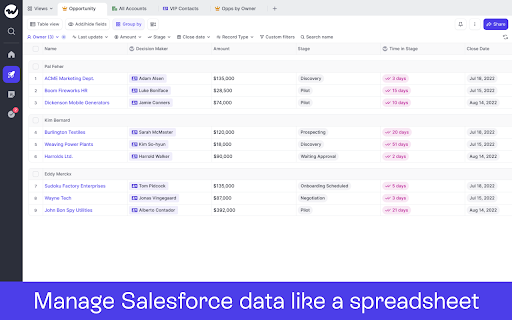
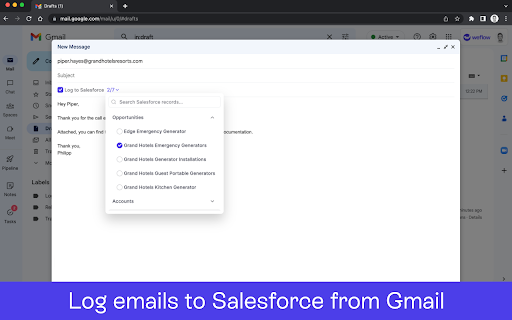


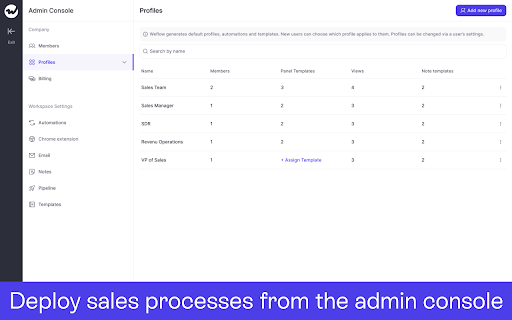
The fastest way to update Salesforce. Manage your pipeline, notes & tasks. Designed for sales teams. Auto-synced to Salesforce. Weflow – The Fastest Way to Log Activities & Update Salesforce Weflow’s Chrome extension enhances your workflow by turning your new tab into a command center for Salesforce. Update your pipeline, take notes, manage tasks, and add records—all synced with your favorite sales CRM. Key Features ✅ Save hours each week updating Salesforce. ✅ Log emails/meetings from Gmail and Calendar to Salesforce. ✅ Manage your pipeline with spreadsheet or kanban views. ✅ Take sales notes and sync them with one click. ✅ Use templates to qualify deals and structure meetings. ✅ Update records in your CRM while writing notes. ✅ Stay on top of deals with an intuitive task manager. ✅ Works out-of-the-box with Salesforce. How It Works 1️⃣ Install the Chrome extension and sign in with your Salesforce account (SSO). 2️⃣ Click on the Weflow icon to open a new tab to access Weflow’s command center. 3️⃣ Use the shortcut CMD+J (Mac) or ALT+J (Windows) to launch global search from LinkedIn, Salesforce, Gmail or the Google Calendar. 4️⃣ View your pipeline, create notes, manage tasks, and update records instantly. 5️⃣ All changes sync automatically with Salesforce. Security & Privacy Weflow is built with security in mind. Your data remains safe with strict security guidelines, automated processes, and third-party audits. About Weflow Our mission is to help revenue teams run a repeatable, efficient, and predictable revenue process - instead of wasting time with non-selling activities, internal meetings, or cleaning CRM data.

Salesforce
Work with Salesforce records directly in your browser. Sales Cloud Everywhere lets you work on your to-dos, see engagement alerts, create records, and update multiple records. You can use it in your Gmail inbox, or in a standalone window alongside any web page. - Sell where you work: Move deals forward as you move around the web. - Access data anywhere: Bring context to every conversation. - Accelerate deals with real-time buyer data: Engage with people who want to engage with you. What you can do with Sales Cloud Everywhere: - Work with Salesforce directly in Gmail. - View, sort, and complete tasks like sending emails, reaching out on LinkedIn, and updating records, without returning to Salesforce.com. - Connect Salesforce to your Calendar and send calendar links, set availability, and more. - Get real time notifications of recent engagements as you browse the web. - Create and update records from within your Chrome web browser without leaving the current page. - Access and quickly update CRM records like leads, opportunities, and contacts. If you can’t access Salesforce via the extension, ask your Salesforce admin for help. Review the app’s terms of service: https://c1.sfdcstatic.com/content/dam/web/en_us/www/documents/legal/Agreements/software-order-form-supplements/gmail-integration-order-form-supplement.pdf

ZaapIT for Salesforce
Eliminate duplicates & improve data quality like never before - ZaapIT for Salesforce 🚀 ZaapIT for Salesforce - The Ultimate Data Management & Deduplication Tool ZaapIT is the Salesforce power tool for Admins, RevOps, and Sales Ops who need dependable CRM data management and consistently high Salesforce data quality. From bulk update Salesforce operations to automated Salesforce deduplication, ZaapIT helps you clean, normalize, and govern your Salesforce data faster - without spreadsheets or risky manual work. Build Smart Lists with summary rollups, hierarchy rollups, and related lists - then act instantly with Excel-like grids, bulk actions, and automation - all with zero code 🧠📊 ✨✨ Make sure to install the package if it doesn’t open automatically. 🚀 🚀 https://www.zaapit.com/install?src=chromestore ⭐What You Can Do with ZaapIT ⭐ ZaapIT lets you mass merge Salesforce duplicates safely - and then automate the cleanup with Auto Merge. ✅ Merge duplicates across Leads, Contacts, Accounts, Opportunities, Cases, and custom objects ✅ Auto Merge Salesforce duplicates based on exact and fuzzy matching rules ✅ Full control over winner selection, merge logic, and data preservation ✅ Safety included: undo merge Salesforce anytime 🔁🛡️ 🧠 Field Merge Strategy: Keep the Best Data - Never Lose Phone Numbers 📞✅ Most “duplicate tools” force a risky, manual choice of which field value survives. ZaapIT goes further with advanced field merge strategies so the right values are automatically preserved and standardized. ✅ Auto-select surviving values using smart rules (for example created date, last modified date, newest or oldest record, or prioritized source) ✅ Concatenate values to retain all information (ideal for notes, descriptions, and multi-source text fields) ✅ Preserve all phone numbers and emails by merging into a single field or keeping values across multiple fields (because nobody wants to lose phone numbers) 📞 ✅ Copy non-empty values, apply overwrite rules, preserve “golden record” values, and define object-level or field-level priorities ✅ Support multiple strategies for different field types and business use cases This is the difference between basic deduplication and enterprise-grade Salesforce data cleansing. 🧼🏆 Keep Salesforce clean continuously - not just during one-time cleanup projects. ✅ Run scheduled merge and scheduled deduplication jobs hourly, daily, or on a custom schedule ✅ Automatically detect duplicates and apply your merge strategies at scale ✅ Track results with reports, logs, and job history Reliable, ongoing Salesforce duplicate management without firefighting. 🔥➡️✅ ZaapIT is built for high-volume Salesforce operations and makes bulk update Salesforce actions safe. ✅ Bulk update Salesforce and bulk edit Salesforce (inline and multi-field edits) ✅ Undo bulk updates and revert changes when needed ✅ Bulk delete Salesforce, mass clone, and mass create (with safeguards) ✅ Mass convert records and apply bulk formatting (proper case, lowercase, phone format, etc) ✅ Mass find and replace plus ETL-style transformations and regex support 🔗 https://www.zaapit.com/page/how-to-update-your-records-in-bulk-Mass-record-in-Salesforce Make large-scale changes confidently knowing every bulk update is safe, auditable, and reversible. ⚡🛡️ Import confidently while protecting Salesforce data quality. ✅ Advanced controls for import Salesforce and bulk import workflows ✅ Duplicate prevention during data load using matching rules ✅ A practical Salesforce Data Loader alternative for teams focused on clean CRM data 📦✅ Keep your pipeline clean and conversion consistent. ✅ Mass convert leads Salesforce ✅ Auto Convert Lead in Salesforce based on conditions and matching logic ✅ Convert Lead into Contact in Salesforce when matching records exist ✅ Support workflows to customize lead conversion process in Salesforce 💼📈 🔗 https://www.zaapit.com/page/Mass-Convert-Merge Scale Salesforce configuration work with bulk metadata control. ✅ Mass edit custom metadata ✅ Update multi-select picklist values ✅ Mass edit layouts, fields, validation rules, and more ✅ Mass edit, delete, and clone custom metadata and object metadata 🔗 https://www.zaapit.com/page/salesoforce-mass-update-metadata ✅ Filter, sort, group, and edit records in an Excel-style interface ✅ Cross-object visibility with related lists and forecasts ✅ Faster daily operations for CRM data management 🧾✨ ✅ Undo merges, bulk updates, and deletions ✅ Access audit logs and backups for compliance and governance ✅ Confidence for high-impact Salesforce operations 🔒🧾 🔗 https://www.zaapit.com/page/salesoforce-unmerge-undo-merge 🧩 Smart Related Lists, Rollups, and CPQ Visibility - Zero Code Turn Salesforce into a smarter workspace with Smart Lists that combine data from related objects and roll it up automatically. ✅ Build Smart Related Lists that go beyond standard Salesforce related lists ✅ Create summary rollups (even where native rollups fall short) and hierarchy rollups for Account structures and other objects ✅ View and manage cross-object data in one place - ideal for complex processes like Salesforce CPQ (quotes, quote lines, products, opportunities, and account context) ✅ Take action immediately using Excel-like grids, bulk actions, and automation - without custom code or heavy admin work ⚡ 🤖 Smart duplicate reports (exact and fuzzy match) 👥 Similar Leads and Contacts reports (name and email patterns) 🔗 Cross-object matching reports (Lead to Contact or Account) 📎 Attachment deduplication to save Salesforce storage 🔹 Video Demo: https://www.youtube.com/watch?v=VzjyR61GB_U 🔹 Video Guides: http://www.zaapit.com/page/Videos Start managing your Salesforce data smarter. Install ZaapIT for Salesforce today! 🔹Global Privacy Policy: https://www.zaapit.com/page/privacy 🔹Terms and Conditions: https://www.zaapit.com/page/Terms-and-Conditions

Salesforce Simplified
Salesforce Recent Components For Salesforce Developers Salesforce Simplified is a Chrome extension designed for Salesforce and Omnistudio developers/administrators to enhance their productivity by making useful data points easily accessible directly from the UI. When working on any module, having your recently created or modified data readily available allows you to work faster and save time by avoiding unnecessary clicks. With the advanced search feature of Salesforce Simplified, you can access your code with just a few clicks. For Vlocity/Omnistudio, it provides access to: This extension is designed to streamline your workflow, making it easier to manage and access critical information.

SellerCrowd
SellerCrowd's extension brings insider info about advertisers and agencies to LinkedIn profiles. 📈 BOOST YOUR PROSPECTING EFFORTS Media buyers publish what they want you to know on their LinkedIn profiles. SellerCrowd’s chrome extension gives you a peek into what other media sellers know. Use SellerCrowd’s extension while you browse media buyer profiles on LinkedIn to discover what the SellerCrowd community knows about them.. What products do they work on? What media types do they handle? Who else is on their team? Are they key decision-makers? 🕵 Just click on the new “SC” icon on your prospect’s LinkedIn profile to see all the info the community has shared about them on SellerCrowd without switching websites. 🔎 Be more productive. Prospect faster with SellerCrowd’s community insights directly on LinkedIn. Browse prospects, save them to your lists, or ask questions about them to the community without leaving LinkedIn. 🆓 FREE WITH YOUR SC SUBSCRIPTION Do you have an active SellerCrowd subscription? Install the extension and use it at no additional cost to you. Never used SellerCrowd? Sign up today to get 7 days of this fantastic tool, no credit card required. SellerCrowd is the world’s most up-to-date database of org charts for major advertisers and their media agencies. Powered by 7,000+ veteran salespeople from all corners of the advertising world - representing news outlets, programmatic platforms, social networks, streaming services, podcast networks, ad technology businesses, DOOH networks, data providers, influencer networks, and much more… So if you’re serious about selling into major advertisers and agencies, SellerCrowd is your place. For more info: Email: sales@sellercrowd.com Website: https://sellercrowd.com/ Privacy Policy: https://sellercrowd.com/privacy
