
mfpdejiampfepmhldpegkelenemgblaj
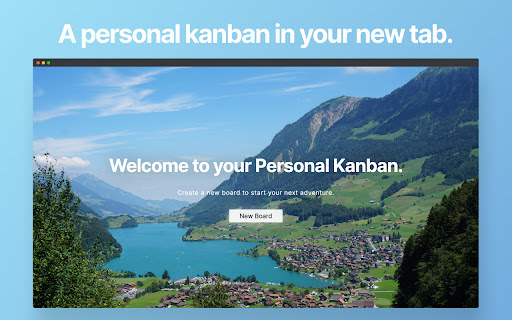

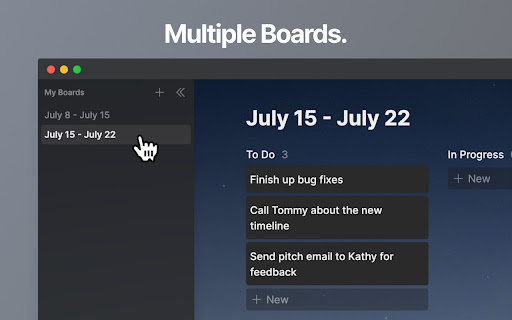
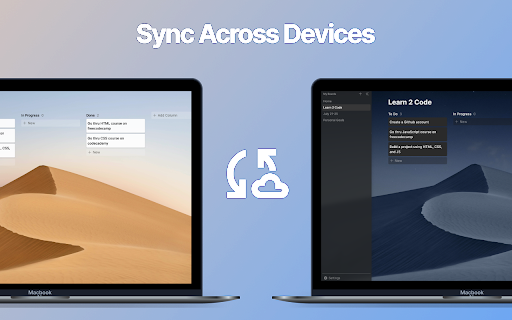
Turn your new tab into a kanban board that helps you focus. The only extension with multiple boards and sync across computers. Unleash your inner productivity machine: Personal Kanban rewards you with a beautiful landscape after you complete all your tasks In Progress. Features 🛠️ Customizable boards and columns ☎️ Works offline. No internet access required 🏄♀️ Multiple boards 🛜 Sync across devices 🌓 Light and dark mode 🚛 Import and Export ➕ Much more to come FAQs Where is my data stored? If you stop working on the app, will I lose my data? - All of your data is securely kept in chrome.storage.local on your own device or if you use Sync Across Devices, within your Google account through chrome.storage.sync. Even if I stop working on the app, you would be able to continue using this app with no data loss until either Google stops being a company, or they make a sudden change to Chrome that would break 80% of Chrome Extensions. Contact me at swekage@gmail.com or submit a support request with any bug reports or questions.

Otto: Pomodoro timer & Website Blocker. Block sites, Focus mindfully
Otto is a mindful focus timer and website blocker. Block websites, work mindfully with the Pomodoro timer. Be mindful while working. Otto - A Little Friend for a Wandering Mind A creature wanders through the vast winding meadows and flat plains of a place that has no name. Those who wander into it, call it the Garden. It's mysteries are shrouded in forgotten dreams and faded memories. The philosophy behind Otto is simple. It's about being present in the moment, being intentional about the things you choose to work on and a little forgiving of yourself. It's not about trying to do many things all at once, but doing very few intentional things that move you a little forward each day. But simple isn't easy. And life isn't perfect, it's mostly uncertain, and the mind always wanders. So a little structure wouldn't hurt. The Timer and Blocker are the core features of Otto. Everything else is built on top of them. The Pomodoro Focus timer helps you be intentional and break your time into focused intervals, while the website blocker helps you with your wandering mind. Pomodoro Timer: Break your time into focused intervals with the Pomodoro timer. Task Timer: Turn your Pomodoro sessions into Task sessions by naming them to be more intentional. Scheduled Website Blocker: Block websites during chosen hours of the day (does not require focus sessions to be running) Autoblock: Set a count down timer on websites instead of blocking them right away. Once the countdown reaches zero, the website will be blocked (Only works during focus sessions) Analytics: See your focus analytics and distraction analytics and more About the Game Mechanic Otto now has a new game mechanic that is more positive and mindful compared to the old mechanic (arcade style health/deplete). In the new one, your primary goal is to build a bond and friendship with Otto. As you spend more time with Otto, you get closer and closer until you reach the final stage. There are three stages for your friendship - The Stranger, The Friend and the Guardian. How does it Work? The more you focus, or the more your mind wanders, you get something called "Essense Particles", these particles represent your bond, the more you have them the more clsoer you get. Think of this as a real life friendship, where you spend time with your friend, you knew them as strangers and the more time you spent with them, the closer you got. There are no punishments or penalties for being distracted or missing a couple of days. But if you drift apart a little too much, your bond starts decaying slowly and you'll have to start over. Data and Privacy We take your privacy very very seriously. We do not spy, collect, steal, or sell your data. That goes against our values of creating good software products and building trust with our users and customers. All the data that is collect for visualization is stored in your browsers local storage and indexDB. It never leaves it! We do collect events and page views using Google analytics. This will help us improve Otto. This is a list of data google analytics colelcts - how long people use the extension - the number of daily/weekly/monthly users - what part of the UI is most active (via GA events) If you have any questions, bug reports or feature requests, email at jbnj@ottoapp.me ✌️

StarterTab - Your next New Tab
A fully customizable webapp to replace your 'New Tab' homepage. Tired of the same boring new tab page? StarterTab is here to revolutionize the way you start your day on the internet. With a completely customizable webapp to replace your new tab homepage, you can personalize your online experience like never before. Say goodbye to plain and generic new tab pages. With StarterTab, you have complete control over the look and feel of your new tab page. You can change the colors, layouts, tiles, background, and more to match your individual style and needs. With 20+ different tiles and a grid to snap them to, the possibilities are endless. Choose from 15+ tiles designed to give you all the information you need to get your work done efficiently and quickly. Whether you prefer Markdown files or need a todo list handy, StarterTab has you covered. Stay organized and productive with this powerful tool. Not only can you personalize your new tab page to meet your needs, but you can also share your themes publicly or find inspiration from other users. With StarterTab, the possibilities for customization are endless. Get ready to take your productivity to the next level!

Kanban Board for Google Chrome™
Visualize tasks and projects in a side‑panel Kanban board. Kanban is a visual, pull-based work-management method that originated within Toyota’s manufacturing system and has since become a staple in software development, product management, and personal productivity. At its core, a Kanban board converts intangible work into tangible cards that move across clearly defined columns representing stages of a process—typically “To-Do,” “In Progress,” and “Done,” Whether you’re managing a product roadmap, sprint tasks, or simply your daily to-do list, this lightweight tool puts a clear, color-coded workflow directly onto every new-tab page, so your priorities remain visible the moment you launch Chrome. Forget scattered sticky notes and buried task managers. Kanban Board translates work into draggable cards across customizable columns— “Doing,” “To Do,” “Done,” or whatever stages reflect your real process. The instant visual feedback helps you spot bottlenecks, balance workload, and celebrate finished work. Because everything lives in the browser, updating tasks is as frictionless as opening a tab, ensuring your board stays current without extra log-ins, syncing headaches, or context switches. Use this free software to keep track of tasks to do and what you are currently working. All the data is stored locally on your computer - so you dont have to worry about data privacy. Kanban offers a pragmatic path to doing less at once and finishing more of what truly matters. Its principles are universally applicable, practical, and easy to start immediately today.

Kanbie
Kanbie is a simple kanban board accessible from your extensions bar. - Manage your task list from any tab - without interrupting your workflow - seamlessly. - Sync your board across chrome on any desktop. - Add colored labels to organise your cards to suit you best. - Assign due dates and get notified when your tasks are due. - Customise your board with themes and custom headers.
