
hancagoabobbbadijbbfepodbdgjbfpf


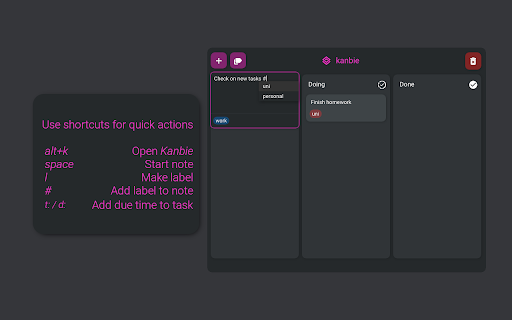
Kanbie is a simple kanban board accessible from your extensions bar. - Manage your task list from any tab - without interrupting your workflow - seamlessly. - Sync your board across chrome on any desktop. - Add colored labels to organise your cards to suit you best. - Assign due dates and get notified when your tasks are due. - Customise your board with themes and custom headers.

PurposeTab
New tab dashboard with goals, habits, calendar, and daily focus. PurposeTab is a minimalist extension that helps you stay centered on your priorities. Every time you open a new tab in Chrome, you see exactly what you need to focus on. On the left side, you can see your daily intention, habits, priorities, and the day's schedule (from your Google Calendar). On the right side, you can upload images of the goals you're working towards. Other exciting features include the ability to submit a journal entry reflection for the day (and you can review all saved journal entries) and to export a graphic of your daily updates to post to social media. It’s built for focus and privacy. All your data stays on your computer, it works offline, and there is no need to create an account. If you connect your Google account, PurposeTab cannot read or edit any of your data (more on that at the bottom). • Daily focus and mantras: Set an intention that resets at midnight to keep you present. • Habit tracking: Add your daily habits with optional links to the tools you use. • Priority list: A simple to-do list for your most important tasks. • Vision board: Upload personal images that inspire you and add custom titles or dates. • Journaling: Use the built-in prompts for daily reflection and look back at your entries later. • Social sharing: Generate custom graphics of your progress to share on Instagram. • Scratchpad: Quick notepads for whenever you have a random idea or need to jot something down. • Google Calendar: Connect your account to see your schedule directly on the sidebar. • Customization: Toggle sections on or off, use dark mode, or use privacy mode when you’re sharing your screen in a meeting. • Data sync: Your settings and data sync automatically across any computer where you’re logged into Chrome. Getting started is easy. Just install the extension and open a new tab. If you want to see how it works first, you can watch the guide here: https://www.jaredgold.com/purposetab If PurposeTab helps you stay on track, please leave us a 5-star review. It really helps others find the tool. For help or questions, you can reach us at: purposetabhelp@gmail.com Privacy is a top priority, and PurposeTab is built with minimal permission requests, and I don't use any servers of my own to read or edit any of your data. Connecting your Google account is fully optional. In addition to enabling data backup to your Google Drive, it allows PurposeTab to show your Google Calendar events and Tasks for the day. It cannot make any changes to your calendar, and it cannot touch anything else in your Google account. When you connect, Google will show a standard message about accessing data on "googleapis.com" and "jgold242.github.io." Every app that connects to Google shows this same message. Your information goes directly from Google to your PurposeTab and nowhere else. Nobody, including me, can see, store, or access your personal data. It securely streams right into your PurposeTab.

Kanban Board
Simplify task management with the Kanban board in your New Tab. Use Kanban software to manage projects and track workflows. Kanban board turns your browser into a visual productivity tool, keeping your projects in clear view. 🆕 All your tasks in one place: access your project board every time you open a new tab. 🔛 Drag and drop kanban cards: Easily move tasks across different stages of your project board with a simple drag-and-drop interface. ⏰ Timers to stay in focus: Use the integrated Pomodoro timer and focus timer to maintain your concentration and productivity. 📊 Progress Insights: Track your progress with our kanban project management insights. Understand where you stand and what needs attention with detailed reports and analytics. 💪 Powerful Productivity Tools Made Simple 1️⃣ Built-in focus timer. 2️⃣ Progress Tracking Insights. 3️⃣ Dark Mode Option. 4️⃣ Shortcuts for quick action. 5️⃣ Instant notifications and updates for productivity planner. 💡 Visual Workflow Management With the kanban board app, every new tab becomes a visual representation of your work, providing you with: ⏩ Clear and concise project overviews. ⏩ Organize tasks into columns like "To Do," "In Progress," and "Done". ⏩ Easy drag-and-drop functionality. ⏩ Custom columns and workflows. 🏃 Boost Your Productivity Stay on top of your game with features that streamline your workflow: 1. Prioritize your tasks with tags and deadlines. 2. Identify and eliminate bottlenecks. 3. Track progress in real-time. 4. Focus on your top priorities in your to do list with the pomodoro timer. 5. Achieve your goals efficiently. 🌐 Instant Access and Seamless Integration - integrates directly into your browser, making your project board accessible with every new tab. - This seamless integration ensures that your workflow is always in view, helping you stay organized and focused. 🐙 Drag and Drop Simplicity Transform your task management with a clear and intuitive kanban board approach: ◆ Easily move tasks between columns with intuitive drag-and-drop functionality. ◆ Customizable fields and tags. ◆ Flexible kanban methodology organization. ◆ Personal and project specific workflow. ◆ The simple, clean interface is designed for users of all skill levels, making it easy to get started right away. ⏳ Time Management Improve your time management with the kanban app: ➤ Break down tasks with kanban flow. ➤ Set deadlines with your project planner. ➤ Use a productivity timer for focused work. ⚙️ Implementing a Kanban Board productivity software Step 1: Set up your project board by customizing columns, settings and tags. Step 2: Add and assign tasks. Step 3: Monitor and adjust. 🎯 Use Cases ▶️ Project Management: Ideal for agile workflows and project planners. Track work through stages like 'Backlog,' 'In Progress,' and 'Completed.' ▶️ Personal Task Management: Perfect as a personal online planner. Organize your daily routine and personal goals. Columns might include 'To Do Today,' 'In Progress,' and 'Done.' ▶️ Sales Pipeline Management: Visualize and manage the sales process with the Kanban board online. Track leads through 'Lead,' 'Negotiation,' and 'Closed.' ▶️ Content Creation Workflow: Manage content creation from ideas to publishing. Use stages like 'Drafting,' 'Review,' and 'Published.' ▶️ Product Development: Track product development tasks. Organize tasks through 'Concept,' 'Development,' and 'Launch.' 🔍 FAQs: ❓ What is Kanban? 💬 It is a visual system for managing work as it moves through a process. It helps improve efficiency and workflow management. ❓ What is a kanban board software? 💬 This is a tool that visualizes tasks in columns representing different stages of a process, helping track progress from start to finish. ❓ Scrum vs Kanban? 💬 Scrum is structured with fixed-length sprints and defined roles, while Kanban is continuous and flexible, focusing on visualizing work and limiting work in progress 💎 Why give it a try? You get more than just a Google to do list app. You gain a comprehensive tool that transforms how you manage tasks: ✅ Intuitive kanban method integration. ✅ Reduced Multitasking: Encourages focus on one task at a time, reducing multitasking. ✅ Flexibility: adapts to various workflows and project types. ✅ Efficient Tracking: Simplifies tracking the progress with kanban tool. ✅ Enhanced productivity with Kanban system and Agile workflow. 📦 All-in-One Solution: 🔺 The functionality of several project management tools - a project planner, task tracker, and productivity tool - are combined into one easy-to-use extension. 🔺 This all-in-one approach streamlines your workflow, reducing the need for multiple tools and apps. ⤵️ Download the Kanban Board now and take control of your tasks and projects effortlessly!

Smart TOC
Displays a table of contents for any website, making it easier to read and navigate long articles, documentations, and online books. - Auto detects article and headings, with our smart algorithm - Highlights current heading - Click to jump to heading - Expand/fold headings, or to specified level - Floating panel, drag, resize, or dock to side - Mouse hover while holding Alt/Option key to glance - Copy to clipboard - Clean user interface - Only runs when you use it The Pro version offers extra features: - Dark mode, automatically - Up to 6 heading levels (free version capped to 3) - Quickly go to headings, with full-keyboard support Click the browser button to toggle table of contents for the current site Any website that conforms to the HTML standard and uses HTML heading tags properly (e.g. Wikipedia.com). You can also enable Smart TOC for local html in the extension settings.

New Tab Todo List: Checklist, Notes, Outliner
Beautiful and sharable checklists, notes, and to-do lists. Collaborate and outline in real-time. Turn your New Tab into a Todo List! ✏️ A lightning fast new tab productivity page and dashboard with stunning backgrounds, todo, tasks, lists, and more. Make your new tab / start page the way it should be: Fast, customizable, beautiful and productive! Make lists, outlines, todos, and more. With the New Tab Todo List extension for Chrome, just open a New Tab to capture your ideas, goals, and daily tasks. New Tab Todo List is a friendly space for your lists, outlines, and teams. Use it as your simple to-do list and task manager. You can instantly make a list and share it with your friends, family, and team. Simple, clean, and beautifully designed with relaxing themes and backgrounds. New Tab Todo List declutters your thoughts so you can focus on your tasks, ideas, and getting things done. Use New Tab Todo List to capture your ideas, goals, daily tasks and stay organized. A homepage you will fall in love with! Checklists, tasks, todos, quick notes, calendar and more. Replace your new tab with a personal productivity tool featuring to-do, task lists, team outliner, and inspirations. • New Tab into a beautiful task list • Collaborate with others, with real-time syncing • Share your task lists instantly using a share link • Easily invite friends and teammates to New Tab Todo List • Work together in a shared team space • Task lists with a natural editing interface • Edit to-do lists like a word doc and document • Mark any items as complete, whether bullet, number, or checkbox. • Infinitely nested lists with indent / outdent • Tag and filter tasks using #hashtag and @mentions • Works on phones and tablets, with live real-time syncing between devices • Automatic syncing between your phone, tablet and computer • Simply click to edit, like a text document • Easily expand and collapse outlines and lists • Inspirational wallpapers and photos • Beautiful and minimal interface • Simple, instant and FREE • Feel good, get motivated, seize the momentum and get things done! Yes, New Tab Todo List is completely free. Soon you will have the option to upgrade to New Tab Todo List Pro, which will have additional features like themes, sticker packs, and customizations. ➜ CAN I USE New Tab Todo List WITH MY TEAM? Yes. Create a space and invite your team instantly. It helps keep your lists and team organized. Members will have full access to lists in space. Use New Tab Todo List as your collaboration tool to help each other get stuff done. Meeting notes, task lists, collaborative documents and processes are now in one place in your shared New Tab Todo List space. Unleash your team’s potential ➜ CAN I COLLABORATE WITH OTHERS? Yes. New Tab Todo List allows you to edit lists dynamically with anyone through a share link in real-time. Your task lists are in sync across all devices live and in real-time. Collaboratively edit together in real-time with teams and groups. Simply select and share the edit link. Stay organized and make progress with your team projects using New Tab Todo List. Your team is on the same page!
