
mfohnjojhopfcahiddmeljeholnciakl
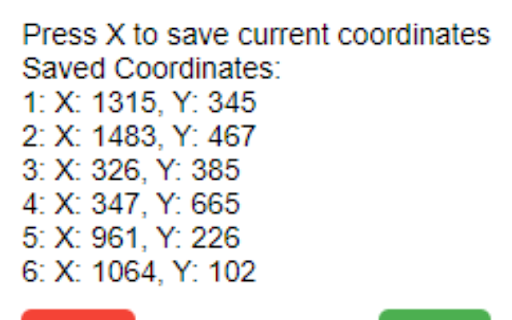
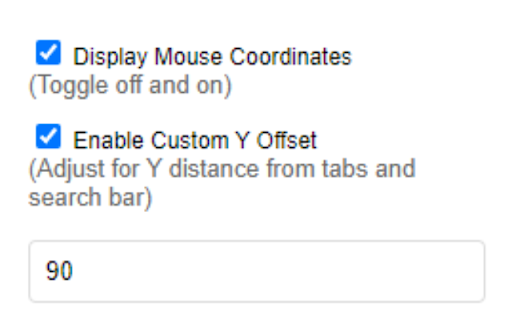
Displays and saves mouse X and Y coordinates on web pages with customizable options. A Mouse Coordinates Chrome extension tracks and displays your mouse pointer position on your screen, useful for precise X and Y element positioning and saving .

Mouse Coordinates
Display mouse coordinates on the web page. A Mouse Coordinates Chrome extension tracks and displays your mouse pointer position on your screen, useful for precise X and Y element positioning.

Automa
From auto-fill forms, doing a repetitive task, taking a screenshot, to scraping data of the website, it's up to you what you want… From auto-fill forms, doing a repetitive task, taking a screenshot, to scraping data of the website, it's up to you what you want to do with this extension. And you also can schedule when the automation will execute. If you have a question or want to report a bug, feel free to open an issue in automa GitHub repository.

Ui.Vision
Task and UI test automation with Computer Vision/OCR. Ui.Vision combines browser automation and desktop automation. Ui.Vision is an open-source automation RPA software that combines classic browser automation with modern computer vision and OCR: Ui.Vision's computer vision commands make automating tasks inside the web browser easy. Existing Selenium IDE scripts can be imported. Conversion help for iMacros scripts is provided, too. (2) Desktop Automation for Windows, Mac, and Linux Beyond web browser automation, Ui.Vision can interpret images and text on the desktop, executing actions like clicking, moving, dragging and dropping the mouse, and simulating keyboard inputs. This desktop automation requires installing the free Ui.Vision XModules, available for Windows, Mac, and Linux. These modules provide Ui.Vision with the necessary capabilities for desktop interaction. The AI commands allow you to automate complex tasks with a single line of code that would traditionally require hundreds of lines of classic commands. For example, you can teach Ui.Vision to play TicTacToe with just one short "Play this game..." prompt. Ui.Vision can be controlled from the command line. Thus it can be used from, and combined with, any programming or scripting language, such as Windows batch files, Linux/Mac shell scripts, Python or PowerShell. Ui.Vision is Open-Source. The source code is available on Github. The software does not send any data back to us or any other place. Everything, including image recognition and OCR processing, is done locally on your machine. The only exception to the "all data is processed locally" rule is if you select the optional AI commands. But these cloud-features are disabled by default. The default computer vision (image recognition and OCR) runs 100% locally on the machine. For questions and suggestions, please visit the Ui.Vision community forum at https://forum.ui.vision.

Pixel measurement
Pixel measurement: An online ruler for measuring pixels on screen 🌐 Pixel Measurement — Precise Pixel Measurements Directly in Your Browser Pixel Measurement is a Chrome extension that helps you measure element dimensions, calculate distances, and determine coordinates directly on any webpage. Whether you're a developer, designer, QA engineer, or content creator, it provides the precision you need without leaving your browser. Stop relying on screenshots and manual calculations. Get accurate measurements instantly and streamline your workflow. Measure the width and height of any element with pixel-perfect precision. Eliminate guesswork and ensure your layouts match the original design. Designed for both designers and developers, Pixel Measurement makes it easy to inspect page elements and gather precise dimensions whenever you need them. See measurements update instantly as you move your cursor, helping you work faster and make adjustments with confidence. The extension is simple and intuitive, making it accessible to beginners while remaining powerful enough for experienced professionals. Works directly inside Chrome, allowing you to measure elements without interrupting your workflow. Pixel-Perfect Accuracy. Measure dimensions and distances with the precision required for professional design and development work. Easy to Use. Get started immediately after installation with no complicated setup or configuration. Increased Productivity. Save time by automating repetitive measurement tasks and accessing information instantly. Reliable Results. Verify layouts, spacing, and element dimensions with confidence. Convenient Workflow. Keep all measurement tools within your browser and always within reach. Versatile Applications. Useful for web development, UI/UX design, quality assurance, and content creation. 📐 Improve Your Design and Development Workflow Pixel Measurement is more than just a measurement tool—it's a practical companion for everyday design and development tasks. Whether you're checking implementation against a design mockup, reviewing spacing between elements, or analyzing page layouts, the extension helps you work faster and more accurately. From small personal projects to large-scale applications, Pixel Measurement simplifies the process of working with interfaces. 💻 Who Is It For? Verify element dimensions, spacing, and layout accuracy during implementation. UI/UX and Graphic Designers Measure interface elements quickly and ensure designs are implemented correctly. Identify visual inconsistencies and validate user interface requirements. Analyze page layouts and improve the visual presentation of digital content. Pixel Measurement helps you: Accurate measurements make it easier to identify and fix layout issues before they become problems. Get dimensions and coordinates instantly without switching between multiple tools. 4. Simplify Your Workflow Access everything you need in a single browser extension and stay focused on your work. 1. Click "Add to Chrome" to install the extension. 2. Open any webpage and launch Pixel Measurement from your browser toolbar. 3. Measure element dimensions, distances, and coordinates directly on the page. 4. Use the collected data for design, development, testing, and interface analysis. Get precise measurements, improve your productivity, and create better digital products with confidence. Pixel Measurement helps make design and development workflows faster, easier, and more accurate.
