
mfkfdcmahjobmohdhpgbhflegccgnmec
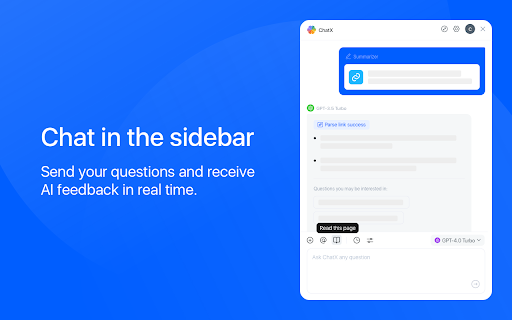


An AI copilot available for all websites. It can answer any complex questions, also capability to auto-summarize and translate. Do you want to use ChatGPT directly in your browser without needing to create an additional ChatGPT account? Do you want ChatGPT/GPT-4 to assist you while browsing web pages? Do you want to use artificial intelligence to gain a deeper understanding of browsing knowledge? All of this can be achieved with ChatX AI Copilot! Whether the content is lengthy or difficult, ChatX AI Copilot will help you quickly find satisfactory answers based on your needs. Simply select the content while browsing the web and click on the shortcut button on ChatX AI Copilot! Or engage in conversations with multiple AI models in the browser sidebar, send your questions, and receive real-time AI feedback. Hope that ChatX AI Copilot can become your on-the-go intelligent advisor! - ChatX has achieved integration with mainstream large language models (LLMs), allowing you to choose your preferred model as your default productivity tool. - Currently supported models include GPT 3.5, GPT 4, Google Gemini Pro, Claude Instant, Claude 2 and Claude 3, among others. - You can utilize the power of AI for translation, summarization, or even to ask for more information about the content you are reading. - Quickly translate or understand selected content using the context menu. - Quick ask questions about selected content and receive real-time answers. - Create and save custom prompts for reuse when needed. - How to use it? ⬇️ - Simply drag your mouse to select the content you want to understand and click on the ChatX toolbar icon to perform the desired action. - Alternatively, you can use the ChatX menu in the browser's right-click menu to perform full-text translate/summarize on the current webpage. - Engage in conversation with designated models, answer any questions or generate various creative texts based on your needs. - Upload images and ask questions utilizing the exceptional visual recognition capabilities of GPT-4V and Gemini Pro Vision. - Chat with multiple models at the same time and compare their answers in real-time. - Immersive paragraph and full-text translation, generating translated results compared to the original text. - Summarize webpage content by paragraphs to enhance reading efficiency. - Enhanced search engine results for improved search effectiveness. ChatX AI Copilot currently aggregates various mainstream LLMs. With our AI Copilot, you can translate, summarize, or gain a deeper understanding of the content you are reading. ChatX AI Copilot will help you find more accurate and higher-quality information, saving you time and effort. ChatX can be used on any webpage, and its built-in chat assistant can answer any complex questions. This allows you to have deeper insights into the content you are browsing by discussing with the AI assistant accompanying you everywhere. ➕ How to use in your browser? We currently offer extensions for Chrome and Edge. Simply download and log in to our extension to use AI and ChatGPT on any website without needing to create additional accounts. 📪 How to get support? If you have any questions or feedback, feel free to contact us at contact@chatx.im. 🔏 Privacy Policy We have updated our privacy policy to ensure it includes detailed information about user data collection, processing, storage, and sharing. You can view it at https://chatx.im/privacy.

Syncia - Power of ChatGPT on any website
Syncia is a browser extension that allows you to use Open AI's GPT in any website. Syncia enables users to chat with ChatGPT by opening a sidebar on any website by using the shortcut ctrl+shift+x. In addition, it provides a floating menu underneath any selected text on any website that allows users to generate text summaries, check grammar issues, and customise text length so on ! 🦾 Features 🗨️ Chat with ChatGPT through a sidebar. 🔑 Use your own Open AI API key. 📜 Quick menu underneath any selected text which allows you to summarise, simplify language, translate, and more. 🗂️ Allows to store custom prompts and use them with quick menu. 💯 Fully customisable settings page. 🔐 Secure and fully Free and open source forever. (Please consider giving this project a star 🌟 and contributing 💖 to support the project.) For more info check out https://github.com/Royal-lobster/Syncia Note: If shortcut is not working, Enter "chrome://extensions/shortcuts", under Syncia set new keyboard shortcut for "Open the sidebar"

Javy: GPT-4 powered assistant
GPT-4 powered tool for quick access to the answer to any question Javy brings the power of OpenAI's language model to your browser. With this extension, you can have a virtual assistant at your fingertips, ready to answer questions, provide information, and complete tasks. Simply type in your query, and GPT-4 will generate a response, offering you relevant and accurate information in a matter of seconds. Whether you need help with homework, want to find the latest news, or just need a quick translation, GPT-4 has you covered. The extension utilizes cutting-edge AI technology to understand natural language and deliver high-quality results. Download the GPT-4 powered assistant today and experience the future of search.

Side Chat AI Copilot Claude & Kimi
Intelligent browser assistant, customize prompts, insights, and summaries, chat with ClaudeAI in the sidepanel. Side AI Copilot - Your Intelligent Browser Assistant Side AI Copilot is a powerful browser extension that enhances your web browsing experience with AI-powered features. It seamlessly integrates multiple AI models (Claude AI, Kimi AI) into your browser's sidebar, providing instant access to AI assistance while you browse. 💡 Multi-AI Model Support - Seamlessly switch between Claude AI and Kimi AI - More AI models coming soon (ChatGPT, Google's Gemini) - Each model optimized for different use cases 🎯 One-Click Sidebar Access - Instant AI interactions without leaving your current page - Clean and intuitive interface - Smooth conversation flow with AI assistants 📝 Smart Prompt System - Customizable prompt templates - Quick-access prompt library - Save and manage your favorite prompts 🔍 Intelligent Search Enhancement - AI-powered search results analysis - Works with Google, DuckDuckGo, and Bing - Get deeper insights from your searches ✂️ Smart Text Selection - Instantly analyze selected text - Quick translation and summarization - Context-aware AI responses 🔄 Cross-Platform Sync - Sync your prompts across devices - Consistent experience everywhere - Secure data storage Perfect for: • Students researching topics • Professionals analyzing content • Writers seeking inspiration • Anyone wanting smarter web browsing The extension is constantly updated with new features and AI model integrations to provide you with the best possible AI-assisted browsing experience. Privacy focused: We respect your privacy and data security. The extension only processes the content you explicitly choose to analyze.

Beyond - Gemini™ AI chat for any website
Summarise or Analyse Youtube™ videos, enhance Google™ and Bing™ searches with Gemini™ Beyond Bard - Google Bard chatbot as assistant on any website and Youtube video summarizing tool . It uses google's BARD chatbot at backend. For popular sites like Google, Bing, Youtube, Duckduckgo, Github there are custom prompts written to enhance the summary(or insights) experience. For all other sites it tries to generate a summary or insights of the content on the page as much as possible. We are continuously increasing support for different types of websites. It ensures 100% privacy, none of your data is sent to any server. Do send up request of any specific site or group of sites that you need if that's not already supported at https://github.com/ishandutta2007/beyond-bard-mini/issues LEGAL: Disclaimer: Beyond Bard app is not official Bard application. It is an unofficial extension that is developed and maintained independently and has no affiliation to Google .
