
mfhlbfloahiajdjfnllfmpfobdhfkfah
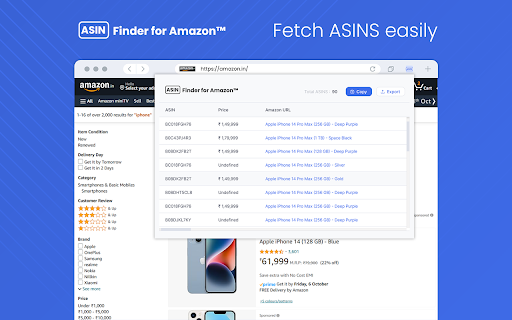
ASIN Finder chrome extension finds and displays codes for all Amazon™ products with a single click. ASIN Finder for Amazon is a powerful chrome extension designed to simplify your Amazon shopping experience. It helps you quickly locate and display ASIN (Amazon Standard Identification Number) codes for products listed on Amazon. ASIN codes are essential for various purposes, including tracking products and conducting research. >> Seamless Integration: ASIN Finder for Chrome seamlessly integrates into your Chrome browser, making it easy to access ASIN codes without leaving the Amazon product page. >> One-Click ASIN Retrieval: With a single click, the extension automatically identifies and retrieves the ASIN code of the product you're viewing on Amazon. >> Multiple ASIN Lookup: Users can check multiple product ASIN at once on Amazon product search page, and it will fetch ASIN codes for all of them at once. How to Use ASIN Finder for Chrome? >> Click on the extension and click "Add to Chrome" to install it. >> Once installed, the extension icon will appear in your Chrome toolbar. >> Navigate to an Amazon product page you want to retrieve the ASIN code for. >> Click on the ASIN Finder icon in your Chrome toolbar >> Now the extension will display the ASIN codes & users can copy or export them on the system ASIN Finder for Chrome streamlines your Amazon shopping experience by providing quick access to ASIN codes, ultimately saving you time and effort when researching or managing Amazon products.

Coupon Hacker: Automatic AI Coupon Finder
Automatically finds & tests coupon codes with AI, applies the best deal at checkout - works on Amazon & 1M+ stores. Coupon Hacker is a free Chrome extension that uses advanced AI deep search to find store-specific deals and automatically tests curated VIP, hidden, and universal coupon codes - unlocking 20-80% savings at checkout. Unlike other extensions that only work on big-name retailers, we focus on the long tail of e-commerce, supporting Amazon and over 1 million online stores including small businesses and boutique shops.💸 Here's what you get with Coupon Hacker: 🤖 AI-Powered Deep Search: Our advanced AI performs deep web searches across Reddit, blogs, social media, and exclusive coupon databases in real-time - finding store-specific codes that traditional extensions miss, then automatically testing every deal for you. 🔍 Curated VIP & Hidden Codes: We test hidden, VIP, and universal coupon codes - including universal ones that work across multiple stores - unlocking 20-80% discounts others miss. ✏️ Custom Coupon Code Testing: Got a code from email or social media? Simply paste it in and we'll test it for you - no manual form filling required. 🌍 Multi-Language & Multi-Currency Support: Works on international sites in 13 languages (English, German, French, Spanish, Portuguese, Italian, Dutch, Turkish, Polish, Swedish, Norwegian, Danish, Finnish) and supports 26 currencies including USD, EUR, GBP, JPY, and more. 📦 Amazon Coupon Auto-Apply: Never miss a deal on Amazon - Coupon Hacker instantly applies coupons on every product page. 🌐 Long Tail Store Support: Unlike extensions that only work on major retailers, we support 1M+ stores including small businesses, boutique shops, and niche e-commerce sites - ensuring you save everywhere you shop. 🛒 Effortless Savings: No searching, no hassle. Shop as usual, and we'll apply the best discount. Install Coupon Hacker now and start saving instantly. It's free, easy, and your key to smarter shopping. 🤑 Have feedback? Email us at hello@couponhacker.xyz with your thoughts. Affiliate Disclosure: Coupon Hacker is free to use, supported in part by affiliate relationships. When you click links in the extension, retailers may pay us a small commission, at no extra cost to you. V1.3.3 ✨ Refreshed welcome experience, 🎨 More consistent popup styling, 🛍️ Quick-access shortcuts to popular deal pages, 🐛 Stability and small fixes V1.3.2 🤝 Community Savings — share working codes and unlock codes verified by other users, 🐛 Bug fixes, 🧠 Improved AI coupon search, 🌐 Additional site support added V1.3.0 Global Update - 50+ Countries, 13 Languages, 26 Currencies 🌍 Works worldwide: German, French, Spanish, Portuguese, Italian, Dutch, Turkish, Polish, Swedish, Norwegian, Danish, Finnish stores 💱 Multi-currency: USD, EUR, GBP, JPY, CNY, CHF, and 20 more currencies supported 🏗️ Complete rewrite of detection engine - way faster and more reliable - Split massive files into smaller platform-specific modules - Cut code size by 50%, loads 2x faster 🎯 Better platform support: Shopify, Stripe, WooCommerce, Magento, BigCommerce - Each platform now has custom detection patterns - Works better on custom checkout pages 🤖 AI finds 3x more coupons with improved accuracy ✨ Test your own custom codes 🐛 12 critical bug fixes & performance improvements V1.1.4 🐛Bug fixes and performance improvements V1.1.3 🐛Chrome Browser bug fix + AI Search Pro with more free credits V1.1.2 🐛Supports now even more sites incl. modern Shopify sites V1.1.1 🤖 Supports AI Coupon Search + Amazon coupon application globally

Amazon Product Finder - AMZScout PRO Extension
Find a profitable product and start selling on Amazon quickly! Amazon product research made easy! See sales estimates and FBA fees. How to check sales data for any product: 1. Install the AMZScout PRO Chrome Extension. Begin your FREE trial by entering your details with a quick sign-up. 2. Access Amazon and search for any items you want to analyze. 3. Open the extension. 4. Review the product and niche information. You can review sales history for both the product and the niche, as well as estimated net margin, sales, and revenue. You can also use a built-in FBA calculator to help you identify profitable products, and much more! What can you use the AMZScout PRO Extension for? • Evaluate niche potential • Check niche and product trends • Calculate potential product profitability • Check product and niche sales, price, and rank history • Evaluate competition in the niche • Estimate FBA costs • Find reliable suppliers • Monitor your competitors' sales, pricing, and keywords ✅ More than 300,000 users already trust AMZScout’s product analysis tools, keyword search, and much more. AMZScout PRO is simple to use and navigate. Here are some hacks for anyone who’s interested in become a seller: [Quickly assess the potential of your niche and product] AMZScout Product Finder provides a niche score rating and a product score for both the private label and reselling business models. With this tool, you can immediately determine if the product is worth considering without having to look deeper into detailed product analytics. [Find the best supplier] Find things to sell on Amazon, or any other marketplaces, to scale your business. Save time by filtering suppliers according to country and price range. [Improve your ranking] Export niche and product keywords to improve product listings and use them in your PPC campaigns. Help your listing rank higher in organic searches and get more sales. This smart product research tool is often considered to be the most accurate tool by sellers. It helps you find unsaturated opportunities, get sourcing options, monitor your competitors, and even improve your keyword research. Base your product choice on concrete data to protect your investment. Find a product to launch with FBA that will bring you $5,000/month or more! The AMZScout Chrome Extension works in the United States in addition to these other Amazon marketplaces: the UK, Germany, France, Italy, Spain, Canada, Mexico, India, Japan, UAE, Saudi Arabia, Australia, and Brazil. You can research 15 niches for free with the trial version. No credit card information is required. Download the PRO Extension and give this fantastic software a try! Q: How are the estimated values calculated? A: These values are calculated using formula-based, top-level categories (for example, Home & Garden or Books) and rank in one of these categories. Q: What does the “LQS” column mean? A: “LQS” is Listing Quality Score. AMZScout analyzes a variety of product description criteria and computes a score for it. A higher score indicates a higher position in the search results. To see details, place your cursor on any LQS value. Q: What does the “RPR” column mean? A: “RPR” means Revenue Per Review. A higher RPR means a better selling opportunity. Q: Can I also get help with how to start selling on Amazon? A: Of course, the AMZScout team publishes useful articles and videos every month that you can find on our blog. You can also participate in an AMZScout Seller's Course and free webinars. Q: If I have any other questions or problems with AMZScout, where can I get support? A: The fastest way to get support is by emailing your question to support@amzscout.net.

Amazon Keyword Tool for free : SellerApp
Generate tons of Amazon suggest keywords in ONE click for free! Amazon keyword tool trusted by Power Amazon sellers worldwide. Find tons of Amazon long-tail keywords for your products with ONE click for free! Whether you're in the product research phase or trying to improve your listing to boost visibility and rank higher, the Amazon keyword research tool helps you uncover the most profitable and relevant long-tail keywords that help you rank better and improves conversions. The Amazon Keyword tool pulls thousands of keywords from Amazon search auto-suggests from your chosen marketplace. Currently, you can select the following marketplaces: 1. USA 2. India 3. Chain 4. Japan 5. France 6. Germany 7. Italy 8. Netherlands 9. Spain 10. UK 11. Canada 12. Mexico 13. Australia 14. Brazil Plus, you can select the modifiers [a-z] or [1-9] to get more long-tail keywords from the seed keywords. With these keywords, you can optimize your product listings, add keywords to the backend, or run ads on them to generate sales. 1. Is SellerApp keyword research extension free? The SellerApp Amazon keyword research tool is absolutely free. Just install and start using it. 2. How to use SellerApp's free Amazon keyword research tool? Enter the seed keyword in the search box, select the marketplace and the modifiers, and wait for the tool to fetch all the keywords from Amazon. The best part is you can extract all the keywords and analyze them further. 3. What is seed and rank in the SellerApp Amazon keyword research tool? Seed: Once you enter the main keyword and select either [a-z] or [1-9] modifiers, the tool will combine your provided keyword with each letter of the alphabet or number from 1 to 9, respectively, and create a list of seed keyword variations for your main keyword. For example, if you provide the keyword "water bottle" and select [a-z] modifiers, the tool will show you results for "water bottle a, " "water bottle b," "water bottle c," and so on, up to "water bottle z." These are all seed keywords and can be a useful way to discover long-tail keywords for your product. Rank: Rank refers to the keyword position in the auto search suggestion when a shopper search with the seed on Amazon. These keywords appear in a drop-down menu as you start typing in the search bar. 4. Where does the Keyword Research tool extract these keywords from? All these keywords are fetched in real-time from the Amazon auto search suggestions. So rest assured, you get the most recent keyword data from our tool.

Amazon Quick View by AMZScout
See Margin, BSR, ASIN, Size, etc. on an Amazon search page! All crucial data available right as you search for or browse products. With Quick View Extension by AMZScout, you can easily compare the products right on the Amazon pages. You now can choose the best item to sell with all the data right in front of you. There is no need to pull up extensions anymore. Simply type in a niche and enjoy viewing the full information. Quick View will show you: + BSR and its history + Price history + The best Keywords + Which sellers sell the product - FBA (and their number) - FBM (and their number) - Amazon itself sells it - Amazon Warehouse deals + The product’s FBA fees + The date it became available + Profit margin + Listing quality + ASIN + Size + Weight
