
mfcpjfioangllnfhokfeeafobgpgodei

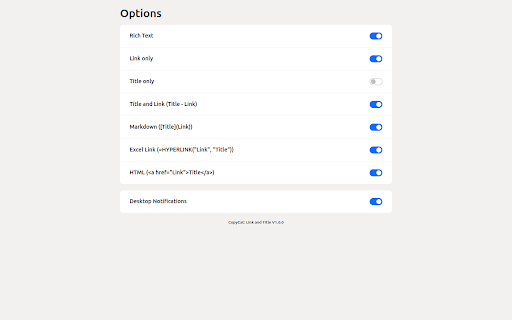
CopyCat: Link and Title. Copy the tab link in following formats with just a click: - Rich Text - Link only - Title only - Title and Link (Title - Link) - Markdown ([Title](Link)) - Excel Link (=HYPERLINK("Link", "Title")) - HTML (Title) Ability to: - Customize the options you use most often - Turn On or Off the notifications

Copy hyperlink as Edge does
Copy hyperlink as Edge does, just press Ctrl-C/Cmd-C in the web page. Shortcut is configurable. A Chrome extension that mimics Microsoft Edge's built-in "copy page as link" feature — available on any webpage. Press **Cmd+C** (macOS) or **Ctrl+C** (Windows/Linux) on any webpage **without selecting any text**. Instead of copying nothing, the extension automatically copies the page title and URL as a rich-text hyperlink (an anchor element `Title`). If you have text selected, the shortcut behaves normally and copies the selected text. A small toast notification confirms the copy action. Paste the copied hyperlink into any rich-text editor that understands HTML or JavaScript DOM objects, for example: - Rich-text input fields in web apps (Gmail, Notion, etc.) - [Obsidian](https://obsidian.md/) and other Markdown editors that accept pasted hyperlinks - Word processors that preserve hyperlink formatting on paste Open `chrome://extensions` → find **Copy hyperlink as Edge does** → **Details** → **Extension options** to customize the shortcut. Click **Record**, press the desired combination (e.g. `Ctrl+Shift+L`), then **Save**. - Runs on all `http://` and `https://` pages as a content script - `storage` — to remember your custom shortcut (synced via your Chrome account) - No background service worker; no data is collected or transmitted

COPY RICH URL
Just clicking the icon and copying the link of the page as RICH TEXT. Markdown and other styles are available with right click menu. ----------------------- Just CLICK the icon, and the Formatted LINK(rich text link) is saved in your clipboard!! You can paste the saved LINK with the title to your document(e.g. Google docs...) WITHOUT any editing. Also, you can RIGHT-CLICK on the page and select the "COPY RICH URL" menu, now you can save the page link in various styles. You can save to a clipboard ... 💕 as RICH TEXT, ❤️ Only URL of the page 💛 URL with Title of the page 💚 as Markdown style LINK 🧡 as HTML style LINK OPTIONS ======== From the extension menu, select the "option", and you can choose which feature to use.

Copy title and URL (plaintext)
Copy title and URL (plaintext) Copy title and URL of the active tab in plain text format by one click. This extension does not use content scripts and will work even on chrome:// pages.

Quick Copy Link
Copy page title and link together with one shortcut. Save time on your daily browsing and sharing tasks. Sharing web pages has never been this easy! Copy both the title and URL of your current web page with just one keypress. Key Features: - Simultaneously copy page title and URL - Paste directly into Slack, Markdown, Notion, Confluence, and more - Customize what to copy for specific websites in the settings Perfect for: - Frequent link sharers - Multi-tool users organizing information - Time-savers - Efficient information managers How to use: 1. Install the extension 2. Use these shortcuts: - Cmd + . on Mac (or Ctrl + . on Windows) to copy title with link - Cmd + / on Mac (or Ctrl + / on Windows) to copy URL only 3. The information is copied to your clipboard 4. Paste anywhere - it appears neatly formatted! Pro tip: Customize your copy preferences in the settings menu. Choose specific selectors for different websites to grab exactly the information you need! No complicated steps. Install and start using right away! Elevate your information management with Quick Copy Link. Never knew sharing links and organizing information could be this easy? Start now!
