
lijjekihhdocbcginjcbipabahcjpjoe

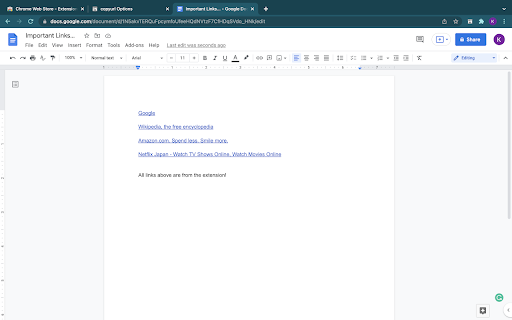

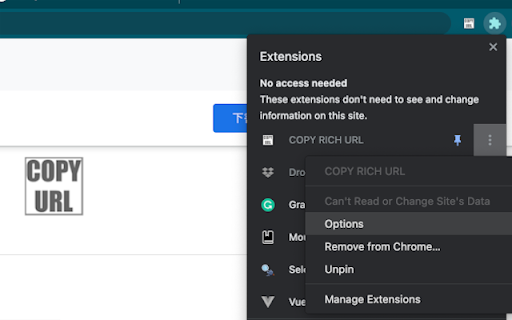

Just clicking the icon and copying the link of the page as RICH TEXT. Markdown and other styles are available with right click menu. ----------------------- Just CLICK the icon, and the Formatted LINK(rich text link) is saved in your clipboard!! You can paste the saved LINK with the title to your document(e.g. Google docs...) WITHOUT any editing. Also, you can RIGHT-CLICK on the page and select the "COPY RICH URL" menu, now you can save the page link in various styles. You can save to a clipboard ... 💕 as RICH TEXT, ❤️ Only URL of the page 💛 URL with Title of the page 💚 as Markdown style LINK 🧡 as HTML style LINK OPTIONS ======== From the extension menu, select the "option", and you can choose which feature to use.

Title and URL Copy
Copy the current page's title and URL with one click. Markdown Title & URL Copier is a lightweight and handy Chrome extension that lets you instantly copy the title and URL of the current webpage as a Markdown-formatted link with just one click. Simplify your content curation, note-taking, or research process by quickly generating Markdown links for your favorite websites, blog posts, or articles with this easy-to-use browser extension.

Sharemaster: Copy Title & URL with Shortcut
Helps you copy the title and URL quickly with keyboard shortcuts Sharemaster enhances your productivity by providing intuitive and customizable keyboard shortcuts to copy webpage titles and URLs in various formats. Copy Page Title and URL: • Windows / Linux: Alt + C • macOS: Option + C Copy Page Title and URL in HTML Format: • Windows / Linux: Alt + H • macOS: Option + H Copy Page Title and URL in Markdown Format: • Windows / Linux: Alt + M • macOS: Option + M Note: These shortcuts can be customized via Chrome’s extensions shortcut settings. Navigate to chrome://extensions/shortcuts to modify them according to your preferences. Sharemaster can also be accessed through the context menu. Simply right-click on any webpage to find Sharemaster’s options, allowing you to copy the title and URL in your desired format without using keyboard shortcuts. Whether you’re compiling reports, blogging, or sharing content with friends, Sharemaster streamlines the process of copying and sharing webpage information!

CopyCat: Link and Title
CopyCat: Link and Title. Copy the tab link in following formats with just a click: - Rich Text - Link only - Title only - Title and Link (Title - Link) - Markdown ([Title](Link)) - Excel Link (=HYPERLINK("Link", "Title")) - HTML (Title) Ability to: - Customize the options you use most often - Turn On or Off the notifications

Rich Text Copy
Copy selected text or the title of a tab to the clipboard as either a rich-text hyperlink or a markdown link. "Rich Text Copy" enhances your browsing and content-sharing experience. With just a single click, it effortlessly combines the selected text or the current tab's title with its URL to produce a rich text link or a markdown link.
