
melnpfdbilnjgbpdfjgjfihojhjphgni
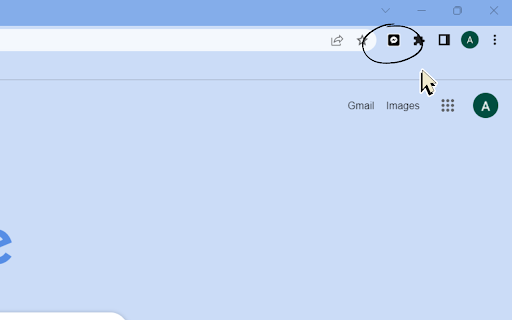
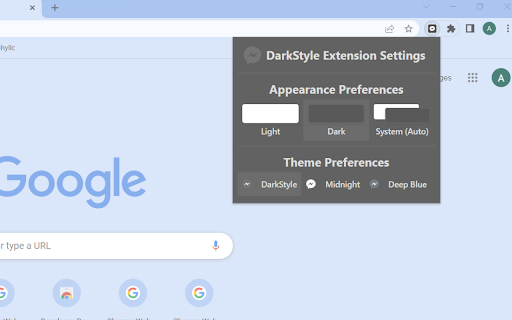
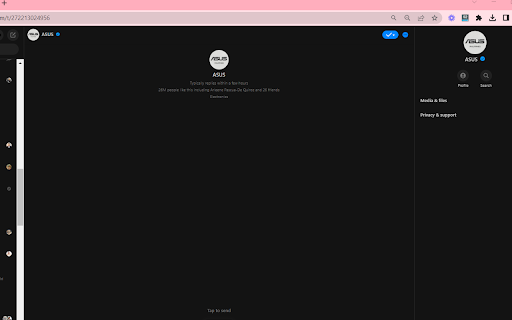
Swap between dark and light mode in Facebook Messenger. 1. Install and add the extension to Chrome. 2. Click on the extension and select your preferences from the 3 options/themes given. 1. Choose between 3 themes: Charcoal, Midnight, and Deep Blue. 2. Toggle between system, light, or dark mode based on your device's setting. Set dark mode for messenger easily with this extension.

Messenger™ in Extension
An easy to use app for messenger Messenger™ in Extension (Facebook™ Messenger) is the easiest way to open and use Messenger from your desktop machine (PC, MAC or Linux). Clicking on the toolbar button, renders Messenger in a standalone UI. Moreover, the window is re-sizable to your desired choice and the changes are auto saved to the memory. Note, to start using this App, you need to have a Facebook account. Important Note: Messenger™ in Extension does NOT belong or related to the official Facebook/Messenger website or application in any ways. It is an unofficial app that is developed and maintained independently.

YouTube Dark Mode
💡 Installed in one click, and immediately applied to your videos. No need to reload the page or do any additional manipulations. If you want to go back to light mode, just click the icon one more time. 💻 Your Assistant: Our extension will enhance your viewing experience, allowing you to easily switch to the background youtube dark mode. 📌 Quality Viewing: Youtube dark theme offers a more comfortable video viewing experience, especially in the night. 📌 Energy Efficiency: With the dark mode, your laptop's battery will last longer. Now you can watch videos in bed without extra battery worries. 📌 Ease of Use: If you've been wondering ‘how to change Youtube dark mode’, our extension has got you covered. ❓ Why choose our theme? Our theme differs from the colors of the standard video platform and is completely unique. We used a deep color for the background, which will allow you to immerse yourself in your favorite video viewings. Also, when you use our extension to set a night background, you protect both your eyes and your computer's battery life. 💻 Available Theme: We have designed a dark theme for your convenience and will explain how to enable it with just one click: 🌑 Dark Mode: A modern mix with purple hues, trendy and unique, this beautiful theme is inspired by deep shades that are so pleasing to the eye. The theme uses a dark background with soft blue and purple accents to create a beautiful backdrop. 🌑 Black Mode: If you're used to a more standard look, you can switch 🌑 White Mode: If you want return to white background Install the extension - and there you are, already using a new experience and control it! ❓Why did we choose these particular themes? Each of the themes considered are excellent options, offering unique and beautiful backgrounds for videos. But we chose the best one. We analyzed hundreds of top products with dark themes, surveyed many people, learned their opinions, and thus we found out that this very theme, which you can see in our extension, turned out to be the most pleasant for the eyes and makes watching your videos a pleasant activity. 🚀 Key Benefits: 1️⃣ Convenience and Comfort: how to put youtube in dark mode? It's easy to turn on and off with just one button. 2️⃣ Eye Protection: The dark background reduces eye strain. 3️⃣ Battery Saving: black screen helps save your device's energy. 💻How to enable black mode? Install the extension and find out – how to turn on dark mode on youtube? Our intuitive interface makes switching modes simple and quick. Whether on desktop or mobile, our dark mode is perfect for Chrome browser. Pin the extension so that you can access it quickly. 🔧Ease of Use: No more searching for ‘how to set dark mode on’. Our dark mode chrome extension makes everything straightforward and convenient. Set to dark mode with one click. It’s too easy to turn on or off. 💡Conclusion: Is your dark theme broken? Try our dark mode! Our theme ensures the best viewing experience and comfort for your eyes. Disclaimer: Please note this extension is NOT made by the video platform and is made by an independent development team. All copyrights belong to their respective owners. UPD 2.0: you can choose the background from three colors: modern deep dark, black standard, white background - easily and in one click.

Dark Theme for Facebook™
A schedulable and customizable dark theme for facebook.com and messenger.com This extension provides a native dark theme for both facebook.com and messenger.com. It applies the native coloring by altering the original colors to bring a dark appearance. This theme is customizable from the options page. Also, the user can inject custom CSS styles into these websites to improve the styling and make it more personalized. You can turn the dark theme on and off from the toolbar button (action button). Also, it is possible to set a schedule (e.g., night-time duration only) to automatically turn the extension on and off. Features: 1. Uses the original theme 2. Does not invert colors 3. Supports single-click on and off feature 4. Supports schedule on and off 5. Does not mess up the original theme 6. Supports user styling -- Note that this theme is only meant to improve Facebook usage and has nothing to do with Faebook.com. It is a free, open-source project.

Themes for Facebook
Enhance your Facebook experience: custom styles, animated backgrounds, fonts, and vibrant colors! 🌈 Elevate your Facebook experience with our cutting-edge Chrome extension that offers a delightful visual transformation. Immerse yourself in a world of endless customization possibilities with a diverse selection of 48 thematic categories, ranging from mesmerizing space landscapes to captivating abstract art, the soothing beauty of nature, and the festive spirit of holidays. 🎞 But we don't stop at just themes – we've taken it a step further. Picture a dynamic, animated video background that breathes life into your Facebook feed, turning it into an engaging canvas of creativity. Our extension empowers you to select from a wide array of fonts and colors, allowing you to curate your very own personalized Facebook style. While this extension introduces a fresh and vibrant aesthetic to your Facebook page, rest assured that all your familiar interface elements remain intact. Your navigation and functionality are preserved, ensuring a seamless and intuitive user experience. Disclaimer: It's important to note that this project is an independent endeavor and is not officially affiliated with Facebook™. However, we are dedicated to enhancing your Facebook journey by providing a visually immersive and captivating environment that you can call your own.
