
meldpjcodilmepbidcokobfflljecbbf
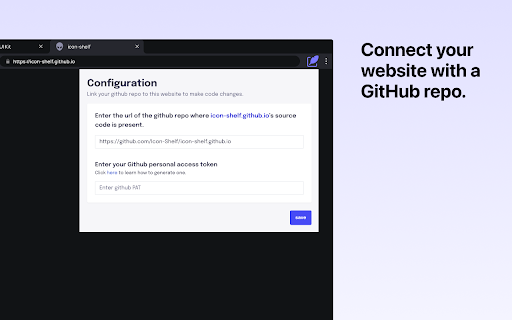


An extension for your browser that makes editing the source code of your website easy. Edit source code of your website without leaving your tab. Have you ever needed to make a quick change to the source code of a website, but didn't want to go through the hassle of opening up your development tools? Source Patch allows you to do just that, right from within your browser. Simply click on the extension icon and a panel will pop up, giving you access to the source code of the website you're currently on. Make changes to the code just like you would in any other code editor. When you're finished making your changes, just click the "Create change request" button to give a pull request to GitHub with your changes. - Search file contents and update source code - Code editor with syntax highlighting - Automatically create a pull request to GitHub with your changes For all feature requests or bug reports, please visit the GitHub repository and fill in an issue https://github.com/MrRobz/Source-Patch Source Patch doesn't track you or share/care about your data at all. GitHub tokens are only needed only to to access private repositories or exceed GitHub API rate limit. Source Patch stores tokens in your browser storage and only uses them to authenticate with GitHub.

Locale Switcher
Lets you quickly switch the browser locale to test localization on your website. 🌏 Locale Switcher Browser Extension to quickly change your browser locale. ❓ What does it do? When a locale chosen the following thinks will be adjusted: Chrome & Firefox Support for 700+ languages and variations Per tab basis Favorite your most used locales Fully shortcut enabled, no mouse needed (Windows: Ctrl+Shift+L / Mac: Cmd+Shift+L)

Text Editor
A free, highly customizable text and code editor extension for your browser. Text Editor is a full-featured text & code editor add-on for your browser. This add-on has plenty of options to adjust and is built on top of the famous CodeMirror open-source JavaScript library (https://codemirror.net/). Once you open the add-on for the first time, you will see a sidebar at the left and an empty text editor at the right. The left sidebar includes file I/O buttons. For example, a button to open file(s) or settings. There is also a right sidebar that includes all the options for this app. Note 1: This extension uses the new file system access API (https://web.dev/file-system-access/) to open and save files to disk. But, if your browser does not support this new API, it uses the - downloads - API instead to save files to disk in the default download folder (asks for downloads permission when opening the interface). Note 2: Currently, Text Editor supports three key-maps for famous text editors (i.e. sublime). Moreover, it supports more than 100 coding languages (i.e. JavaScript, CSS, HTML, etc.) If you have a feature request or found a bug to report, please fill the bug report form in the add-on's homepage (https://mybrowseraddon.com/text-editor.html).

QR Code Reader
A chrome extension for reading QR code from webpage. Get the link to the QR Code shown on any web page. To use just open extension or use 'Command/Ctrl+Shift+F' shortcut to read QR code on current tab. Yes it is that easy.

Page Plain Text
Chrome extension that shows page plain text and allows you to edit or download the text [Features] - Shows page plain text (keyboard shortcut: Ctrl + Shift + 1) - Extracts text from the selection on the page - Text editing - Download page plain text (keyboard shortcut: Ctrl + Shift + 2) - Removes all formatting from text - Removes all advertising to focus only on the content of the text - Copy text to use it in other documents (keyboard shortcut: Ctrl + Shift + 3) - Zoom In and Zoom Out text to improve legibility (keyboard shortcut: Ctrl + ➕ / Ctrl + ➖) - Contextual menu to quickly copy or download the plain text of the current page - Dark Mode color scheme [Keyboard Shortcuts] To change the keyboard shortcuts of the extensions you can go here: chrome://extensions/shortcuts [Links] - My Home page: https://www.vincenzodevivo.com/ - My GitHub: https://github.com/deltavi ... or you can buy my books on Amazon 📚 www.amazon.it/Vincenzo-De-Vivo/e/B09MPTBBFY
