
meekeganelaaeijimakghhbiphjbfgdn
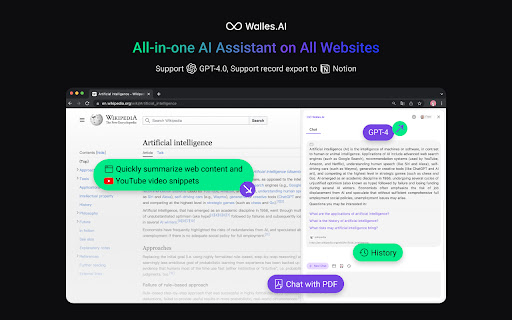
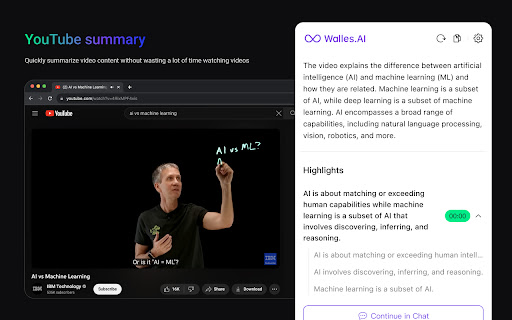
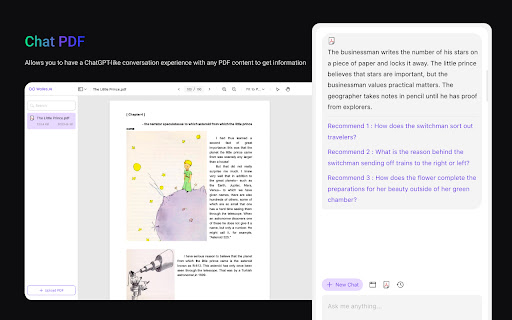
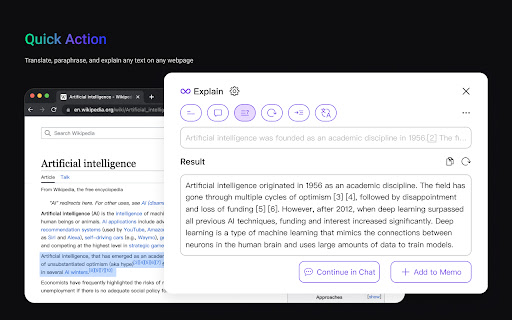
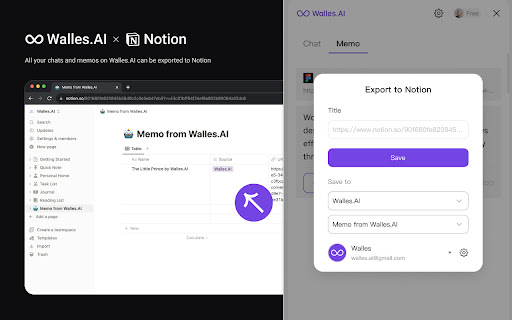
🔥 Walles.AI as your co-pilot and can answer any complex questions in the sidebar. It can also help you write articles, read articles, summarize YouTube videos, and enhance Google search engines. Available on all websites. 🚀 Quick Start Tips 1️⃣ Open the Sidebar to chat with Walles.AI easily about anything, all powered by GPT-4 and GPT-3.5, just as intelligent as ChatGPT. 2️⃣ Select any text on the webpage and let Walles.AI explain, translate, or paraphrase it based on GPT-3.5. 3️⃣ Open YouTube to get video summaries and quickly generate summary outlines without wasting a lot of time watching videos. 4️⃣ Upload PDF files to quickly generate article summaries and chat with PDF instantly. 💡 All your chats and memos on Walles.AI can be exported to Notion.

ChatX - Your AI Copilot for Web
An AI copilot available for all websites. It can answer any complex questions, also capability to auto-summarize and translate. Do you want to use ChatGPT directly in your browser without needing to create an additional ChatGPT account? Do you want ChatGPT/GPT-4 to assist you while browsing web pages? Do you want to use artificial intelligence to gain a deeper understanding of browsing knowledge? All of this can be achieved with ChatX AI Copilot! Whether the content is lengthy or difficult, ChatX AI Copilot will help you quickly find satisfactory answers based on your needs. Simply select the content while browsing the web and click on the shortcut button on ChatX AI Copilot! Or engage in conversations with multiple AI models in the browser sidebar, send your questions, and receive real-time AI feedback. Hope that ChatX AI Copilot can become your on-the-go intelligent advisor! - ChatX has achieved integration with mainstream large language models (LLMs), allowing you to choose your preferred model as your default productivity tool. - Currently supported models include GPT 3.5, GPT 4, Google Gemini Pro, Claude Instant, Claude 2 and Claude 3, among others. - You can utilize the power of AI for translation, summarization, or even to ask for more information about the content you are reading. - Quickly translate or understand selected content using the context menu. - Quick ask questions about selected content and receive real-time answers. - Create and save custom prompts for reuse when needed. - How to use it? ⬇️ - Simply drag your mouse to select the content you want to understand and click on the ChatX toolbar icon to perform the desired action. - Alternatively, you can use the ChatX menu in the browser's right-click menu to perform full-text translate/summarize on the current webpage. - Engage in conversation with designated models, answer any questions or generate various creative texts based on your needs. - Upload images and ask questions utilizing the exceptional visual recognition capabilities of GPT-4V and Gemini Pro Vision. - Chat with multiple models at the same time and compare their answers in real-time. - Immersive paragraph and full-text translation, generating translated results compared to the original text. - Summarize webpage content by paragraphs to enhance reading efficiency. - Enhanced search engine results for improved search effectiveness. ChatX AI Copilot currently aggregates various mainstream LLMs. With our AI Copilot, you can translate, summarize, or gain a deeper understanding of the content you are reading. ChatX AI Copilot will help you find more accurate and higher-quality information, saving you time and effort. ChatX can be used on any webpage, and its built-in chat assistant can answer any complex questions. This allows you to have deeper insights into the content you are browsing by discussing with the AI assistant accompanying you everywhere. ➕ How to use in your browser? We currently offer extensions for Chrome and Edge. Simply download and log in to our extension to use AI and ChatGPT on any website without needing to create additional accounts. 📪 How to get support? If you have any questions or feedback, feel free to contact us at contact@chatx.im. 🔏 Privacy Policy We have updated our privacy policy to ensure it includes detailed information about user data collection, processing, storage, and sharing. You can view it at https://chatx.im/privacy.

Felo - Your Free AI Search Assistant
Search the world in your own language and enhance your social networking content search, all for free. **Felo AI Search Assistant**: Your Free Browser Extension for Enhanced Web Searching! 🌐✨ Felo is your ultimate tool to elevate your web searches and boost your reading productivity. ⚡️👨💻 Experience a unique and efficient way to explore the web, saving time while expanding your knowledge. **How to Use the Felo AI Search Assistant Extension?** 🤖 Once installed, simply perform your searches on felo.ai—no additional setup required. 🌐 It's user-friendly and easy to get started. 👍 The assistant extension activates automatically when you need it, without requiring any extra actions from you. 🔍✨ ### Key Features of Felo AI: ⏱ **Global Search**: Access a wealth of reliable global resources, providing you with the most accurate answers you need. 💬 **Ask Anything**: Pose any question about the page you're reading and receive sourced answers from top search engines, simplifying complex information. 🔎 **Focus**: Master complex concepts and vocabulary on any webpage, ensuring you understand everything you read. ✅ **Cross-check**: Access factual and reliable sources to gain diverse perspectives on any topic. 📰 **Explore**: Dive into news, academic sources, and videos from multiple outlets, enriching your understanding of any subject. ### Premium Features Offered by the Felo Extension: ⚡️ **Cross-Language Reading**: Enjoy seamless reading with our AI-powered translation engine, designed to help you navigate and understand materials in various languages effortlessly. ⚡️ **Search Agent**: Easily search content from Reddit and Twitter directly through the extension, filling gaps left by traditional website search functions. **Ready to upgrade your web search and reading productivity? Get Felo now!** ### ❓ Frequently Asked Questions **• Is Felo free?** Yes, Felo is completely free! Both the extension and AI search services are available without charge. **• What is Felo AI Search Assistant?** Felo AI Search Assistant is a browser extension designed to aid in cross-language reading and searching across various websites. **• How can I install Felo?** To start using Felo, click the "Add to Chrome" button, install the extension, and visit [felo.ai](https://felo.ai) to begin your AI search journey. **• What does Felo collect about me?** Your data is confidential and will not be used for ads or commercial purposes. It is solely for debugging and product improvement. **• How to contact us?** We'd love to hear your feedback! Email us at support@felo.ai , and we’ll respond quickly to your suggestions. **Start your enhanced search experience with Felo AI today! 🚀**

ChatsNow: ChatGPT AI Sidebar (o1-preview, GPT-4o, Claude 3, Gemini)
ChatsNow is an AI tool uses GPT-4o, GPT - 5.4, o1-preview, Claude3, Gemini to provide services, e.g. AI search, read, PDF and write ChatsNow: OpenAI ChatGPT SideBar(GPT- 5, Draw) is an artificial intelligence assistant that utilizes OpenAI's ChatGPT to provide intelligent services. It supports o3-preview, GPT-5, GPT-4o, Claude , Gemini models, helping you with writing, AI-generated drawings, enhancing Google and Newbing search engines, and providing answers to various questions. Install the extension now to sign up for an account and get free access to GPT-4o. ChatsNow: AI Assistant - Sidebar with ChatGPT powerful features: -ChatGPT is a product of OpenAI, and the AI assistant is based on ChatGPT to realize intelligent services. Support for o3-preview, GPT-5, Claude4 Opus, Gemini Pro, Grok4 is now available. -Integrate a powerful sidebar in the browser, supporting for Customizable Prompts, ChatGPT translator, rewrite text, ChatGPT programming, grammar check, writing papers, summarizing, chatting with ChatGPT, etc. -Optimize your writing, enhance your reading, can act as your reading and writing assistant. -Support Customizable Prompts, you can ask any questions on any webpage -Enhance your search engine results by quickly obtaining higher quality answers that combine online content with powerful AI responses. -Built-in over 100+ preset suggestion templates, can be optimized for your writing, marketing, coding, translation, and other activities. Additionally, you can add any suggestion templates you like and activate them with just one click on any webpage. -Easy to use -Free Examples: 📖 Reading Assistant: Summarizes, lists key points, explains complex text, explains code, and translates various languages. 📝 Writing Assistant: Checks grammar, rewrites content, expands content, writes papers, modifies text, and more. 💬 Chat: Chat freely with ChatGPT. 🔍Enhanced Search: One-click access to the core content of search engines. Supports all popular search engines such as Google, Baidu, Bing, and DuckDuckGo, making it convenient for users who frequently switch between different search engines. 👦 Customized Question Reply: Replies to content on social media platforms. Also replies to chat content, responds to emails, selects web content to answer any questions, and more. AI painting: It allows you to input text to generate pictures just like using Midjourney, stable diffusion, and Dall-E to draw pictures. How to Use ChatsNow: AI Assistant - ChatGPT Sidebar 1. Click the "Add" button located in the upper right corner. 2. Select either the "Ask","Chat","Write" or "Draw" mode. 3. Enter the text or select content from the webpage, choose a template or customize the question, submit and generate. 4. Copy the generated results to any desired location. Support GPT-4o, GPT-5, Claude4 Opus, Gemini Pro and other models. With the ChatsNow AI Assistant extension, you can instantly write, translate, summarize, rewrite, explain, or respond to any text, including professional code and industry-specific knowledge, without needing to sign in to your ChatGPT (OpenAI) account. The running speed of the ChatsNow AI Assistant extension is just as fast as ChatGPT Plus. It also a AI Copilot powered by ChatGPT. Like Sider and Monica, we improve work/study efficiency.

Kimi Copilot - 网页总结助手
用Kimi AI一键总结网页内容 安装后,在浏览网络文章时点击插件图标,或使用快捷键 Ctrl/Cmd+Shift+K,即可一键召唤Kimi.ai总结网页内容 特点: 1. 免费,登录Kimi账号即可无限使用 2. 得益于Kimi的长文本大模型,总结更全面 3. 极简,除了一键总结没有其它花里胡哨的功能 4. Kimi无法访问的网站也能总结 5. 支持总结YouTube和B站视频 6. 支持总结PDF页面(试试arXiv论文吧!) 7. 支持暗黑模式 8. 支持自定义总结时使用的prompt 注意: 1. 本插件为第三方爱好者开发,不是Kimi.ai或月之暗面官方产品 2. 由于技术限制,本插件无法在Arc等非原生Chrome浏览器使用
