
fbnbeocmafoobaeodhmcgnammdeaoglg
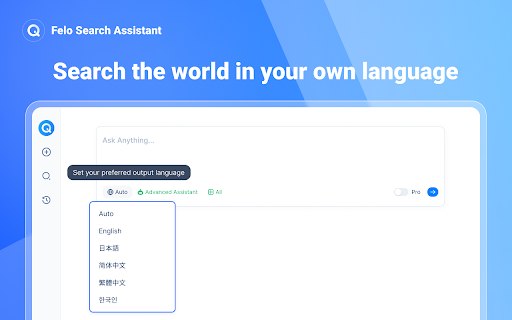


Search the world in your own language and enhance your social networking content search, all for free. **Felo AI Search Assistant**: Your Free Browser Extension for Enhanced Web Searching! 🌐✨ Felo is your ultimate tool to elevate your web searches and boost your reading productivity. ⚡️👨💻 Experience a unique and efficient way to explore the web, saving time while expanding your knowledge. **How to Use the Felo AI Search Assistant Extension?** 🤖 Once installed, simply perform your searches on felo.ai—no additional setup required. 🌐 It's user-friendly and easy to get started. 👍 The assistant extension activates automatically when you need it, without requiring any extra actions from you. 🔍✨ ### Key Features of Felo AI: ⏱ **Global Search**: Access a wealth of reliable global resources, providing you with the most accurate answers you need. 💬 **Ask Anything**: Pose any question about the page you're reading and receive sourced answers from top search engines, simplifying complex information. 🔎 **Focus**: Master complex concepts and vocabulary on any webpage, ensuring you understand everything you read. ✅ **Cross-check**: Access factual and reliable sources to gain diverse perspectives on any topic. 📰 **Explore**: Dive into news, academic sources, and videos from multiple outlets, enriching your understanding of any subject. ### Premium Features Offered by the Felo Extension: ⚡️ **Cross-Language Reading**: Enjoy seamless reading with our AI-powered translation engine, designed to help you navigate and understand materials in various languages effortlessly. ⚡️ **Search Agent**: Easily search content from Reddit and Twitter directly through the extension, filling gaps left by traditional website search functions. **Ready to upgrade your web search and reading productivity? Get Felo now!** ### ❓ Frequently Asked Questions **• Is Felo free?** Yes, Felo is completely free! Both the extension and AI search services are available without charge. **• What is Felo AI Search Assistant?** Felo AI Search Assistant is a browser extension designed to aid in cross-language reading and searching across various websites. **• How can I install Felo?** To start using Felo, click the "Add to Chrome" button, install the extension, and visit [felo.ai](https://felo.ai) to begin your AI search journey. **• What does Felo collect about me?** Your data is confidential and will not be used for ads or commercial purposes. It is solely for debugging and product improvement. **• How to contact us?** We'd love to hear your feedback! Email us at support@felo.ai , and we’ll respond quickly to your suggestions. **Start your enhanced search experience with Felo AI today! 🚀**

NotebookLM Web Importer
Import web pages and YouTube videos to NotebookLM with one click NotebookLM Web Importer is a powerful Chrome extension for saving web pages, YouTube videos, links, browser tabs, RSS feeds, and more directly to Google NotebookLM. Stop copying URLs, switching tabs, and manually organizing sources. With NotebookLM Web Importer, you can capture online content in seconds, add it to the right notebook, and start using NotebookLM to summarize, ask questions, generate insights, and create Audio Overviews. Built for students, researchers, creators, writers, analysts, and anyone who uses NotebookLM as an AI research assistant. ## One-Click Web Page Import Save the current web page to NotebookLM instantly. Turn articles, blog posts, documentation, reports, and reference pages into NotebookLM sources without copy-paste. ## YouTube to NotebookLM Import YouTube videos into NotebookLM so you can study lectures, interviews, tutorials, podcasts, webinars, and long-form videos more efficiently. ## Bulk Import Add multiple sources at once from link lists, open browser tabs, YouTube playlists, RSS feeds, and more. Build a complete research notebook faster. ## Notebook Management Manage your notebooks in one place and keep your NotebookLM research workflow organized while you browse. ## Audio Overview Management Manage NotebookLM Audio Overviews and sync them to a podcast feed, making it easier to listen, review, and learn on the go. ## Full WebSync Workflow Send pages and videos to NotebookLM from your browser, then chat with your sources, generate summaries, create study materials, or produce podcast-style Audio Overviews inside NotebookLM. NotebookLM is great for understanding sources. NotebookLM Web Importer makes it much faster to collect those sources. Use it to: - Save articles, reports, and documentation to NotebookLM - Import YouTube videos and playlists for research or learning - Collect sources from multiple tabs in bulk - Build notebooks from RSS feeds or link lists - Organize research for school, work, writing, or content creation - Turn saved sources into NotebookLM summaries, Q&A, study guides, and Audio Overviews - Reduce repetitive copy-paste work while browsing # Perfect For ## Students Collect lecture videos, course readings, articles, and research materials in NotebookLM. ## Researchers Build source collections from papers, websites, reports, documentation, and reference links. ## Creators and Writers Save inspiration, competitor research, scripts, articles, and YouTube videos into structured notebooks. ## Professionals Gather market research, product docs, news, client materials, and internal knowledge sources for faster analysis. 1. Install NotebookLM Web Importer from the Chrome Web Store. 2. Browse the web or watch YouTube as usual. 3. Click the extension icon. 4. Choose where to import your source. 5. Open NotebookLM to chat with your sources, generate insights, or create an Audio Overview. NotebookLM Web Importer helps you turn the web into a searchable, organized AI knowledge base. If you use NotebookLM for research, learning, writing, analysis, or content creation, this extension saves time every day. Works with Google NotebookLM. This extension is not affiliated with Google.

Felo Search Toolkit
Enhances your Felo Search experience with shortcuts and quick access buttons for the Felo Search website. Enhance the user experience of the Felo Search website. Currently, it adds some shortcut key functions to the Felo Search website ( https://felo.ai ), and more UX-enhancing features may be added in the future. More useful features will be released in the future, and we welcome everyone to provide ideas and suggestions. 1. Click the extension's icon to directly open the Felo Search website. 2. On any page, right-click to select "Use Felo Search to summarize this page" from the context menu to automatically summarize the entire webpage. - Quickly toggle the sidebar - Press Ctrl+b to quickly toggle the sidebar - Quick page navigation - Press Escape to quickly return to the homepage - Press t to jump to the Topic Collections page - Press c to click the Create topic button within the Topic Collections page - Press / or Alt+/ to jump to the History page - Press j or Alt+j to jump to the next history record - Press k or Alt+k to jump to the previous history record - Thread keyboard operation optimization - Press s or Alt+s to quickly share the current thread - Press Ctrl+Delete to quickly delete the current thread - Input field operation optimization - Press Escape to clear the input field - If on the history page and the input field is empty, press Escape to go back to the previous page - Zen Mode - Press f to enter Zen Mode (similar to a full-screen display)

Obsidian Web Clipper
Save and highlight web pages in a private and durable format that you can access offline. The official extension for Obsidian. Bring the web to your personal knowledge base. Save content to your Obsidian vault so you always have access to it, even offline. Obsidian is secure, private, and designed around durable open formats that allows you to preserve your data for the long term. Obsidian Web Clipper is the best way to save, highlight, and interpret the web: - Save anything: From news articles and blog posts to recipes, product pages, and research papers — if it's on the web, you can save it. - Highlight: Easily highlight important passages, and save highlights to Obsidian. When you return to a page, your highlights are visible. - Interpret: Use natural language to extract and modify data from pages. Compatible with any model provider including local model options. - Save entire pages, selected text, or just the main content. - Templates let you automatically extract structured metadata from web pages. - Rules let you apply a specific template based on the website you're on. - Advanced templating variables let you extract data from OpenGraph, Schema.org, CSS selectors, and more. - Filters let you format and transform data before saving it. - Hotkeys let you save pages with a single keystroke. As with everything Obsidian, Web Clipper is designed to protect your privacy, and give you control over your data. - No lock-in: Your data is saved in durable, portable Markdown files. No proprietary formats. - Offline access: Your data is stored locally, and available later even without an internet connection. - 100% private: Obsidian doesn't gather or store any data about your requests. Obsidian helps you create connections and links between your notes so you can organize your thoughts. You can create links between everything — ideas, articles, lists, locations, books — anything you can put in a note, you can link to other notes. Obsidian Web Clipper is open source. You can help us improve it by submitting issues and feature requests on GitHub: https://github.com/obsidianmd/obsidian-clipper

Kimi Copilot - 网页总结助手
用Kimi AI一键总结网页内容 安装后,在浏览网络文章时点击插件图标,或使用快捷键 Ctrl/Cmd+Shift+K,即可一键召唤Kimi.ai总结网页内容 特点: 1. 免费,登录Kimi账号即可无限使用 2. 得益于Kimi的长文本大模型,总结更全面 3. 极简,除了一键总结没有其它花里胡哨的功能 4. Kimi无法访问的网站也能总结 5. 支持总结YouTube和B站视频 6. 支持总结PDF页面(试试arXiv论文吧!) 7. 支持暗黑模式 8. 支持自定义总结时使用的prompt 注意: 1. 本插件为第三方爱好者开发,不是Kimi.ai或月之暗面官方产品 2. 由于技术限制,本插件无法在Arc等非原生Chrome浏览器使用
