
mdgllalimgngccepbdbapaklheoenabo
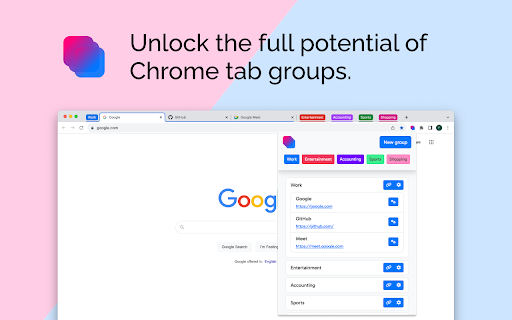

Unlock the full potential of Chrome tab groups. Tired of having countless tabs cluttering your Chrome browser? Searching for a seamless solution to manage and access your favorite websites effortlessly? Look no further! GroupMark is the must-have Chrome Extension you've been waiting for. 🌟 Simplify Your Browsing Experience GroupMark empowers you to regain control of your web browsing by allowing you to create and manage tab groups with ease. Say goodbye to tab overload, and hello to a more organized and efficient online experience. 📂 Create and Name Tab Groups With GroupMark, you can create custom tab groups, each with a unique name and color for easy identification. Whether it's work-related research, shopping lists, or entertainment sites, you can organize your tabs according to your preferences. 🖌️ Customize with Colors Color-code your tab groups for quick recognition and effortless navigation. No more hunting through tabs; simply select the color that corresponds to your desired group, and you're on your way. 🔗 Save URLs and Access Them Instantly GroupMark allows you to add specific URLs to each tab group. Upon clicking the group's button, all the associated websites will open simultaneously, saving you valuable time and effort. 🚀 Boost Your Productivity GroupMark enhances your productivity by streamlining your browsing tasks. Whether you're working on multiple projects, planning your next vacation, or organizing your online resources, this extension is your secret weapon for improved efficiency. Create, name, and color-code tab groups. Add and manage URLs within each group. Access your favorite websites instantly with a single click. Customize your browsing experience for improved organization. Say goodbye to cluttered tabs and hello to a more productive online life. Don't let chaotic tab management slow you down. Experience the revolution in web browsing with GroupMark! Try it today and discover the joys of organized, efficient browsing. Get started now and transform your Chrome experience. Download GroupMark from the Chrome Web Store and take control of your tabs like never before. Say hello to a more organized, productive, and enjoyable online journey!

Tab Group Maestro
Quickly search and find your Chrome tab groups. Quickly search and find your native Chrome tab groups with fast autocomplete. No more wasting time trying to find that window, continue where you left off! Features: - Cmd+Shift+2: Launch extension. This can be changed in Chrome Extensions settings. - Search your tab groups by name with fast autocomplete. Press enter to jump to the window of that tab group. - Cmd+Shift+1: Switch to edit mode to add current tab to a new or existing tab group. Type group name and press enter. Press Cmd+Shift+1 again to switch back to search mode. Note: This only works for open tab groups. Chrome doesn't expose closed tab groups to extensions. See the blog post for how to use it: https://medium.com/@semih.sezer/how-i-organize-my-chrome-tabs-in-2024-for-focus-and-productivity-d81802b0f14e More about Chrome's native Tab Groups: https://blog.google/products/chrome/manage-tabs-with-google-chrome/ Release History: 1.2.0: 14th August 2024 - Show tab groups in reverse accessed order, to keep the latest one at the top. - Do not show current tab group in the dropdown - Move focus to the selected tab group, instead of just focusing on the window

Tabiola: Manage Tabs, Groups, Windows & Sessions
Tabiola is a tab manager that lets you organize your tabs and tab groups in sessions and spaces with a lot of useful features. Tabiola is the ultimate solution for managing your browser tabs efficiently. Whether you're a multitasker juggling numerous projects or a casual browser who values organization, Tabiola helps you to take control of your online workspace. With Tabiola, you can: - Organize Tabs into Sessions: Save and restore your tabs as sessions for different tasks, projects, or browsing moods. - Create Spaces: Group related sessions together for better focus. - Seamlessly Manage Tab Groups: Easily collapse, expand, or move tab groups without losing track. - Search and Navigate: Quickly locate tabs across sessions and spaces using the integrated search feature. - Sync and Backup: Keep your tabs safe and in sync across devices and browsers. - Windows management: You can manage your opened and recently closed windows with ease - Import & Export: Import your data from browser extensions like Workona or Toby - Productivity Boost: Spend less time searching for tabs and more time accomplishing your goals. - Clutter-Free Browsing: Eliminate tab overload and keep your browser neat and organized. - Customizable Workflows: Tailor Tabiola to suit your unique browsing habits and preferences. - Peace of Mind: Save your work and tabs effortlessly, reducing the stress of accidental tab closures. - Take control of your browser and revolutionize the way you work online with Tabiola!

Tab Manager - sort, group and more
Tab Manager - sort, group and more Introducing Tab Manager – Your Ultimate Chrome Tab Organizer! Are you overwhelmed by the chaos in your browser tabs? Say goodbye to clutter and welcome seamless organization with Tab Manager, the essential Chrome extension for a streamlined browsing experience. • Pin tab group • Create custom group • Auto collapse groups • Sort tab groups by the number of tabs, both increasing and decreasing. • Automatically group tabs by domain, supporting up to 5 levels of subdomains. 🔍 Smart Tab Sorting: Transform your workspace with ease by sorting your tab groups by title or tab count. With just a click, Tab Manager intelligently organizes your tabs, making it effortless to find exactly what you need. 🚀 Boosted Productivity: Enhance your productivity with a perfectly arranged workspace. Effortlessly switch between projects, tasks, or leisure browsing without sifting through a cluttered tab bar. 🌐 Automatic Grouping: Let Tab Manager do the heavy lifting by automatically grouping your tabs by domain, keeping related tabs together and your browsing neat. 💎 Streamlined Interface: Enjoy a smooth, user-friendly experience with a sleek interface designed for efficient tab management. No complex settings, just seamless integration into your Chrome browser. 🔒 Privacy and Security: Your privacy is our priority. Tab Manager operates locally on your browser, ensuring your sensitive data remains secure. Feedback: We value your input! Help us improve Tab Manager by sharing your thoughts and suggestions. Discover the difference with Tab Manager and transform the way you browse!

Tab Deck - Tab/Tab Group Manager
Your all-in-one tab/tab group manager that helps you effectively manage and organize your tabs/tab groups Tab Deck is a Chrome extension alternative to OneTab/Session Buddy, that allows you to manage your tabs & tab groups in one place. One click to aggregate all tabs & tab groups into one session. - ⚡️ Organise tabs & tab groups efficiently - 🖼️ Master Your Open Windows - ✨ See all your open windows at a glance - 💾 Save tabs into sessions for later access - 🗂️ Save/Restore/Reorganise tabs, even tab groups - in the current window - in a new window - restore and suspend tabs to save memory - 🔄 Synchronizes your browser tabs & tab groups - 🤏 Reorganize tab sessions use Drag & Drop with ease - ⌨️ Command `K` Interface - easily explore the all tabs & tab groups. - 🏷️ Visual Web Bookmark - Turn a link into a visual web bookmark with a beautiful QRCode, that you can share with others. - 💾 Session Backup Solution - 📑 Save your session as a JSON file - 📧 Send your session to your email (Sign-in) - 📥 Support migrating solution - 🔖 Support for migrating tabs data from `OneTab` to `One Tab Group` - 🔖 Support for migrating tabs data from `SessionBuddy` to `One Tab Group` - 🔍 Search all tabs quickly using fuzzy search - 🧹 Suspend open tabs to save memory - ☁️ Auto Cloud Sync with Sign in - ❤️ Bookmark your favorite sessions - ✨ Share Sessions as a link with anyone
