
flbgfjckllcjpcnmanlfbaachmpgapom

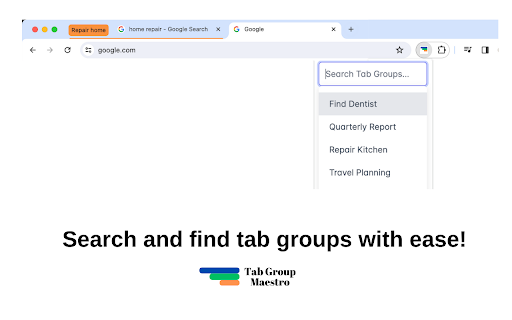
Quickly search and find your Chrome tab groups. Quickly search and find your native Chrome tab groups with fast autocomplete. No more wasting time trying to find that window, continue where you left off! Features: - Cmd+Shift+2: Launch extension. This can be changed in Chrome Extensions settings. - Search your tab groups by name with fast autocomplete. Press enter to jump to the window of that tab group. - Cmd+Shift+1: Switch to edit mode to add current tab to a new or existing tab group. Type group name and press enter. Press Cmd+Shift+1 again to switch back to search mode. Note: This only works for open tab groups. Chrome doesn't expose closed tab groups to extensions. See the blog post for how to use it: https://medium.com/@semih.sezer/how-i-organize-my-chrome-tabs-in-2024-for-focus-and-productivity-d81802b0f14e More about Chrome's native Tab Groups: https://blog.google/products/chrome/manage-tabs-with-google-chrome/ Release History: 1.2.0: 14th August 2024 - Show tab groups in reverse accessed order, to keep the latest one at the top. - Do not show current tab group in the dropdown - Move focus to the selected tab group, instead of just focusing on the window

Custom Cursor for Chrome™
Fun custom cursors for Chrome™. Use a large collection of free cursors or upload your own. Customize your Chrome browser experience with our free collection of mouse cursors at Custom Cursor. At Custom Cursor we have created a giant collection of hand-drawn cute cursors. We have over 10,000 different packs available on our website for you to enjoy. With your help, our collection has grown so big that we divided it into categories that should fit every taste, like: - Minecraft; - Cute Cursors; - Anime mouse packs; - Memes; - Spy x Family pointer packs with Anya Forger; - Among Us; - Two types of Minimal pointers for work and studies; - Games; - Roblox; - And many, many other funny elements for you to play with. Some of our mouse pointer packs are bundled with the Custom Cursor browser extension, but most of them await you on our website. Keep an eye out for new and trending additions. To simplify navigation, we've organised our collection into Editor's Picks collections, each with a unique theme. Examples include: - Green arrows for autumn; - Christmas themed arrows; - Holidays editor's picks; - Halloween; - Custom Cursor collaboration with Daieny Schuttz; - Pink pointers editor picks; - Summer mouse decorations; - Rainbow colors; and much, much more on our website. If you can't find what you're looking for, use the "UPLOAD CURSOR" button to add your own. Manage your personal arrow collection on the Upload page and adjust cursor size in the "Manage" section. Newly added collections will be uploaded to the Custom Cursor for Chrome extension and can be found at the bottom of the collection list. Your added packs will appear in “My Collection”. Create your own collection of mouse cursors from any images with Custom Cursor Creator tool on our website. It will allow you to create new packs from almost any arrow or pointer shaped image on the internet. ------------------- ! After installing the extension, refresh previously opened tabs to use it on those pages. Note that the extension may not work on Chrome Web Store pages or the home page. Open another website (e.g., google.com) to test the extension. If you like the extension you can also check our Custom Cursor for Windows app. Preview arrow appearance by clicking on it in the extension window and moving the mouse to the empty space within the window.

Auto Close Tab Groups
Have you had enough of those pesky tab groups automatically being created and interrupting your workflow and peace of being? Look no further, this extension will auto-close them faster than you can start being annoyed. Looking out for you.

Сhrome grouping tabs
Boost productivity with Chrome Grouping Tabs! Easily organize, tabs in chrome manage. Ideal for clutter-free & multitasking! 🚀 Introducing the chrome grouping Tabs extension, a revolutionary tool designed to transform your browsing experience by simplifying how to group tabs in Chrome. This powerful extension is here to streamline your digital life, making tabs grouping in chrome more intuitive and efficient than ever before. Whether you're a busy professional, a student, or just someone with a knack for multitasking, chrome grouping tabs is the solution you've been looking for. 1. Click on the extension icon in your browser. 2. Select the browser sections you wish to cluster. 3. Assign a name to your sets for easy identification. 4. Voila! Your browser sections are now neatly organized. 🔺 One of the main features of this extension is its ability to effortlessly handle chrome grouping tabs. With just a few clicks, you can organize your browser by topics, projects, or however you see fit. This feature not only saves time but also significantly reduces clutter, allowing you to focus on what matters most. ⭐ For those wondering about tabs grouped in Chrome, our extension offers a variety of customization options: - Color coding for page bundles. - Custom naming conventions. - Easy drag-and-drop interface to manage your browser sections. Another standout feature is the ability to chrome save tab groups. This means that even after you close your browser, your window clusters will be saved and ready for when you return. This is a game-changer for those who work with extensive research or need to pick up where they left off without missing a beat. ⚡ To make the most out of chrome save tab groups, follow these tips: 1️⃣ Use descriptive names for your page bundles to easily remember the purpose of each. 2️⃣ Regularly update your window cluster to remove browser sections that are no longer needed. 3️⃣ Take advantage of the color-coding feature to visually distinguish between different browser sections. But that's not all. The Chrome grouping tabs extension is packed with additional functionalities to enhance your productivity: 📌 One-click tab addition to existing window cluster. 📌 Quick ungrouping options for when tasks are completed. 📌 Seamless integration with Chrome's existing tab management features. 📝Users love the Chrome grouped Tabs extension for its simplicity and effectiveness. Here are just a few ways it can improve your browsing experience: • Keep your browser organized and tidy. • Saves valuable time by reducing the need to search through multiple browser sections. • Enhances focus by minimizing distractions. • Ensures important internet batches are easily accessible and not accidentally closed. 💎 We understand the importance of keeping your workflow smooth and uninterrupted. That's why Chrome browser sections has been meticulously designed to integrate seamlessly into your daily routine, ensuring that your internet batches are always just a click away from being perfectly organized. 💪 Chrome grouping tabs offers an unparalleled blend of functionality and simplicity, making it the ultimate tool for anyone looking to take control of their online workspace. Say goodbye to endless browser slots and hello to a more organized productivity. Try chrome grouped bandles today and revolutionize the way you navigate the web. ❓ FAQs: 📌 Can I share my tab groups with others? 💡 Yes, with chrome tab groups, sharing your organized tab groups with colleagues, friends, or family is straightforward and efficient. ➤ Create or select the tab group you wish to share. ➤ Right-click on the sections title and choose the "Share Group" option. ➤ You'll be provided with a link that you can send to others, allowing them to access your tab group. 📌 How many tabs can I include in a single group? 💡 Chrome tabs group supports up to 100 tabs per group, accommodating extensive information needs from deep research to large projects, thereby enhancing both organization and productivity. 📌 Is there a limit to how many groups I can create? 💡 Chrome tabs groups allow for unlimited sections creation, offering a flexible tool tailored to organize your browsing experience efficiently, regardless of your workflow's complexity. 🚀Stay Connected: Follow us for updates and tips on maximizing your Chrome page collections usage, and don't hesitate to share feedback. Download our extension to streamline your browsing, making it more organized, productive, and stress-free. 🌿 Troubleshooting: For any inquiries or suggestions, feel free to contact our development team olgamashtaler220@gmail.com

Save Tabs Chrome
Organize browser with Save Tabs chrome extension. Restore chrome session in one click. Save tab groups, manage and export tabs The Save Tabs Chrome app will help you never lose your research again. This powerful tab extension protects your work, organizes research sessions, and lets you switch between different contexts instantly. Your pages are stored locally, organized into named groups, and ready to restore anytime. 🔷 Why You Need This Extension 💡 Ever lost hours of research to a browser session crash? Need to reopen chrome tabs after an unexpected restart? Our tool solves these problems and more. Whether you're managing multiple projects, conducting deep research, or simply need better organization, this tool transforms how you work with browser. 🔷 Core Features 1️⃣ Instant Saving. Click once and your entire browser session is captured – titles, URLs, and exact order preserved in milliseconds. The save tabs chrome extension works faster than bookmarking and keeps everything organized. 2️⃣ Smart Organization. Create unlimited collections for different contexts. Group tabs chrome by project, topic, or purpose. Keep "Monday Research," "Client Work," and "Weekend Reading" separate and accessible. 3️⃣ Quick Restore. Our chrome session saver lets you restore browsing session with a single click. Open entire groups or cherry-pick individual pages. Everything reopens in the original order, so you pick up exactly where you stopped. 4️⃣ Powerful Search. Search tabs across all collections instantly. Find anything by title, URL, or group name, even if you forgot where you stored it. 5️⃣ Selective Control. Don't want to save all tabs chrome? Select specific pages and capture only what matters. You control what stored and what doesn't. 6️⃣ Multi-Window Support. Working across multiple browser windows? No problem. This Save Tabs Chrome tool opens across all windows and keeps your multi-window workflows organized effortlessly. 7️⃣ Export & Backup. Export any collection to CSV format. Save tab groups to cloud storage, email to colleagues, or transfer between computers. Your data stays portable and shareable. 8️⃣ Offline Ready. Full functionality without internet. The extension Save tabs chrome locally uses storage API. Lightweight design won't slow your browser down. 🔷 How It Works ✓ Saving Process: Click the toolbar icon. Done – everything is stored and searchable ✓ Restoring Process: Browse your collections. Click to restore chrome session instantly Continue from exactly where you left off 🔷 Real-World Solutions ▶️ Research Management. Collecting information over days or weeks? Save tabs in chrome as you find them. Add more tomorrow. Your research survives crashes, restarts, and accidental closures. ▶️ Context Switching Made Easy. Stop manually reopening everything when switching between work and personal projects. The save tabs chrome app lets you transition instantly. Each workspace stays preserved and ready. ▶️ Crash Protection Computer froze? Unexpected update? Battery died during presentation? Your collections remain safe. Tab save functionality ensures nothing is ever truly lost. ▶️ Shared Computer Solution. Family needs the computer? Save and close tabs - Chrome makes it easy with our extension, let others use the browser, then restore everything when you return. Your workspace stays private and recoverable. ▶️ Reading List Control. Stop keeping 20+ "read later" pages open forever. Keep articles in collections, read when ready, keep your browser running smoothly. ▶️ Long-Term Projects. Managing multiple topics simultaneously? This Chrome save tabs tool keeps everything organized by purpose. "Client Meeting Prep," "Q4 Report Research," "Technical Documentation" – each context preserved separately. 🔷 Privacy Commitment Your data stays on your device. We use local storage only. No external servers, no tracking, no analytics, no data selling. When you save browser session data, it stays yours completely. 🔷 How to save tabs in chrome Getting started is simple. Install the extension, click the icon, and your first collection is created. Name it something memorable. From there, you can create unlimited collections for different purposes. 🔷 Coming Soon ⭐ Auto-Backup. Scheduled automatic exports protect against data loss. Set it once, forget about it forever. ⭐ Cross-Device Sync. Access collections from any computer. Seamless synchronization across all devices makes the save tabs chrome app even more powerful. ⭐ Share via Link. Generate shareable links for collections. Send resources to teammates without file attachments. Perfect for collaborative research. 🔷 Why Not Regular Bookmarks? Bookmarks pile up endlessly without context. They lose their original purpose. This tool organizes by intent and preserves your complete working environment. You restore entire workspaces, not just individual pages. 🔷 Get Started Today Your browser deserves better management. Download the chrome tab saver extension today and transform how you handle work forever.
