
mcegnmnbknompceoafjbhnhmmpcbpfmi

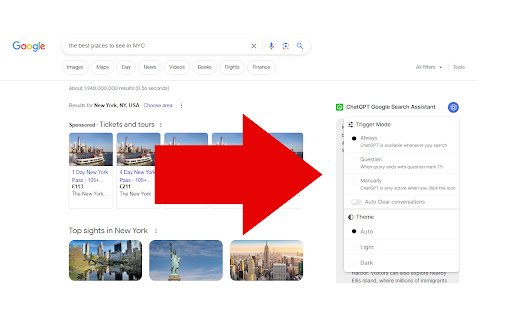
ChatGPT answers next to Google search results. Works with other search engines as well. ChatGPT Google Search Assistant is a handy addition to your regular web searches: it displays ChatGPT answers next to your Google search results. Enter your question in the Google search bar, and ChatGPT will promptly provide you with answers and suggestions displayed next to your Google search results. It's a big time saver: two in one without a need to change a website to chat.openai.com and repeat your question there! This free and convenient tool offers quick access to Chat GPT's advanced AI capabilities directly from your search engine. The extension also works with Bing, DuckDuckGo and Yahoo!

AskGo:AI Chat Assistant: ChatGPT, DeepSeek, Claude, Gemini, Grok, etc
AskGo Sidebar: Integrates multiple AI models like ChatGPT, DeepSeek, Gemini, Claude, and Grok into a single AI sidebar for chatting, searching, reading, writing, programming, translation, and image generation. 💡 AskGo offers you a one-stop solution! AskGo is committed to continuously integrating and optimizing top-tier models and tools, providing you with comprehensive intelligent support for daily Q&A, office efficiency, learning assistance, academic research, and more. 🔥 Why Choose AskGo? ✅ Continuously updated cutting-edge AI think tank—GPT-5.4, DeepSeek, Gemini 3.1 Pro, Claude 4.6, Grok 4.1, and more—meeting all your needs. ✅ Instantly summon the sidebar on any webpage without switching tabs, effortlessly enabling multitasking. ✅ Supports document/image chat functionality, compatible with dozens of formats like PDF, Word, XLSX, JPG, helping you quickly extract key insights and deeply understand content. ✅ Supports web search, allowing you to access the latest information in real time. 💻 How to Use: 🔸 Click the "Add to Chrome" button and pin it to your toolbar. 🔸 Log in to your account. 🔸 Start chatting with AskGo! ❓ Frequently Asked Questions: 📌 Do I need OpenAI/Google/Anthropic accounts? - No, AskGo provides direct access to all major models. 📌 Is it free to use? - Yes, you can use the free version with daily limits. For higher quotas, a membership plan is available.

ChatGPT for Google by cloudHQ
This extension gives you ChatGPT query responses alongside Google search engine results. This extension is easy to use and enhances your Google search experience. Features: ✅ OpenAI Responses alongside your Google search results ✅ A summary of search results ✅ Supplement responses with data after 2021 via search results ✅ OpenAI API and multiple version support ✅ Toggle on/off as desired ✅ Copy to clipboard ~~~How to use it~~~ 1. Get an OpenAI account here if you don't already have one: https://chat.openai.com/chat and create an account 2. Install this extension 3. Open Chrome and search for anything in Google Search 4. AI-generated responses alongside conventional search engine results will be displayed on the right side of your window 5. When in ChatGPT, simply type in your prompt, and the results will be ChatGPT's response, and will then provide you with a Google Search summary on the subject (very helpful for up to date information) ~~~FAQ~~~ 1. What is ChatGPT? ChatGPT is a computer program created by OpenAI that can generate human-like text. It's like a super-advanced version of autocorrect: it predicts and generates what it thinks should come next in a conversation or a piece of writing. This is useful for many things, such as writing emails, creating content, answering questions, and even tutoring in different subjects. It's important to note that it doesn't know any personal data unless you tell it during the conversation, and it doesn't know specifics about the documents it learned from. 2. What does this extension do? This browser extension is developed by cloudHQ LLC. The extension enhances search engine results with the power of artificial intelligence from OpenAI. The extension operates by displaying AI-generated responses alongside conventional Google search engine results, offering users an enhanced search result experience. 3. Is this extension free to use? Yes, the extension is free to use. 4. Is this extension integrated with other cloudHQ products? Yes. This extension is fully integrated with other cloudHQ products such as Save Emails to PDF by cloudHQ, Export Emails to Sheets by cloudHQ, and more. 5. Do I need an OpenAI (chat.openai.com) account? Yes, you need to have an OpenAI account to use this extension. Go to https://chat.openai.com/chat and create an account. If you choose to use an API, you need to have a developer account. You can create it here: https://platform.openai.com/ We hope you enjoy your new search result experience and find it helpful for your overall knowledge about anything you wish to know about. cloudHQ. Helping your productivity, 1 click at a time. cloudHQ website: https://www.cloudhq.net/ App website: https://www.chatgpt-for-google-search.com/ Pricing: https://www.chatgpt-for-google-search.com/pricing Support page: https://support.cloudhq.net/category/browser-extensions/chatgpt-for-google/ FAQ page: https://support.cloudhq.net/ Blog: https://blog.cloudhq.net

ChatGPT AI assistant for Google Reviews and Questions
Use ChatGPT to automate answering Google Reviews, change tones, work with all languages, and more, all for free. Use ChatGPT AI to reply to Google reviews. Works on Google Map and Google Search. You can change tones, reply in all languages, and more, all for free and powered by MailMagic AI. Reply to Google reviews with ChatGPT AI (privacy-friendly). FREE to use forever and No Ads. 🆓 ✔️ Highest quality responses that outcompete all other tools in the market. ✔️ Select interest level for your response. ✔️ All languages are supported. ✔️ Most stable free AI tool on the market for Google Review. (Do not fully rely on ChatGPT) ✔️ Machine learning on your frequent ask questions. Popular ways our users are using MailMagic's AI Assistant For Google Reviews: ✍️ Reply to Google reviews: Effortlessly craft the perfect message. Convince bad reviewers to remove their reviews. 🔍 Grammar Fixes: Eliminate typos and grammatical errors with ease. 🌐 Translation: Translate an existing review to any language. 🔄 Rephrasing: Make your text clearer and more impactful. 📝 Summarization: Turn lengthy text into concise summaries in seconds. 💼 Tone Adjustment: Adapt the tones of your message in a click (Polite, Professional, Mean, etc).

YouChat AI for Google
A browser extension to display YouChat response - like ChatGPT, but with knowledge of recent events and source citation - alongside Google and other search engines results, supports Chrome/Edge/Firefox Troubleshooting: Please check out https://github.com/fedebotu/youchat-google-extension for troubleshooting. Feel free to submit issues there! Changelog: 1.0.1 - Fix error due to API change - Better documentation and troubleshooting solutions 1.0.0 - Dynamics links: numbering of links is done automatically - Reference listing: for each reference in the main response, there is now the corresponding source link! - Update to latest YouChat API Source code: https://github.com/fedebotu/youchat-google-extension Also check out: https://github.com/wong2/chat-gpt-google-extension
