
fadggkehmhkhahfcdeoghpepnpnhilhg
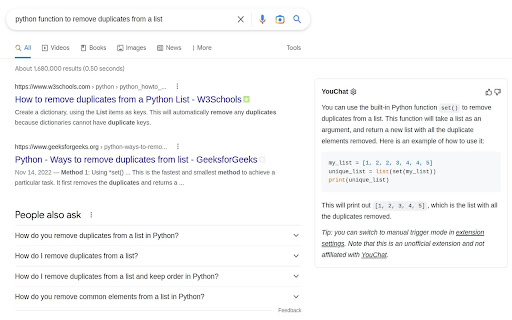

A browser extension to display YouChat response - like ChatGPT, but with knowledge of recent events and source citation - alongside Google and other search engines results, supports Chrome/Edge/Firefox Troubleshooting: Please check out https://github.com/fedebotu/youchat-google-extension for troubleshooting. Feel free to submit issues there! Changelog: 1.0.1 - Fix error due to API change - Better documentation and troubleshooting solutions 1.0.0 - Dynamics links: numbering of links is done automatically - Reference listing: for each reference in the main response, there is now the corresponding source link! - Update to latest YouChat API Source code: https://github.com/fedebotu/youchat-google-extension Also check out: https://github.com/wong2/chat-gpt-google-extension

Javy: GPT-4 powered assistant
GPT-4 powered tool for quick access to the answer to any question Javy brings the power of OpenAI's language model to your browser. With this extension, you can have a virtual assistant at your fingertips, ready to answer questions, provide information, and complete tasks. Simply type in your query, and GPT-4 will generate a response, offering you relevant and accurate information in a matter of seconds. Whether you need help with homework, want to find the latest news, or just need a quick translation, GPT-4 has you covered. The extension utilizes cutting-edge AI technology to understand natural language and deliver high-quality results. Download the GPT-4 powered assistant today and experience the future of search.

AI Anywhere for ChatGPT
Quick access to popular AI engines like ChatGPT, Gemini, Grok, GitHub Copilot and others. 💬 AI Anywhere gives you quick access to the most popular AI tools like ChatGPT, GitHub Copilot, Gemini, Mistral, Perplexity and others. Now also with Grok and T3 chat support! ⭐ Main features: - press "Alt + I" to open ChatGPT in a new window - press "Alt + Up/Down" to switch between providers (ChatGPT, Claude, Gemini, Grok...) - customizable context menu options - Summarize / Explain / Translate {selected text} - click toolbar icon for instant access - press arrow Up / Down inside ChatGPT to access previous queries

ChatGPT, Bing & Bard For Chrome: Kursor
Discover an unparalleled web browsing experience with Kursor, the comprehensive solution for all your online communication needs. Summarize, translate, rephrase, correct grammar, and create content with just one click. Experience the future of web surfing with Kursor, powered by GPT-AI ! Kursor utilizes the power of OpenAI's GPT- AI to revolutionize your browsing, ensuring seamless integration and the latest technology. 💸 100% Free and Unlimited Use Kursor is entirely free to use, with no restrictions on the number of searches you can perform. 🖱️ One-Click Functionality Effortlessly select any text on the web and access Kursor's powerful features like summarizing, translating, rephrasing, and grammar correction with just one click. 🔎 ChatGPT for LinkedIn: Gain valuable insights into job opportunities by seamlessly integrating LinkedIn's job data, helping you stay informed and connected in the professional world. 🌐 50+ Language Translations Translate text into over 50 languages, breaking down language barriers and accessing content from around the globe. 🎭 10+ Tonalities for Rephrasing Rephrase text in more than 10 different tonalities, giving your content a unique and customized feel. 💬 AI-Driven Chat Ask questions and resolve queries instantly with our AI chat window powered by ChatGPT. 📝 Versatile Composition Functionality Compose emails, messages, paragraphs, tweets, articles, or blog posts with specified objectives, length, and tone. 🔥 Easy Access to Third Window Open the third window effortlessly using cmd + shift (for Mac) / ctrl + shift (for Windows). ⚡ Swift Response Time Enjoy smooth and timely responses with our seamless integration of GPT technology. 📧 Contact Us for Support Reach out to our team anytime at contact@kursor.in for any assistance or inquiries. Install Kursor now and elevate your web browsing experience with the power of ChatGPT!

GPTx
ChatGPT-powered Chrome Extension, Elevates Browsing Experience and Productivity. Introducing GPTX - the powerful Chrome Extension - that leverages ChatGPT to elevate your browsing experience and make daily tasks effortless. GPT-generated results can improve search accuracy, efficiency, user experience, creativity, accessibility, trust and credibility, and convenience. The use of GPT-generated results alongside traditional Google results can provide several benefits. Showing both types of results can increase the accuracy and relevance of the information presented to the user, as the GPT-generated results can provide additional context and information that may not be present in the traditional results. This can also improve the efficiency of the search, allowing users to find the information they need faster. Including GPT-generated results can also enhance the user experience by adding diversity and novelty to the search results. This can make the search process more engaging and enjoyable for the user. The GPT-generated results can also provide users with new ideas and perspectives, fostering creativity and inspiration. Additionally, the inclusion of GPT-generated results can increase the accessibility of the search experience, as they can provide information and context that may not be easily accessible through traditional results. This can make the search experience more inclusive for users with different needs and abilities. Showing GPT-generated results alongside traditional results can also increase trust and credibility in the information presented, as it provides users with a more comprehensive picture of the information they are seeking. Finally, the GPT-generated results can provide users with quick and easy access to additional information, increasing the convenience of the search experience.
