
mbmmpilinpiapfcmknmjgikgoeicadka
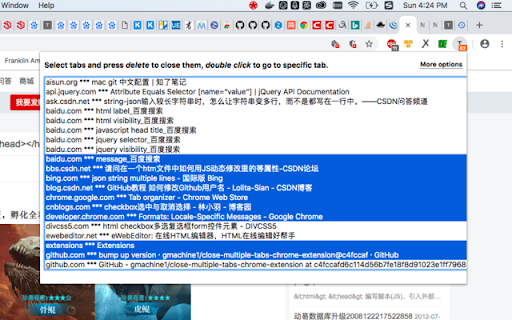
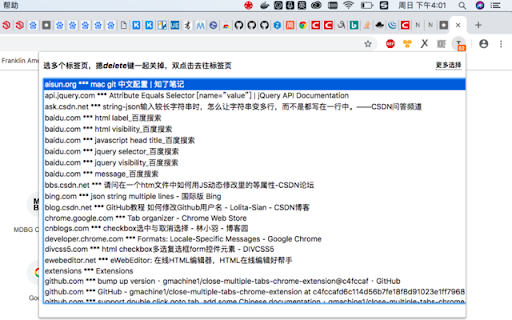
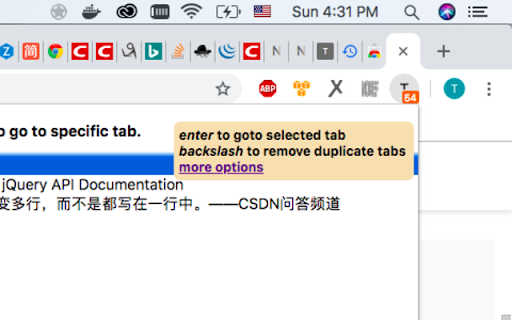

Select multiple tabs and close them together. Group tabs. Remove duplicate tabs. Goto specific tab. Too many tabs and tired of having to close them one by one to find the one you want? This extension lets you select multiple tabs and close them all at once. Tabs auto grouped/ordered.

Gemini Bulk Delete
Multi-select and batch-delete Gemini chats. Tired of deleting Gemini chats one by one? Bulk Delete for Gemini adds a bulk-deletion toolbox right inside Google Gemini so you can clean up in seconds. • Multi-select checkboxes – pick the exact chats you want gone • Select All + auto-scroll – capture your entire chat history in one shot • One-click “Delete Selected” – confirm once, done • Keyboard shortcuts – Shift + A (select/deselect all), Delete (remove) • Feels native – UI matches Gemini’s light & dark modes 1.Install the extension 2.Open gemini.google.com 3.Toggle Multi-select mode 4.Choose chats → click Delete Selected Privacy No chat content is read, stored or sent anywhere. We request only the permissions needed to add the delete buttons and (if you upgrade) validate your license. Bulk Delete for Gemini is an independent project and is not affiliated with Google LLC. Stop wasting time on manual deletions—install now and take control of your chat history.

Close Duplicate Tabs
Find and close duplicate tabs fast, with optional auto-close and smart tab grouping. MAJOR UPDATE: Now with automatic tab grouping & automatic duplicate tab closing! Check options to enable settings! Too many duplicate tabs can quietly slow down your browsing and make it harder to stay organized. Close Duplicate Tabs helps you spot duplicate tabs quickly and clean them up in one click. Use the popup to review duplicates before closing them, or turn on automatic duplicate cleanup for a more hands-off workflow. The extension also supports a keyboard shortcut, tab-count hover summaries, optional automatic tab grouping, URL matching controls for # fragments and ? query strings, and an exclusion list for domains you do not want to deduplicate. - One-click duplicate cleanup - Optional auto-close for new duplicates - Popup review with per-URL manual close - Keyboard shortcut for closing all duplicates - Hover summary with tab count and duplicate count - Optional smart tab grouping by domain - Matching controls for # fragments and ? query strings - Exclusion list for domains to ignore - No data collection v3.2 * Using latest Chrome APIs * Auto Group Tabs based on their domain. * Auto close duplicate tabs so you save on memory. v2.5 * Top domains listed on hovering over the extension icon. v2.3 * Now see titles for duplicate tabs, not long URLs * Special case handling for websites that "replace" tabs behind the scenes. Short version: more accurate duplicate tracking. v2.0 * Options page, with list of upcoming capabilties * NEW: Reorder (sort) pages by URL v1.8: * Lists open tab count, and duplicate tab count * List duplicate URLs, and their counts * Groundwork for options v1.6: * Now identifies & closes duplicates across windows * More accessible colors for duplicate count badge

Tab Groups Extension
Automatically group tabs, save tabs/groups, and provide shortcuts for tabs/groups. 📢 February 2026: Sorry, Chrome 145 has a bug that causes problems with tab group operations (collapse and modify title). This bug will be fixed in Chrome 146. This is a Chrome bug, not an extension bug. All browser extensions with similar functionality are affected. In addition to general tab management functions, this extension specifically enhances the browser built-in "Tab Groups" feature. Features: ● Automatically create group for tabs through custom matching rules. ● Save and restore current tabs or groups (snapshots). ● Opened tabs/groups management: activate, close, expand/collapse, move to other window, modify group name and color, new tab in group. ● Saved tabs/groups management: delete, edit, add, expand/collapse, merge same name groups, data import/export. ● Grouping rules management: add, edit, delete, enable/disable, import/export. ● Keyboard shortcuts: group/ungroup, activate, move, close, pin, duplicate, expand/collapse, auto group by domain.

Vertical SidePanel Tab Group Manager
Manage tabs and groups in side panel. Support multi-level group, tab search, tab rename, recent used/closed tab, saving bookmarks... This Extension helps you manage your tabs and groups more structurally in the vertical sidebar. Features are as follows: 1. Display tabs and groups vertically in the sidebar, supporting batch selection and drag order. 2. Support cascading management between groups, allowing you to drag/drop/right-click to set up subgroups. 3. Support fuzzy searching for tab titles and URLs. 4. Support lists of recently accessed tabs and recently closed tabs. 5. Right-click on the tab menu: 1. Quick grouping: Create new groups, remove from groups, and move to other groups in the current window. 2. Rename: Support changing the name of the tab. 3. Move window: Support moving the tab to a new window or existing other windows, with target window previews. 4. Other common tab functions: Refresh, copy, close, create new, copy link, save bookmark. 6. Right-click on the group menu: 1. Change group name and color. 2. Subgroup management: Quickly set parent group, leave current parent group, remove subgroup, retain group (allowing groups without tabs to be retained). 3. Group move window: New window or existing other window, with target window previews. 4. Save bookmark: Save all subgroups and tabs in the group to a single bookmark folder. 5. Other common group functions: Close group, ungroup. 7. Settings: 1. Choose between "Light" and "Dark" themes manually. 2. Choose between "Normal" and "Slightly Smaller" font sizes manually. 3. Choose between "Custom" and "System Automatic" group colors manually. Changelog: Version 1.1.6: 1. Fix: Improve some user experience. Version 1.1.5: 1. Feature: Added customization for predefined group colors 2. Feature: Added quick actions to locate current tab and expand/collapse all groups 3. Feature: Added quick creation of new tabs within groups Version 1.1.4: 1. Fix: Resolved various experience issues. Version 1.1.3: 1. Feature: Group menu supports nested sub-groups for indentation display. Version 1.1.2: 1. Fix: Improve some user experience. Version 1.1.1: 1. Feature: Automatically open the right-click group menu after creating a new group/subgroup.. Version 1.1.0: 1. Feature: Added cascading management for groups. Version 1.0.7: 1. Fix: Resolved various experience issues. Version 1.0.6: 1. Feature: Added right-click option to expand/collapse all groups. 2. Fix: Resolved various experience issues. Version 1.0.5: 1. Feature: Saving bookmarks supports selecting the target folder. Version 1.0.4: 1. Fix: Resolved various experience issues. Version 1.0.3: 1. Fix: Optimized the drag-and-drop experience for moving tabs and groups. Version 1.0.2: 1. Feature: Supports multi-select of tabs; allows batch operations for grouping, moving windows, and closing tabs. 2. Fix: Resolved various experience issues.
