
mblpddadpjkiohoclgkhdpoiggjhkdoa

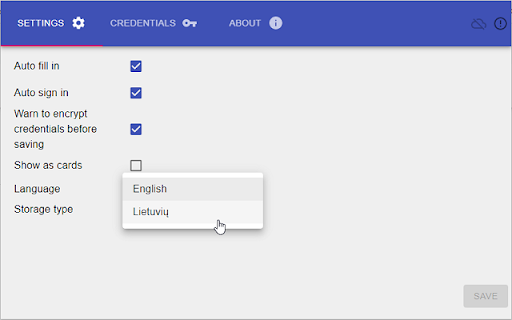
Saves default logins and fills in fields on ebank page. Initially I created it for my personal needs, and later on decided to extend it as a proof of concept for more like portfolio reasons. However it works just fine. This extension simply saves bank login credential together with other Chrome settings. Credentials are saved ONLY in your browser, they are not send anywhere else. Before using extension, please evaluate potential risks. No more repetitive manual data entering. Saved credentials can be automatically filled in after bank page loads. Or it can be selected which credentials needs be filled in from extension window if there are multiple single bank logins. Currently this extension works with SEB bank, Swedbank and Luminor in Lithuania, Latvia, Estonia.

Credit Card Offer Claimer
Automatically accepts promotional offers from Chase and American Express automatically. Some credit card companies offer promotions that can be tedious to claim manually. This extension automates the process whenever you check your credit card's available offers. This extension currently supports: - Chase (https://secure08ea.chase.com/web/auth/dashboard/) - American Express (https://global.americanexpress.com/offers/eligible) - More soon?

Fintable - Check All Your Bank Balances in Chrome
View all your bank balances with one-click in Chrome - for users of Fintable.io View all your bank accounts and credit card balances at a glance with the Fintable Dashboard. Simply sign up for Fintable, link your accounts, and instantly sync your financial data to Chrome or Google Sheets. Fintable supports over 15,000 banks across 30+ countries and has been trusted by thousands of happy customers since 2021. Enjoy real-time updates from up to 10 banks — all accessible through a simple, one-click dashboard.

Paypal Remove Extension
Revoke permissions for all Automatic Payment apps in Paypal.

SubSaver
Unlock Trial Subscriptions with Ease SubSaver is a convenient Chrome and Firefox plugin/extension designed to simplify the process of activating trial subscriptions. Say goodbye to the hassle of providing your personal credit card information for free trials. With SubSaver, you can effortlessly access trial subscriptions without compromising your privacy or financial security. How does it work? SubSaver generates virtual credit card details that can be used to activate trial subscriptions. These virtual cards are specifically tailored for trial purposes and are not linked to your actual credit card or personal information. Installing the plugin/extension allows you to generate a unique credit card number, expiration date, and CVV code with a single click, enabling you to complete the trial subscription process quickly and securely. Seamless Integration: SubSaver seamlessly integrates into your Chrome or Firefox browser, providing a user-friendly interface for accessing trial subscriptions. Privacy Protection: By using virtual credit card information, SubSaver safeguards your personal credit card details, ensuring privacy and security. Time-Saving Convenience: Activate trial subscriptions effortlessly, without the need for manual credit card entry or providing sensitive information. Customized Trial Cards: SubSaver generates unique credit card details for each trial, increasing the chances of successful subscription activation. Legal and Ethical Compliance: SubSaver emphasizes adherence to applicable laws and regulations, promoting ethical usage of trial subscriptions. With SubSaver, enjoy the freedom to explore trial subscriptions without the hassle or concern of sharing your personal credit card information. Unlock the full potential of trial offers today! Disclaimer: The names used in the virtual credit card details generated by SubSaver are fictional and not associated with real individuals or the rightful owners of the virtual credit cards. They are solely provided for the purpose of trial activation.
