
mbbkknmhhcfmleopndnflnpeflgjfbjd

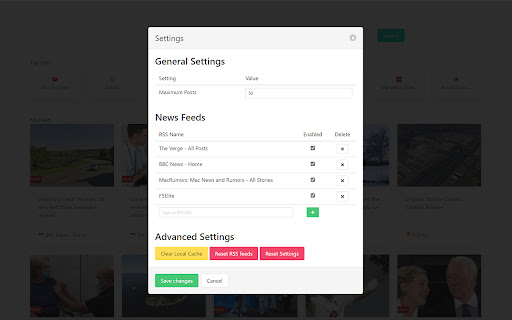
A new tab extension for chrome that allows you to view the latest news Want to view the news while browsing the web, or love the Microsoft News Tab but hate the adverts or weird articles it recommends? Then The News Tab extension is for you! A simple new tab that provides you with the news you want to see! The News Tab extension was inspired by the new tab page for Microsoft Edge and their extension, Microsoft News Page. However this extension allows you to choose what RSS feeds are shown and doesn't display adverts! This projects is in constant development and updates will keep coming. If there is a feature you would like to see don't hesitate to get in contact.

News summary
AI generated news summaries. Removes biases and opinions from news articles. Browse news without views. Transform the way you consume news with our AI News Summarizer Chrome Plugin. Designed for the modern, fast-paced world, this innovative tool uses cutting-edge AI technology to provide quick, unbiased summaries of news articles. Say goodbye to sifting through opinionated content and embrace a streamlined approach to staying informed. AI-Driven Summaries: Get to the heart of the story fast with AI-generated, factual briefs. Bias-Free News: Enjoy news as it should be - free from personal opinions and slants. Effortless Browsing: Navigate through news efficiently, saving time while remaining well-informed. User-Friendly: Easy to install and use, this plugin is a must-have for anyone seeking a neutral, fact-focused news experience. Whether you're a professional on the go, a student, or just someone keen on staying updated without the clutter of biases, our AI News Summarizer is your perfect news companion. Install now and start experiencing news in a smarter, more efficient way!

News Hub kiosk
Google News, Google Play Newsstand and BuzzFeed. News aggregator for every country. Weather forecast for Chrome. MSN News. ★★★★★ Stay updated with the latest News 📰 with this extension. Google News give you a summary updated to the minute of the most recent news in your country 🌍 Buzzfeed on the other side will give you the most trending 🔥 news and hot topics for the day. As extra you will also have access to MSN News from Microsoft, available in over 10 languages 😵 This is the very best extension for your Browser 💻 FEATURES ★ Notifications 📣 let you stay updated with the latest news. ★ Google News provides the latest news for all over the world and available to many countries 🌍 ★ Buzzfeed is the Internet trending news source 🚨 ★ MSN is the very best Microsoft News service updated with local TV news from each country 📺 ✔ Small window well positioned for texting. ✔ Auto-Start when Browser starts. ✔ Configurations in a Options 🔧 section. ✔ Quickly see your profile and news feed. ✔ Very Low CPU/RAM/Bandwidth consumption 📌 ANDROID APP 📱 Also available as a Android App for Smarthphone/Tablet devices. Get it on Google Play: https://jitt.wwevents.fun/project/hub-for-google-news-buzzfeed/#download 💎 Building Apps and Extensions for Google Chrome and Android 🔥📣 📔 Available on the product page: https://jitt.wwevents.fun/project/hub-for-google-news-buzzfeed/#changelog Google News™, Buzzfeed™ and™ MSN are a trademark of Google Inc., MSN Inc. and Buzzfeed Inc., registered in the U.S. and other countries. This is an independent project developed by WWevents and has no relationship to Google News™, Google Inc., MSN™, MSN Inc., Buzzfedd™ or Buzzfeed Inc. By installing this product you agree to our privacy policy & terms of service: https://jitt.wwevents.fun/privacy-policy/ You may consult the list of permissions and the reason why they are required on the product page: https://jitt.wwevents.fun/project/hub-for-google-news-buzzfeed/#permissions “notifications” – Used to send desktop notification. For example when a new message arrive or App is updated. “contextMenus” – Allow to add more settings when right click in the App icon in the browser toolbar and browser context menu. “storage” – Used to save settings on your local computer. “scripting” – Used to be able to insert JS or CSS on the required host/domains. “system.display” – Used to detect the display size and position the Extension window. “unlimitedStorage” – Storage is limited to 5MB of data that may not be enough to store all configs. “host_permissions” – Permission to access to some hosts/domains that we must modify in order to provide the desired functionality detailed in the functionality. It also allows that you can share content (links or text) from other pages directly to inside the App and send it as a SMS/Android message to a friend for example. Also used to allow intercommunication with other WWEvents Apps (i.e. Emojis). “activeTab” – Permission to access the window that the extension is running and is show to the user. “all_urls” – Permission required for users be able to take screenshots of the current window – captureVisibleTab. “declarativeNetRequestWithHostAccess” - Used to get the mobile version of the websites. Only impact the Extension Window. “declarativeNetRequestFeedback” - Used to get the mobile version of the website by changing the User-Agent. This information is also available inside the App: Options -> About

FeedPal: Turn Your Browser Into an RSS Reader
View recent content from your bookmarked blogs and get notified when they update. If you've ever bookmarked articles from a blog, you'll likely want to stay updated with its new posts. FeedPal works out of the box with zero configuration, effortlessly turning bookmarks into subscriptions—ensuring you never miss valuable content that matters to you. Since high-quality content often updates less frequently, FeedPal intelligently adjusts notifications based on update frequency, minimizing distractions and only alerting you when it truly matters. • How often are RSS feeds fetched? FeedPal automatically adjusts the fetching frequency based on the characteristics of the RSS feed (such as update frequency, etc.), ranging from 1 hour to 45 days. • How to add a specific RSS feed? Create a new folder in your bookmarks with a name containing [sources] (note that the square brackets are included), then add the RSS feed (URL of the XML) to this folder. FeedPal will automatically fetch the RSS feeds within this folder. • What should I do if the website indicates no RSS feed was found? FeedPal will attempt to parse the RSS feed from the website's homepage. If it fails to parse, you can also try manually adding it by following the steps above. • Is my data safe? FeedPal uses the browser's local storage feature, so all data is saved on your computer and will not be uploaded to any server. This includes the fetching process, which is also performed solely on your computer. FeedPal is in its early iteration phase. We’ll continue to enhance features and optimize the user experience. Any questions or suggestions are welcome—feel free to submit feedback.

The Best News Extension
This extension helps you simply read the world news. Get news and updates all over the world right at your homepage! By clicking “Add To Chrome”, you accept and agree to install our News Extension, set the Chrome™ New Tab - newsbuzzzer.com, and to the Terms of Use, and Privacy Policy. The New Tab Search features within the extension will be powered by Microsoft Bing http://newsbuzzzer.com/pages/terms-of-use.html https://newsbuzzzer.com/pages/privacy-policy.html https://newsbuzzzer.com/pages/about-us.html https://newsbuzzzer.com/pages/contact.html
