
maonpfakiajhbgnapbpaipaidkpppfmj
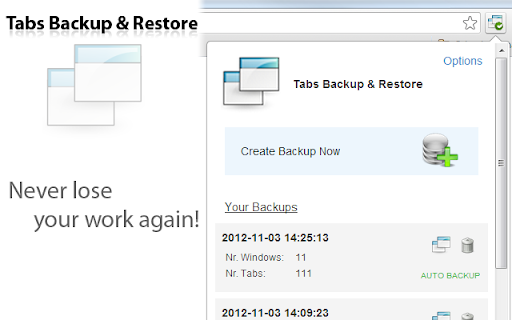
Never lose your work again! Backup an entire Chrome session (windows and tabs). With 'Tabs Backup & Restore' you will never lose your work again! Backup an entire Chrome session (windows and tabs). Backup an entire Chrome session (all opened windows and tabs) and restore it when needed. Backups are created automatically (every XX minutes, definable in the Options Page), but can also be created manually whenever you want.

Tab Backup
Tab Backup & Restore is a simple Chrome extension that lets you back up and restore all your open tabs. With a single click, you can download a list of your current tabs as a .txt file and later restore those tabs by uploading the file. It's perfect for saving your browser session or transferring tabs between devices! Lightweight and user-friendly interface. Never lose your browsing session again!

ReTabs - Save & Restore your tabs
ReTabs save your tabs even if you turn off your computer and then you can restore them With Remember-Tabs, you can save the links of your currently open tabs so you can restore them later, even if you close your browser or turn off your computer. This means you'll never have to worry about losing a tab again, even if you have an unexpected event. - Save and reopen your tabs - Choose between a simple and extended layout - Supports English and Spanish - Local storage: Remember-Tabs stores your data locally on your computer so you can access it when you need to. Download Remember-Tabs today and start saving your tabs!

Tab Restore
Tab Restore helps to restore recently closed tabs and window sessions. Welcome to Tab Restore. With the help by chrome.sessions API released in Chrome 37, Tab Restore can restore the tabs you closed, not only reopen a page with the same URL, but also with the full navigation histories, and even the tabs you closed in the last time you using Chrome. 1. When you just open Chrome, the tab restore lists may be empty. You need to press Ctrl+Shift+T to restore some closed sessions, and then the last time Chrome closed sessions will be activated. (For Windows users. Chrome for OS X seems OK) * Thanks to BoB3R@GitHub for helping update the project for Manifest V3 compatibility! * Window session (n Tabs) now can be expanded and open tab independently. * Text selectability fixed. * Icon set fixed.

Flow - Tab Manager
A new way to manage chrome tabs and windows easily. Flow is your ultimate solution for managing tabs and windows in Chrome. Whether you’re a power user or just someone who wants to keep things tidy, Flow streamlines your browsing experience. Here’s why you’ll love it: Effortless Tab Management • Create Sessions: Start fresh by initiating a new session. A dedicated Chrome window opens, marking the beginning of your focused browsing journey. • Automatic Saving: Flow takes care of your tabs in the background. Close a window without hesitation; your tabs are securely saved. • Resume Seamlessly: Reopen any session whenever you need to pick up where you left off. • Unsaved Windows: Add any open window to your sessions directly from the ‘Unsaved Windows’ section. Boost Your Workflow with Additional Features • Main Session: Designate a session as your ‘Main Session.’ When you launch Chrome, all other windows close, leaving only your essential workstream active. • Backups: Create local backups of your sessions. Flow auto-generates a backup before deleting any session, ensuring you never lose your work. • Dark Mode: Enjoy a sleek dark mode that’s easy on the eyes during late-night browsing. • Resizable Interface: Customize the extension’s size by simply dragging the bottom right corner to fit your screen and preferences. • Simplicity: Flow keeps things straightforward. • Speed: It’s fast and reliable. • Organization: Say goodbye to tab overload. Give Flow a try and experience a clutter-free browsing environment. Your feedback is invaluable in making Flow even better! What's new? 1.2.8 • Added session badge • Removed the unsaved window popup 1.2.7 • Added sessions details to view tabs and move tabs between sesssoin • Added move tabs to session in chrome context menu • Added permission view to review optional permissions for certain settings 1.2.5 • Now Discarding tabs after title is load to improve search and visibility. • Clicking on the open sessions will bring them to front. • Bug fixes. 1.2.1 • Organizing settings and added a few more settings in additional settings • Bug fixes 1.1.0 • Sessions can be opened in the current window. • Project is open source now. see about us in extension settings for more info. • Pinned tabs will be saved now. • Alert will be shown if a window is not saved as session. • Performance improvements.
