
ddmmamibgihlgejeklfopeebcnobmfeb
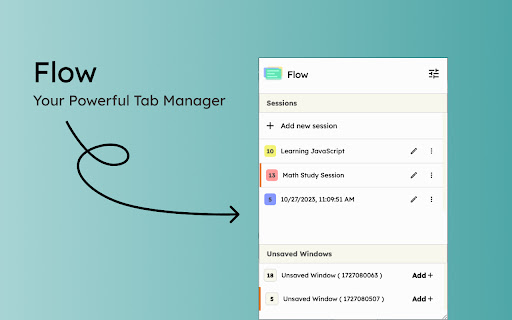
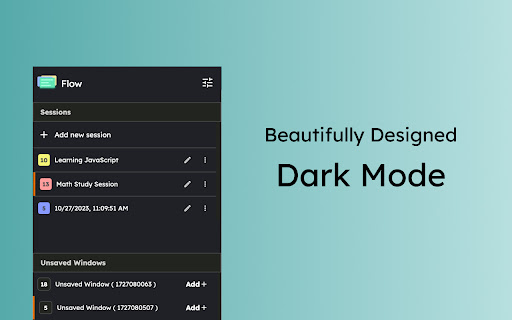
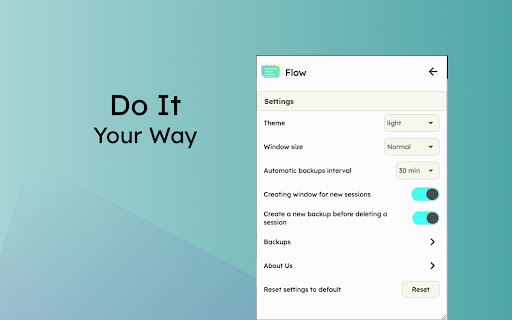
A new way to manage chrome tabs and windows easily. Flow is your ultimate solution for managing tabs and windows in Chrome. Whether you’re a power user or just someone who wants to keep things tidy, Flow streamlines your browsing experience. Here’s why you’ll love it: Effortless Tab Management • Create Sessions: Start fresh by initiating a new session. A dedicated Chrome window opens, marking the beginning of your focused browsing journey. • Automatic Saving: Flow takes care of your tabs in the background. Close a window without hesitation; your tabs are securely saved. • Resume Seamlessly: Reopen any session whenever you need to pick up where you left off. • Unsaved Windows: Add any open window to your sessions directly from the ‘Unsaved Windows’ section. Boost Your Workflow with Additional Features • Main Session: Designate a session as your ‘Main Session.’ When you launch Chrome, all other windows close, leaving only your essential workstream active. • Backups: Create local backups of your sessions. Flow auto-generates a backup before deleting any session, ensuring you never lose your work. • Dark Mode: Enjoy a sleek dark mode that’s easy on the eyes during late-night browsing. • Resizable Interface: Customize the extension’s size by simply dragging the bottom right corner to fit your screen and preferences. • Simplicity: Flow keeps things straightforward. • Speed: It’s fast and reliable. • Organization: Say goodbye to tab overload. Give Flow a try and experience a clutter-free browsing environment. Your feedback is invaluable in making Flow even better! What's new? 1.2.8 • Added session badge • Removed the unsaved window popup 1.2.7 • Added sessions details to view tabs and move tabs between sesssoin • Added move tabs to session in chrome context menu • Added permission view to review optional permissions for certain settings 1.2.5 • Now Discarding tabs after title is load to improve search and visibility. • Clicking on the open sessions will bring them to front. • Bug fixes. 1.2.1 • Organizing settings and added a few more settings in additional settings • Bug fixes 1.1.0 • Sessions can be opened in the current window. • Project is open source now. see about us in extension settings for more info. • Pinned tabs will be saved now. • Alert will be shown if a window is not saved as session. • Performance improvements.

Octab - Smart Tab Manager
Optimize your browsing with Octab, the smart tab manager that organizes and enhances your digital life. Octab is the ultimate Chrome tab management and productivity suite designed for professionals, students, and anyone who finds themselves drowning in browser tabs. Take control of your digital workspace and boost your productivity with our comprehensive all-in-one tool. 📂 Smart Tab Organization * Create hierarchical folders and subfolders to organize your tabs and resources * Save entire browser sessions with a single click * Quickly search and filter across all your saved content * Drag-and-drop functionality for intuitive organization 🏠 Customizable Dashboard * Transform your new tab page into a productivity command center * Add widgets for notes, tasks, search, and more * Create up to 5 different dashboard layouts for different contexts * Custom backgrounds for personalization 🔄 Chrome Tab Grouping & Management * Automatically group tabs by domain or custom rules * Use regex patterns for advanced tab grouping * Sort tabs by domain, last accessed, or custom order * Quickly identify and close duplicate tabs * Suspend inactive tabs to save memory and boost performance 📝 Integrated Note-Taking * Create rich-text notes directly in your browser * Markdown support for advanced formatting * Automatic saving as you type * Organize notes within your tab folder structure ✅ Task Management System * Create and organize tasks with customizable priorities * Set due dates and reminders * Track progress with Kanban-style status columns (Backlog, Todo, In Progress, Done) * Convert any saved resource into an actionable task 🏷️ Advanced Tagging & Filtering * Create color-coded tags for visual organization * Quickly filter resources by tags, status, or priority * Apply multiple tags for granular organization * Tag-based color highlighting for visual identification 🔍 Powerful Search Features * Find anything with the global search (press F key) * Search across all your saved websites, notes, and tasks * Real-time results as you type * Filter search results by type or tags * Save Time: Quickly find tabs and resources without endless scrolling * Reduce Stress: No more "too many tabs" anxiety * Boost Focus: Keep related tabs and resources together * Improve Organization: Turn tab chaos into a structured system * Enhance Memory: Free up system resources with tab suspension * Streamline Workflow: Everything you need in one integrated tool Perfect for researchers, developers, writers, students, and professionals who work with multiple tabs and need to organize their digital workspace effectively. Contact Us: Have questions or feedback? We're here to help. Get in touch at hello@octab.app and let us assist you in making the most of your digital experience. Privacy & Security: We take your digital safety seriously. We use strong security protocols to keep your data safe, making sure your browsing experience is both private and secure.

Blixem Tab Manager
Organize, save & share your tabs for easy collaboration with Blixem. Blixem helps you manage your tabs and windows efficiently, reducing distractions and improving performance. Homepage: Your new tab screen shows tabs vertically, gives quick access to favorite sites, and lets you launch Workspaces with one click. Customize with widgets, colors, and backgrounds. Workspaces: Save tabs into Workspaces for easy access, sharing, and collaboration. Customize Workspaces and share them with a few clicks. Collaborate: Share Workspaces by granting view or edit permissions. Teams can add content, comment, and invite others with a link or email. Collaborators don't need the extension installed. Windows: See all open tabs across all Chrome windows from one page. Rearrange, close, or add tabs to Workspaces. Pause tabs and windows to speed up your computer. Widgets: Add widgets like recently closed tabs, frequently visited sites, and top Workspaces to your homepage. Work-Personal Separation: Separate work and personal tabs using Categories. Hide work tabs when off duty and personal tabs during work hours. Blixem Tab Manager helps you control and organize your online life.

Simple Tab Manager
Simple tab manager that allows you to easily manage and sort tabs. Windows: - Open, close, and minimize windows - Change window title - Color code windows Tabs: - Open, close, mute, pin, refresh, duplicate tabs - Move tabs within and between windows - Select multiple tabs at once - Sort tabs by title or url - Easily find tabs by searching Other: - Supports dark mode - An alternative, more compact view (grid view) - Use shortcuts to quickly perform actions - Export and import windows and tabs

TabTabTab - All In One Tab Manager
Supports your browsing by improving tab management. Lost in a sea of tabs? Feel overwhelmed by their sheer number? TabTabTab is here to revolutionize the way you manage tabs. Experience a seamless, organized, and efficient browsing like never before. * Comprehensive Tab Overview: View all your windows and tabs, including those grouped, in one unified list. * Flexible Drag & Drop: Organize your tabs freely - be it pinned, grouped, or standalone. * Window and Group Save & Restore: Quickly save and restore your tab groups and window sessions, ensuring a seamless continuation of your work. * Automatic Tab Grouping: Tabs are automatically organized based on domain or subdomain, making it easier to manage and navigate your tabs. * Duplicate Tab Alert: Avoid clutter with automated alerts for duplicate tabs. Effortlessly close duplicates to streamline your browsing. * Window Merge: Combine multiple browser windows into one with a single click, organizing scattered tabs into a cohesive session. * Time Tracking: Keep track of how long it's been since you last accessed a tab. * Essential Tab Operations: URL copying, pinning, grouping, and more. * Screenshot Tool: Quickly capture the active tab's visible area. * Efficient Navigation & Search: Jump to or find your desired tabs in seconds. * Automatic Cleanup: Auto-remove tabs you haven't accessed based on your preferences. * Side Panel Tab Overview: Easily access a list of your tabs through a convenient side panel. * Dark Mode: Switch to a darker, more focused look whenever you wish. The source code for TabTabTab is public on GitHub at the following link.
