
cebpjoogodhghekdailhkbododekfggb

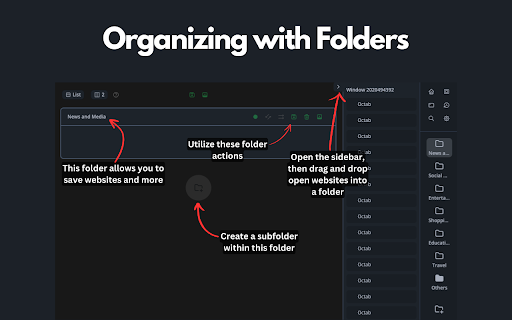

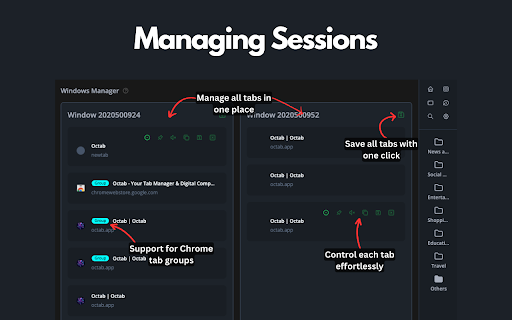
Optimize your browsing with Octab, the smart tab manager that organizes and enhances your digital life. Octab is the ultimate Chrome tab management and productivity suite designed for professionals, students, and anyone who finds themselves drowning in browser tabs. Take control of your digital workspace and boost your productivity with our comprehensive all-in-one tool. 📂 Smart Tab Organization * Create hierarchical folders and subfolders to organize your tabs and resources * Save entire browser sessions with a single click * Quickly search and filter across all your saved content * Drag-and-drop functionality for intuitive organization 🏠 Customizable Dashboard * Transform your new tab page into a productivity command center * Add widgets for notes, tasks, search, and more * Create up to 5 different dashboard layouts for different contexts * Custom backgrounds for personalization 🔄 Chrome Tab Grouping & Management * Automatically group tabs by domain or custom rules * Use regex patterns for advanced tab grouping * Sort tabs by domain, last accessed, or custom order * Quickly identify and close duplicate tabs * Suspend inactive tabs to save memory and boost performance 📝 Integrated Note-Taking * Create rich-text notes directly in your browser * Markdown support for advanced formatting * Automatic saving as you type * Organize notes within your tab folder structure ✅ Task Management System * Create and organize tasks with customizable priorities * Set due dates and reminders * Track progress with Kanban-style status columns (Backlog, Todo, In Progress, Done) * Convert any saved resource into an actionable task 🏷️ Advanced Tagging & Filtering * Create color-coded tags for visual organization * Quickly filter resources by tags, status, or priority * Apply multiple tags for granular organization * Tag-based color highlighting for visual identification 🔍 Powerful Search Features * Find anything with the global search (press F key) * Search across all your saved websites, notes, and tasks * Real-time results as you type * Filter search results by type or tags * Save Time: Quickly find tabs and resources without endless scrolling * Reduce Stress: No more "too many tabs" anxiety * Boost Focus: Keep related tabs and resources together * Improve Organization: Turn tab chaos into a structured system * Enhance Memory: Free up system resources with tab suspension * Streamline Workflow: Everything you need in one integrated tool Perfect for researchers, developers, writers, students, and professionals who work with multiple tabs and need to organize their digital workspace effectively. Contact Us: Have questions or feedback? We're here to help. Get in touch at hello@octab.app and let us assist you in making the most of your digital experience. Privacy & Security: We take your digital safety seriously. We use strong security protocols to keep your data safe, making sure your browsing experience is both private and secure.

Simple Tab Manager
Simple tab manager that allows you to easily manage and sort tabs. Windows: - Open, close, and minimize windows - Change window title - Color code windows Tabs: - Open, close, mute, pin, refresh, duplicate tabs - Move tabs within and between windows - Select multiple tabs at once - Sort tabs by title or url - Easily find tabs by searching Other: - Supports dark mode - An alternative, more compact view (grid view) - Use shortcuts to quickly perform actions - Export and import windows and tabs

TabDock
TabDock is a chrome extension that allows you to save your tabs in workspaces and open them later. 🚀 Welcome to TabDock — Your Ultimate Tab Management & Productivity Tool! 🌐 Elevate your browsing experience with TabDock, the smart solution for organizing, managing, and synchronizing your tabs and sessions across devices, all within your Google Chrome browser. Perfect for students, professionals, developers, and researchers! 🗂️ Workspace Management: Create and switch between multiple workspaces effortlessly, each tailored to your projects or tasks. Keep your browsing experience organized and clutter-free. ☁️ Cloud Synced Tabs & Sessions: Save your tabs and sessions to the cloud. Never lose your work, and access everything from any device with TabDock installed. ⚡ Commands & Kbar: Harness the power of quick tools directly in your browser. Execute custom commands, search tabs, save workspaces, and more — all with just a few keystrokes. 🖥️ Enhanced New Tab Page: Transform your new tab page into a powerful dashboard, displaying your saved workspaces, calendar events, world clock, and quick access commands. 🔄 Auto-Save: Relax knowing your tabs are always safe. TabDock automatically saves your current session, so you can restore it anytime, anywhere. 🎓 Students: Keep your research, class notes, and project tabs neatly organized in separate workspaces. Seamlessly switch between subjects and keep your academic life on track. 💼 Professionals: Efficiently manage multiple projects, client info, and research tabs. Boost productivity by having all your essential tabs just a click away. 💻 Developers: Organize your development environments, documentation, and resources into distinct workspaces. Supercharge your workflow with custom commands and quick access tools. 🔬 Researchers: Store and organize research materials, references, and notes in dedicated workspaces. Access your work from anywhere, anytime. Feedback and Support: We’re dedicated to making TabDock the best tool for you. Have questions or need help? Contact us at angel@tabdock.app.

Tabmanager.io - Tab Session Manager
Manage, save and restore your windows, tabs and sessions. Tabmanager.io is an all-in-one session, window and tab manager extension for Chrome that helps you manage your open tabs, tab-groups and windows in one convenient place. ★ Windows & Tabs Our manager empowers you to swiftly navigate through open windows and tabs using either your mouse or keyboard. You can effortlessly switch between tabs and windows, search and filter tabs by title or URL keywords, and efficiently manage various aspects of your tabs such as pinning, sorting, grouping tabs by domain, suspending, identifying tabs with sound, and removing duplicates. Additionally, you have the option to export your tabs and windows as files for backup, save tabs for future use, and synchronize them across multiple devices. Our manager presents a multiple column layout that enables you to gain a comprehensive overview of all your open windows and tabs while providing the flexibility to organize your windows by renaming them. Through simple drag and drop functionality, you can easily move tabs between windows, open them in new windows, or merge entire windows. The tab manager also offers convenient features to save tabs for later restoration. You can save specific tabs within a window, save all tabs within a window, or save the entire session encompassing all open windows. ★ Tab Groups The tab manager comes with built-in support for managing your tab-groups. You can easily create a new tab group, move groups between windows, merge tab groups, rename tab groups and save your tab groups and restore them with the window at a later time. ★ Session Manager The session manager provides a comprehensive view of all your saved sessions, allowing you to effortlessly manage and swiftly restore previously saved sessions. Our intelligent restore feature ensures that opening tabs in a new or existing window does not slow down your computer, as tabs are opened in a suspended state. You can also sync your saved sessions to the cloud, ensuring data integrity and accessibility across all your devices. ★ Session History You can access a timeline overview of your browser sessions, enabling you to easily restore individual windows or tabs from earlier points in time. Save session snapshots from either the manager or the menu, providing you with the flexibility to quit your browser or temporarily use a blank browser without the risk of losing your tabs. Enabling the auto-save session feature helps you track your local browser session history in case of a browser crash. Sessions in the session history is saved on your local machine and are not saved to the cloud. ▪ Overview of active Windows and Tabs ▪ Keyboard navigation support ▪ Rename Windows ▪ Switch between Tabs and Windows ▪ Multiple Window columns for wide screens ▪ Light/Dark theme ▪ Filter Tabs with search ▪ Drag and drop Tabs and Windows ▪ Merge Windows by drag and drop ▪ Group Tabs by domain ▪ Sort Tabs ▪ Remove duplicate Tabs ▪ Suspend/Discard Tabs from memory ▪ Find Tabs playing audio ▪ Mute/Unmute Tab playing audio ▪ Create new Tab-group ▪ Drag and Drop Tab-group ▪ Merge Tab-groups ▪ Save Tab-groups for later ▪ Save Tabs for later ▪ Save Windows for later ▪ Save Session for later ▪ Quickly restore Windows and Sessions ▪ Share Windows by URL ▪ Automatic Sessions history snapshot ▪ Take Session snapshots for easy restore later ▪ Export Tabs, Window or Session as JSON/CSV ▪ Import exported Tabs, Window or Session ▪ Backup & Sync ▪ Cloud Backups ▪ And more... Send us an email at support@tabmanager.io if you need support or have suggestions about missing features.

TabXpert - session and tab manager
Auto-saved browser sessions. Tab groups support. Sync with the cloud. - Session manager: auto-saved sessions, single- and multi-window modes, tag-based session management. - Tab manager: tab groups, vertical tabs, bookmarks, drag and drop, and powerful search. - Cloud sync: sync sessions across devices and profiles (optional). - Privacy-first: no content access, no data collected; local-first data storage. - Customizable interface: pop-up, tab, window, and side panel interfaces to your choice. - New tab page: most visited and recent tabs, history, bookmarks, and sessions. - Import from: OneTab, Session Buddy, Workona, Toby and other extensions. - And more: cloud backups, browser integration, keyboard shortcuts, tab suspending.
