
maibbieoloohoippoecmlpbgifflannf
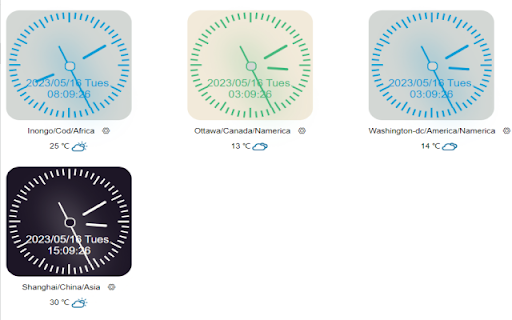
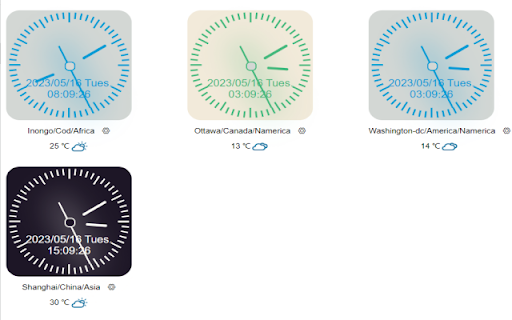
World Clock-Time Weather Assistant,which supports real-time local time and weather queries in 2000+ cities around the world major function Support for customizing the background colors of individual/batch dial settings: gray/blue, white/green, black/white Support for custom time font size Support custom display formats for dates, weeks, and times Support for custom city names Supports sorting of city lists, with larger numbers ranking first Support local time and weather queries for over 2000 cities worldwide Support for user data synchronization based on browser accounts Supports associative search for city names, pinyin, and English Supports one click refresh of synchronized data and synchronization of the latest time Support for deleting added cities Support for multilingual switching, such as Simplified Chinese and English

World Clock - Time Zone Converter
Time zone conversion and world clock display, support for one-time display and conversion of multiple locations/time zones "World Clock - Time Zone Converter" is a simple and user-friendly world clock application and widget. Whether you're on a business trip, vacationing, or keeping in touch with friends overseas, this powerful tool provides you with accurate time and time zone information from around the globe, meeting your precise time needs. ⭐ Global Time Zone Coverage Displays all time zones, covering countries and a wealth of city information. Quickly search for and add the cities you need to easily view their current time. 📶 Offline Use All features are available offline, without the need for an internet connection. 🌍 Clear Overview Supports viewing multiple time zones simultaneously without the need to switch pages frequently. ⌨️ Keyboard Shortcut Support Provides keyboard shortcuts for quick access to the time data you’ve added. 💸 Completely Free All features are available for free, with no additional charges. 🕒 Multiple Clock Formats Supports both 12-hour and 24-hour clock formats. 🔒 Safe and Reliable Absolutely no personal information is collected or shared with third parties, ensuring your privacy is secure. 🌙 Night Mode Supports night mode for a more comfortable viewing experience. 🌐 International Meetings Helps schedule international meetings by allowing you to easily view the time of colleagues around the world, making coordination effortless. ✈️ Travel A handy tool for your travels, keeping you informed of the time in your destination. 📞 Contacting Overseas Friends and Family Accurately know the time in the locations of your friends or family abroad, facilitating communication. 🕰️ Time Zone Conversion Makes it easy to convert between time zones and resolve time-related issues across different regions. 🌎 Precise Time Queries Search for and obtain the current time in any location, satisfying your time inquiry needs. 🛠️ Download and Install Download and install "World Time - GlobalTimeHub" from the Google Plugin Store. 🔍 Search and Add Open the app and search for the desired city/time zone/country, then add it to the page. ✅ View Time Once added, the page will automatically display the real-time information. ❌ Delete Time Remove added times using the "X" icon at the top right of the page. 📢 Submit Feedback Use the "More" button at the top right to submit your suggestions or feedback, or rate the plugin. Thank you for using our app! We welcome your valuable suggestions! If you want easy access to global time information and learn more about various cities, download and experience "World Time - Time Zone Converter"!

World Clocks
Add any world clock of your choice to remain updated with the time in different locations. ⏰ A productivity booster World Clock browser extension! 🏆 Featured by Google on Chrome Web Store (since following all technical best practices, latest platform APIs, and meeting a high standard of intuitive user experience & design, among other things). 💪 Features: - All settings are kept in sync - Add, Remove, SORT, and Edit time zones - Convert time zone time to other time zones - Very easy to use - Responsive layout - Nice add/remove effect for better user experience - Select the color theme from the available presets - Set your color for the individual clock - Set font color and size as per your choice - Select 12 or 24-hour format - Turn on/off seconds display - Change the display name after adding the clock - Different sets of layouts added - Keep the settings panel on the left or right - Reset all settings --- New features are added regularly 👨💻 🏡 Home Page: https://weball.io/products/browsers/extensions/world-clocks ⭐⭐⭐⭐⭐⭐⭐ 🥂 Praise ⭐⭐⭐⭐⭐⭐⭐ If you like the extension, I would like to request you to give a 5️⃣⭐ rating, it keeps me motivated to contribute back to the community. 💓 /*****************/ 🐞 Bugs /*****************/ If you find any bugs or if you feel that some feature is missing, please send me a mail 📩 (justdecodeme@hotmail.com) before giving a bad review 🙏, and I'll fix that ASAP. 🙇 Thank you for your understanding, and enjoy the extension!!! :) 🎉 v 23.5.2 - New toggle buttons - UI/UX improvements - Optin for GA4 - Reduces overall extension size - Bug fix: Fixed some crossbrowser CSS issues v 22.11 - Manifest migration from v2 to v3 (very important update) - Size reduced (Increased performance, only ~500KB) - Few CSS updates in the Settings panel - Bug fix: Time conversion just after install v 21.12 (biggest update so far) - Timezone convert feature added (MOST REQUESTED FEATURE) - Multiple layouts added for eye-catching UI - New shades theme added - New mix theme added - Text color options added - Font size options added - Base input font size added to increase or decrease overall time zones font - Reset functionality added - Clock icons positions updated - Beautiful radial background added at loading time - Drag & Drop animation added - Settings panel slide effect added for better UX - Settings panel position can be LEFT or RIGHT - Font sizes change from px > rem and em for better usability - Settings panel now have a scroll bar for screen having small heights - Removed time value from tab - Overall user experience improved - Redundant code removed - Date format updated and the Month has also been added now - Bug Fixed: MAX_WRITE_OPERATIONS_PER_MINUTE - Bug Fixed: Error because of old and new database mismatch v 21.04 - Version naming changed - Few things improved as per the user's feedback - Thank you page will open only on the new install, not on the update - Credit section added - Button text replaced with icons - UI Improvements - Small bug fixed v 2.2 - Note able to drag at the end bug solved - Code refactoring - Thank you page message updated - Credits link added v 2.1 - Don't show the sort and delete icon for the last clock remaining while deleting - Thank you page added after installation - Feedback form added after uninstallation v 1.9 - Items can be rearranged now by drag and drop - Add timezone animation added - Delete buttons not showing up on first load bug fixed - Logic and UI updates v 1.8 - Remove timezone animation added - Can't add duplicated timezones - Default 4 time zones added on the first load V 1.6 - New Features + Bugs solved: - New Add button and Edit Button Layout. - Don't show am/pm in 24hr format. - Stop the user from adding an invalid Time Zone. V 1.4 - New features added: - CSS/Style updates. - Select 12 or 24-hour format. - Change the display name after adding a clock. Oh still here, you are super awesome! 🤘 Keep rocking!!! ❤️ You are breathtaking! ❤️ CWC is yours to keep. Forever.

Time Zone Meeting Planner
Schedule global events with Time Zone Meeting Planner, your world clock meeting planner, and an international time zone converter. Introducing the Time Zone Meeting Planner chrome extension, the ultimate solution for anyone needing to schedule and manage international events seamlessly. This powerful tool integrates a comprehensive world clock meeting planner and a versatile time zone converter, making it an essential asset for professionals who coordinate with teams worldwide. Features Overview: 1. Time Zone Meeting Planner: view intervals in multiple cities worldwide to easily schedule events. 2. Time Zone Converter: convert between different time zones instantly to find the perfect event interval (for example: 9am pst to singapore time) 3. Global scheduler: organize international events without the hassle of calculating hour differences. Why Choose Time Zone Meeting Planner? – Simplicity and Efficiency: Streamlined interface that’s easy to navigate. – Accuracy: Provides up-to-date data for reliable scheduling. – Customization: Set your preferred world clock for quick access. Comprehensive Planning Tools: 𑇐 Plan events with the international planner feature, which covers all clock bands from UTC to Pacific. 𑇐 Use the eastern and central time zone converter to manage events across the U.S. 𑇐 Convert intervals using specific tools like the CET and pacific standard time zone converter. How does the time zone meeting planner? work: 🏙 Add the cities where participants are based to the list. ⏩ Adjust the event period to accommodate all attendees' working hours. 📤 Schedule the event in the calendar and send invitations to all participants with time zone overlap. Additional Features: ▸ World time and date zone planner integration for scheduling on a global scale. ▸ International event planner capabilities, ideal for large conferences. ▸ Time zone calculator to help you manage international calls. Who Can Benefit? 1️⃣ Executives: Utilize the time zone meeting planner to arrange high-level calls. 2️⃣ Project Managers: Effortlessly coordinate teams across different continents. 3️⃣ Freelancers: Connect with clients around the world at convenient timeframes. Use Cases: 1. Web conferences across 10+ different time zones: simplifies scheduling common times, ensuring global participation. 2. Virtual family reunions: Coordinates across time zones for shared celebrations. 3. Global sales pitches: Helps sales teams schedule intl client meetings, avoiding clock zone errors. 4. International educational events: Allows institutions to plan lectures for maximum global attendance. 5. Virtual team building: Schedules events within remote teams' working hours to boost engagement. 6. Multi-national medical consultations: Facilitates expert healthcare discussions across different timezones. 7. Global product launches and press releases: PR teams schedule announcements for optimal media coverage. 8. International legal consultations: Manages client sessions and negotiations, respecting legal timelines. Key Benefits: ⏳ Efficiency Boost: Quick setup and easy-to-understand interface. ↘️ Minimize Errors: Avoid confusion with global clock comparison. 📈 Enhance Productivity: Streamline planning to maximize operational efficiency. ❓ Frequently Asked Questions: 📌 How does it work? 💡 Time Zone Meeting Planner is a Chrome extension designed to simplify the scheduling of global events. By integrating a world clock converter, it allows you to view and compare clock across different clock regions, making it easier to find suitable worldmeeting intervals for participants worldwide. 📌 How do I install? 💡 To install the extension, navigate to the Chrome Web Store and select "Add to Chrome". It will automatically be added to your browser, and you can begin planning your intl events right away. 📌 Can this extension manage events across the world? 💡 Yes, world clock meeting planner can manage and schedule events globally. 📌 Is my privacy protected when using this extension? 💡 Absolutely! Timezone meeting planner operates entirely within your browser. It respects your privacy by not collecting or storing any personal data. 📌 Are there any limitations on the number of events I can schedule? 💡 There are no limits on the number of events you can schedule with world clock meeting planner. It's designed to support both frequent and occasional international meeting planning, accommodating your specific needs without restrictions. Streamline scheduling with the Time Zone Meeting Planner Chrome extension. Perfect for global teams, it synchronizes events worldwide, offering a world clock planner right at your fingertips. Elevate your planning effortlessly. 🌍

汇率转换
此插件为跨境卖家设计,用于显示跨境平台前端页面上商品价格对应的人民币价格。同时也提供手动输入数字转换货币的功能,货币种类共有163个 这是一个为跨境卖家设计的,用于显示平台前端商品价格对应的人民币价值 同时提供163种货币间的自由转换 代码开源托管于Github 更新记录请查看网站 -3.8.1.0 2026年4月20日 修复walmart页面价格转换不正确的问题 -3.8.0.0 2025年9月30日 POP页面支持输入公式计算,例如输入125*36-100,新增POP页面主题:赛博霓虹 - 3.7.3.1. 2025年1月12日 修复TEMU价格转换 - 3.7.3.0. 2024年11月27日 增加Yandex页面价格转换。 - 3.7.2.0 2024年10月14日 修复amazon页面上的价格转换bug -3.7.1.0 2024年8月22日 增加跨境平台walmart的支持,如有问题可以反馈,感谢。 -3.7.0.0. 2024年8月21日 增加100货币量的转换显示,设置中可以关闭 - 3.6.5.0 2024年7月14日 修复ozon页面价格转换不显示的问题 -3.6.4.0 2024年5月31日 增加wildberries和coupang的页面价格转换 -3.6.3.0 2024年5月9日 跨境平台页面价格转换支持选择货币(意为不仅支持人民币,还可以选择其他货币,目前测试站点:美客多) -3.6.2.0 2024年4月23日 修复Temu页面价格造上的问题。POP页面可以设置千分位. - 3.6.0.0 2024年4月2日 增加韩国Kream站点的价格转换支持。POP页面可以记忆,而且可以识别粘贴时的千分位(,或空格) -3.5.5.0 2024年3月23日 增加美客多各站点的价格转换 -3.5.4.0. 2024年3月15日 增加Vinted站点的页面价格转换。 -3.5.3.0 2024年3月11日 增加Ozon站点的价换转换支持.支持切换各种货币.由于站点的特殊性,如果要整个页面翻译成中文,请先等价格显示后再翻译. -3.5.1.1 2024年1月20日,POP页面主题增加以前的"原*经典" -3.5.0.0. 2024年1月11日 POP页面可以设置主题与布局。27种主流货币,按中国银行实时汇率。 - 3.4.5.1. 2023年12月19日 优化汇率请求频率 - 3.4.2.0. 2023年12月11日 汇率请求的频率改为15分钟一次,减轻服务器压力。 - 3.3.1.0 2023年11月21日 重构设置页面,pop汇率转换可以自定义小数位数,跨境平台显示人民币价格可以自定义颜色. - 3.2.0.4 2023年11月07日 主界面优化,整体用wxt改造 - 3.1.1.2 2023年10月18日 增加亚马逊 印度 站的页面价格转换 - 3.1.1.0 2023年9月26日 增加wowmajp 的价格转换支持.同样需要手动授权开启。 -3.1.0.0 2023年5月15日 所有站点的价格转换,需要手动开启.(如后续有更新或问题,请再次手动开启一次)。为了保持最小的请求权限. -3.0.5.0 2023年5月3日 增加TEMU站的支持,需要手动点击开启权限. 取消Aliexpress的支持,因为Aliexpress要登陆才可以看到价格。 3.0.4.0 2023年4月30日 增加韩国Gmarket站的支持,需要手动点击开启权限. 3.0.3.0 2022年11月9日 主界面增加反馈按钮,可以及时反馈异常。POP页面去掉下面的小字1USD=xxx类,使界面更简洁. 3.0.2.2 2022年4月15日 减少不必要的权限,增加安全性。 3.0.2.1 2022年4月15日 插件更新或浏览器更新时,保存之前自由转换的币货种类,不重置 3.0.1.8 2021年12月11日 修复lazada详情页主价格不显示人民币的问题 3.0.1.4 2021年11月26日 增加日本趣天站的支持qoo10 3.0.0.1 2021年8月28日 升级chrome扩展版本到V3,支持离线使用。background切换到Server Worker 2.9.1.0 2021年9月24日 修复chrome94版本下 POP页面不能打开的问题 2.9.0.3 2021年8月17日 修复amazon法国站大金额显示价格错误的问题 2.9.0.1 2021年7月21日 完全重构aliexpress页面价格转换,适应多站点,多语言,多货币 2.8.6.0 2021年7月18日 amazon增法国 加拿大 西班牙 意大利 站点的前面页面价换转换。 2.8.5.0 2021年7月16日 增加shopee巴西,墨西哥,哥伦比亚,智利的支持,增加捐助二维码(:>), 2.8.4.0 2021年3月16日 修复shopee页面规则。改为在线获取,以后页面改变,不必发布新版本,直接后台更新。GoodBOy 2021年3月5日 修复lazada详情页面sku变动后价格不变的问题(redMart页面价格转换未成功,下版修复) ----自由转换界面可以手动拖动排序
