
hhofnjbnimclnejljkgajhdleeafaajo
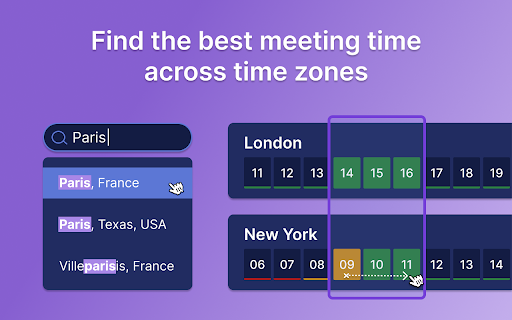
Schedule global events with Time Zone Meeting Planner, your world clock meeting planner, and an international time zone converter. Introducing the Time Zone Meeting Planner chrome extension, the ultimate solution for anyone needing to schedule and manage international events seamlessly. This powerful tool integrates a comprehensive world clock meeting planner and a versatile time zone converter, making it an essential asset for professionals who coordinate with teams worldwide. Features Overview: 1. Time Zone Meeting Planner: view intervals in multiple cities worldwide to easily schedule events. 2. Time Zone Converter: convert between different time zones instantly to find the perfect event interval (for example: 9am pst to singapore time) 3. Global scheduler: organize international events without the hassle of calculating hour differences. Why Choose Time Zone Meeting Planner? – Simplicity and Efficiency: Streamlined interface that’s easy to navigate. – Accuracy: Provides up-to-date data for reliable scheduling. – Customization: Set your preferred world clock for quick access. Comprehensive Planning Tools: 𑇐 Plan events with the international planner feature, which covers all clock bands from UTC to Pacific. 𑇐 Use the eastern and central time zone converter to manage events across the U.S. 𑇐 Convert intervals using specific tools like the CET and pacific standard time zone converter. How does the time zone meeting planner? work: 🏙 Add the cities where participants are based to the list. ⏩ Adjust the event period to accommodate all attendees' working hours. 📤 Schedule the event in the calendar and send invitations to all participants with time zone overlap. Additional Features: ▸ World time and date zone planner integration for scheduling on a global scale. ▸ International event planner capabilities, ideal for large conferences. ▸ Time zone calculator to help you manage international calls. Who Can Benefit? 1️⃣ Executives: Utilize the time zone meeting planner to arrange high-level calls. 2️⃣ Project Managers: Effortlessly coordinate teams across different continents. 3️⃣ Freelancers: Connect with clients around the world at convenient timeframes. Use Cases: 1. Web conferences across 10+ different time zones: simplifies scheduling common times, ensuring global participation. 2. Virtual family reunions: Coordinates across time zones for shared celebrations. 3. Global sales pitches: Helps sales teams schedule intl client meetings, avoiding clock zone errors. 4. International educational events: Allows institutions to plan lectures for maximum global attendance. 5. Virtual team building: Schedules events within remote teams' working hours to boost engagement. 6. Multi-national medical consultations: Facilitates expert healthcare discussions across different timezones. 7. Global product launches and press releases: PR teams schedule announcements for optimal media coverage. 8. International legal consultations: Manages client sessions and negotiations, respecting legal timelines. Key Benefits: ⏳ Efficiency Boost: Quick setup and easy-to-understand interface. ↘️ Minimize Errors: Avoid confusion with global clock comparison. 📈 Enhance Productivity: Streamline planning to maximize operational efficiency. ❓ Frequently Asked Questions: 📌 How does it work? 💡 Time Zone Meeting Planner is a Chrome extension designed to simplify the scheduling of global events. By integrating a world clock converter, it allows you to view and compare clock across different clock regions, making it easier to find suitable worldmeeting intervals for participants worldwide. 📌 How do I install? 💡 To install the extension, navigate to the Chrome Web Store and select "Add to Chrome". It will automatically be added to your browser, and you can begin planning your intl events right away. 📌 Can this extension manage events across the world? 💡 Yes, world clock meeting planner can manage and schedule events globally. 📌 Is my privacy protected when using this extension? 💡 Absolutely! Timezone meeting planner operates entirely within your browser. It respects your privacy by not collecting or storing any personal data. 📌 Are there any limitations on the number of events I can schedule? 💡 There are no limits on the number of events you can schedule with world clock meeting planner. It's designed to support both frequent and occasional international meeting planning, accommodating your specific needs without restrictions. Streamline scheduling with the Time Zone Meeting Planner Chrome extension. Perfect for global teams, it synchronizes events worldwide, offering a world clock planner right at your fingertips. Elevate your planning effortlessly. 🌍

World Clock
Quickly check the time in major cities around the world.

Time Genie
Time Genie is a powerful Chrome extension that helps users stay on top of their productivity game with elegant time zone management. It is a user-friendly new tab chrome extension, that allows individuals who frequently interact with people across the globe to view & manage multiple time zones which can help with scheduling meetings or events accordingly (note, scheduling is not part of this extension). All of this experience is offered whenever you create a new tab in your chrome browser. Time Genie provides an easy-to-use interface that allows users to customize their time zone settings based on their preferred cities, regions, and countries. It also allows users to add or remove time zones, making it more convenient to manage time differences between multiple locations. One of the standout features of Time Genie is its ability to display the current time in multiple time zones simultaneously. This feature is particularly useful for individuals who work in different time zones or have clients located in various parts of the world. The tool provides users with an at-a-glance overview of the time in different locations, which eliminates the need to calculate time differences manually especially when day saving time changes happen. This feature also helps users to avoid scheduling conflicts and ensures that they are not contacting individuals during their off-hours. In addition to its functional features, Time Genie also boasts a collection of stunning background images that feature landscapes from around the world. The images are not only beautiful but also help to create a sense of immersion that adds to the overall user experience. From the Northern Lights in Iceland to the Great Barrier Reef in Australia, the background images of Time Genie are truly mouth-watering and add an extra layer of excitement to managing time zones. With such an aesthetically pleasing design, Time Genie makes time management not only efficient but also enjoyable. Overall, Time Genie is an invaluable tool for anyone who needs to manage multiple time zones. It is easy to use, customizable, and provides users with a range of features that make it effortless to stay on top of time differences across the globe. Whether you're a business professional, a student, or a frequent traveler, Time Genie is a must-have tool that will save you time and ensure that you never miss an appointment, flight or meeting again.

表-世界时钟
主要功能: 实时显示:提供多个城市的当前时间,帮助您快速了解各地的时间状况。 简洁界面:直观的设计,让您轻松查看和切换不同城市的时间。 自动更新:时间信息实时更新,无需手动刷新。 适用场景: 商务人士:安排跨时区会议,确保不会错过重要的国际电话。… 主要功能: 实时显示:提供多个城市的当前时间,帮助您快速了解各地的时间状况。 简洁界面:直观的设计,让您轻松查看和切换不同城市的时间。 自动更新:时间信息实时更新,无需手动刷新。 适用场景: 商务人士:安排跨时区会议,确保不会错过重要的国际电话。 旅行者:计划旅行行程,了解目的地的当前时间。 全球沟通:与世界各地的朋友、家人或客户保持联系,避免不必要的时间误差。 使用方法: 1. 安装扩展后,点击浏览器工具栏上的图标。 查看弹出窗口中显示的各城市当前时间。 3. 根据需要调整和查看不同城市的时间信息。 "表-世界时钟" 是您管理全球时间的得力助手,帮助您更高效地进行国际交流和计划。

World Clock Meeting Planner
Convert different time zones instantly. World Clock Meeting Planner: time zone meeting planner & world clock for your team. ⏰ World Clock Meeting Planner is the professional Chrome extension for scheduling international meetings without timezone errors. This world clock meeting planner converts times instantly, displays live world clocks, and exports meetings to any calendar with one click — saving you hours every week. Perfect for remote teams, freelancers, and international businesses losing hours coordinating calls across continents. With World Clock Meeting Planner, you get accurate timezone conversion, zero scheduling conflicts, and a professional reputation — never accidentally schedule a 3 AM meeting with a client again. 🌍 Instant Timezone Conversion for Global Teams Turn timezone chaos into simple scheduling: ➤ World clock meeting planner converts between any two zones in seconds — no calculators or confusion needed ➤ Choose your direction: "Attendee's timezone → My timezone" or vice versa — the system automatically shows the correct result ➤ See both zones side-by-side with clear day indicators — "tomorrow," "yesterday," or "same day" ➤ Plan meetings weeks ahead — select any date for accurate conversion ➤ Support for 400+ timezones — from New York to Tokyo, London to Sydney Your result: Instead of 5-10 minutes doing timezone math — you get the answer in 3 seconds. No more errors, no more missed meetings, just professional scheduling. 🕐 Live World Clocks with Visual Context Meeting planner world clock shows more than numbers — it gives you complete context: 1️⃣ Current display in both locations simultaneously — yours and your attendee's 2️⃣ Visual indicators showing morning ☀️, afternoon 🌤️, evening 🌆, night 🌙 3️⃣ Updates every minute — always current information 4️⃣ Instant difference calculation — "+8 hours" or "-5 hours" at a glance Your result: You immediately see if the slot works for the other party. If it's 11 PM for your client — you'll suggest a different slot, maintaining professionalism. 📅 One Click — Meeting in Your Calendar Time zone meeting planner automatically creates calendar events with complete context: - Google Calendar — export with meeting title, both participants' zones, and descriptions - Office 365 Calendar — seamless integration for enterprise users - Outlook Live Calendar — for outlook.com users - Local calendar with reminders — works offline Each event includes a description: "Meeting at 3:00 PM your zone (10:00 PM client's zone, GMT+8)" — complete clarity for all participants. Your result: Save 2-3 minutes per meeting. If you have 10 meetings weekly — that's 20-30 minutes back. Per month — 2 hours of pure productivity. 🔔 Smart Reminders — Never Miss a Call Global meeting planner monitors your schedule: - Browser notifications 5, 10, 15, 30 minutes, or 1 hour before meetings - "Starting now!" alerts when it's moment to join - Quick access to meeting details from notifications - All data stored locally — no accounts, no syncing required Your result: Even if you forget about a meeting — World Clock Meeting Planner reminds you. Professional punctuality without effort. 💡 Real Savings for Real Professionals For Distributed Teams: Use meeting planner time zones to coordinate daily standups across US, Europe, and Asia. One manager saves 45 minutes weekly on scheduling — that's 3 hours monthly for strategic work. For Freelancers: International meeting planner helps you propose perfect slots for every client. Result — 40% more meetings confirmed on first try. Less back-and-forth, more billable work. For Sales Teams: Time and date world clock meeting planner ensures you call prospects at convenient moments. Teams report 25% higher first-call conversion rates — people are more receptive when timing is right. For International Businesses: Coordinate meetings between headquarters, regional offices, and remote employees. HR managers save up to 5 hours weekly scheduling interviews across timezones. 🔒 Your Privacy is Our Priority World time clock meeting planner operates completely locally: ✓ Zero account creation — install and use immediately ✓ All data in your browser — nothing sent to servers ✓ No tracking, analytics, or advertising ✓ Calendar exports via secure URLs — no access to your accounts ✓ Your schedule stays private to you Your result: Complete control over your data. Use it for confidential client meetings without concerns. 📋 Get Started in 30 Seconds 1. Open meeting planner timezone tool — it's pre-configured with your current zone 2. Enter participant's timezone — system suggests popular options 3. Specify proposed meeting hour — see conversion instantly 4. Click "Add to Calendar" — choose Google, Outlook, or local 5. Get reminded before the meeting — join on schedule 🎯 Proven Results from Thousands of Users Remote teams report 75% fewer scheduling conflicts after implementing world meeting planner. Freelancers reclaim 3-5 hours weekly — hours previously spent coordinating calendars and fixing mistakes. International companies reduce timezone-related meeting no-shows by 90%. Sales departments increase successful first-call rates by 25% — because they call at the right moment. ⚡ Install World Clock Meeting Planner Now Stop wasting hours on timezone calculators and missed meetings. Join thousands of professionals who schedule international meetings in seconds, not minutes. Install time converter meeting planner right now — and get your first perfectly-scheduled meeting today. No risk, no payment, no complexity. Just professional scheduling from the first click.
