
nbelininlnogobickdnooicambobdjdc

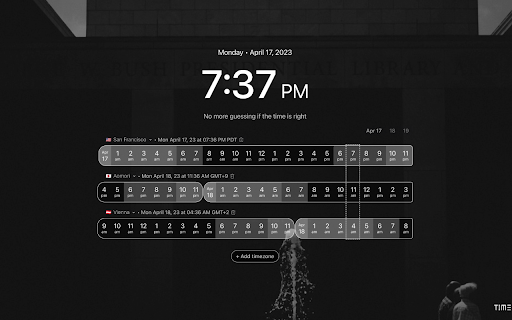
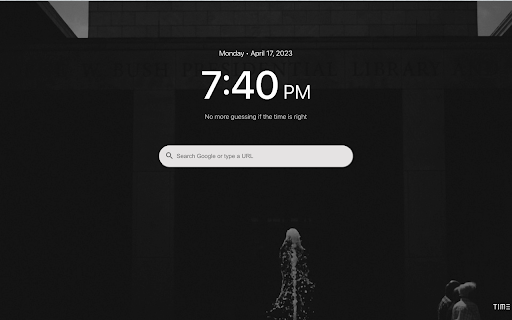

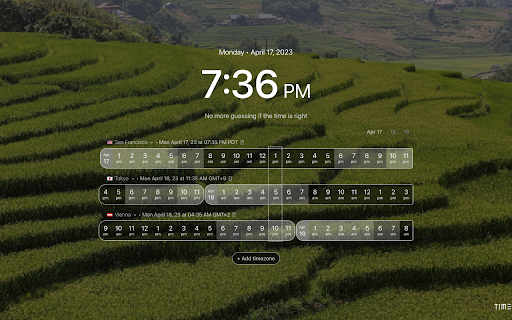
Time Genie is a powerful Chrome extension that helps users stay on top of their productivity game with elegant time zone management. It is a user-friendly new tab chrome extension, that allows individuals who frequently interact with people across the globe to view & manage multiple time zones which can help with scheduling meetings or events accordingly (note, scheduling is not part of this extension). All of this experience is offered whenever you create a new tab in your chrome browser. Time Genie provides an easy-to-use interface that allows users to customize their time zone settings based on their preferred cities, regions, and countries. It also allows users to add or remove time zones, making it more convenient to manage time differences between multiple locations. One of the standout features of Time Genie is its ability to display the current time in multiple time zones simultaneously. This feature is particularly useful for individuals who work in different time zones or have clients located in various parts of the world. The tool provides users with an at-a-glance overview of the time in different locations, which eliminates the need to calculate time differences manually especially when day saving time changes happen. This feature also helps users to avoid scheduling conflicts and ensures that they are not contacting individuals during their off-hours. In addition to its functional features, Time Genie also boasts a collection of stunning background images that feature landscapes from around the world. The images are not only beautiful but also help to create a sense of immersion that adds to the overall user experience. From the Northern Lights in Iceland to the Great Barrier Reef in Australia, the background images of Time Genie are truly mouth-watering and add an extra layer of excitement to managing time zones. With such an aesthetically pleasing design, Time Genie makes time management not only efficient but also enjoyable. Overall, Time Genie is an invaluable tool for anyone who needs to manage multiple time zones. It is easy to use, customizable, and provides users with a range of features that make it effortless to stay on top of time differences across the globe. Whether you're a business professional, a student, or a frequent traveler, Time Genie is a must-have tool that will save you time and ensure that you never miss an appointment, flight or meeting again.

Figured
Resurrection of the old Figure It Out by TrustInsights.ai. Multiple timezones on your Chrome new tab page. Local, private, free. Figured is a Google Chrome extension by Christopher Penn, sponsored by TrustInsights.ai. It's a resurrection of the old "Figure It Out" service, which has been defunct for years, reimagined for the modern web with a focus on privacy and local operation. Figured provides an intuitive and efficient way to view multiple timezones simultaneously on your Chrome new tab page. It emphasizes local operation, user privacy, and a clean, informative interface. Overview In a globally connected world, keeping track of time across different regions can be challenging. Figured aims to simplify this by transforming your new tab page into a dynamic timezone dashboard. Whether you're coordinating with international teams, connecting with friends and family overseas, or planning your next trip, Figured provides the time information you need at a glance. The core principle is to display distinct IANA timezone zones, with the ability to show multiple user-added cities that fall under the same IANA zone on a single, consolidated card. All operations are performed locally within your browser, ensuring your data remains private and the extension works seamlessly even offline. Built with modern Chrome Extension best practices (Manifest V3), Figured is lightweight, performant, and respects your privacy. Key Features ✨ New Tab Dashboard: Replaces your new tab page with a customizable timezone display. 🏙️ IANA Zone Grouping: Consolidates multiple cities (e.g., "New York" and "Boston") onto a single card if they share the same IANA timezone (e.g., America/New_York). 🕒 Detailed Time Info: Each card shows: Current time (HH:MM AM/PM). Current date (e.g., "Wed, May 26"). Official timezone abbreviation (e.g., "PDT", "CEST"). Current UTC offset (e.g., "UTC-7", "UTC+2"). ☀️ A clear indicator for Daylight Saving Time (DST) when active. 🏠 Personalized "Home" Timezone: Designate a "Home" timezone, marked with a 🏠 icon, which serves as the central reference for sorting other timezones. 💻 System Timezone Display: Automatically detects and can display your computer's current system timezone, marked with a 🕰️ icon. 🎨 Granular Time-of-Day Theming: Timezone card backgrounds dynamically change based on the current hour in that specific zone, using a beautiful 2-hour interval gradient system (e.g., bright yellows for midday, deep blues for night, and transitional hues for dawn/dusk). 🔍 Easy Management: Add timezones by searching for cities from a comprehensive built-in list, with autocomplete suggestions. Remove timezone cards with a single click. Supports up to 24 distinct IANA timezone cards. ↔️ Relative Sorting: Timezone cards are intelligently sorted relative to your "Home" timezone – times behind "Home" to the left, times ahead to the right. 🔒 Local & Private: All core operations are performed locally. No external network requests for its primary functions. Your selected timezones and settings are stored only in your browser. 💾 Data Persistence: Your timezone configurations are saved locally and automatically reloaded. 🚀 Manifest V3 Compliant: Built using the latest Chrome extension platform for enhanced security, performance, and privacy. 👋 First-Run Setup: A simple prompt to set your "Home" timezone when you first install. ❓ Unlisted Location Handling: Clear "Location not found" messages with advice and a link to search on Google. How It Works Figured is built as a Manifest V3 Chrome Extension, ensuring it adheres to the latest standards for security and performance. New Tab Override: The extension overrides Chrome's default new tab page to display the Figured dashboard. Local Data: It uses a bundled JSON file (common/locations.json) containing a comprehensive list of cities and their corresponding IANA timezone identifiers. Time Calculations: All time calculations, including current time, date, DST status, and UTC offsets, are performed using the browser's built-in Intl API with IANA timezone identifiers. This ensures accuracy and leverages the user's system updates for timezone rules. Dynamic Updates: A service worker (service-worker.js) uses the chrome.alarms API to trigger updates every second. This prompts the new tab page to refresh displayed times. User Interface: The main interface (newtab.html, newtab.css, newtab.js) is responsible for: Rendering timezone cards. Applying the dynamic time-of-day background themes. Handling user interactions like adding/removing timezones and setting the home timezone. Displaying search suggestions. Local Storage: User preferences, including selected timezones, the home timezone, and associated cities per card, are stored locally using chrome.storage.local. No data is sent externally.

Worldtime
This extension inspired by http://www.worldtimebuddy.com/. It provides information about time of the day in different locations in very convenient way. As a data source it uses most recent version of IANA time zones database http://www.iana.org/time-zones provided by momentjs timezone library (http://momentjs.com/timezone/), it accounts daylight saving time in different regions. Features: - show active DST for different regions (if available) - show UTC offset - export to .ICS file which could be opened in outlook - export directly into your google calendar - copy schedule into the clipboard - theme customisation (light/dark, colors) v1.2.30 - fixed bug with adding new timeline when only one timeline is presented - added 'reset to defaults' button to clear settings - removed unnecessary permission v1.1.21 - fixed bug with initialization v1.1.19 - fixed bug with dislaying DST flag v1.1.13 - extended clickable area for range selector v1.1.10 - start of selected range is set to current time by default - extended clickable area for range selector

Timezone Converter and World Clock
Timezone Converter and World Clock Effortlessly Convert Time Across Time Zones Instantly convert time between multiple time zones with ease. Interactive timeline visualization for intuitive time comparisons. Drag, scroll, and explore different time zones seamlessly.

Time Zone Converter by OneCal
Quickly convert between multiple time zones in an instant, right inside your browser. A Time Zone Converter and World Clock, right inside your browser. Quickly convert between multiple time zones in an instant, without context switching, right inside your browser. 🔀 CONVERT TIME BETWEEN TIME ZONES Easily convert the time between multiple time zones in a very intuitive way, right inside your browser. Simply enter the local time in any city and you will instantly see what time it corresponds to in every other city. 🌍 WORLD CLOCK Quickly see what time is it anywhere in the world, with just a single click. Adding a new time zone is as simple as searching for a city and removing one is only one click away. 👩💻 NO CONTEXT SWITCHING Whether you’re planning a meeting with your team, writing a document or speaking to a team member, you won’t be distracted. Install the extension on your browser and you will never need to switch tabs again to convert between time zones again.
