
lplcbopdbafpdcogfmgfhedhlpepljga
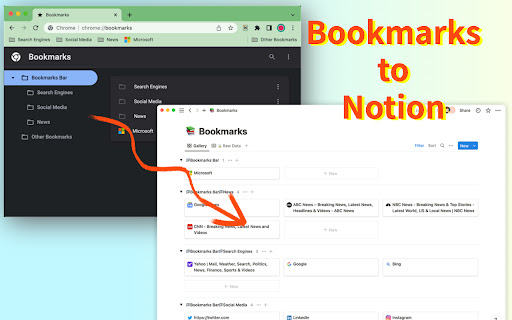

Sync Browser Bookmarks with Notion Database. Centralize your bookmarks. Bookmarks to Notion is used for syncing your browser bookmarks to Notion databases. It helps centralize your bookmarks into notion databases. Notion is the internet's only all-in-one workspace for essential work tools. By syncing your browser bookmarks with Notion databases. You can easily manage your resources in one place. To do that, you need to connect the extension with your Notion database, choose to use our template, then you can sync your browser bookmarks to Notion with 1 click. Features: ✅ Sync your browser bookmarks to the Notion Database with just 1 click ✅ Sync bookmark icon as Notion page icon ✅ Automatically synchronize additions, removals, or modifications of your local bookmarks to Notion ✅ Support multiple connections ✅ Support bookmark sub-folders ✅ Support multiple Notion workspaces Should you have any issues or feature requests, shoot us an email support@bookmarkstonotion.com

Notion Boost
Boost Notion productivity with 20+ customizations like outline, small text full width for all, back to top button etc Make Notion more productive and less distractive. Notion Boost is a lightweight extension to add extra features and tweaks to Notion: ✔️ Show sticky outline (table of contents) for pages that have headings or sub-headings. ✔️ Set full width for all pages by default. ✔️ Set small text for all pages by default. ✔️ Add 'Scroll to top' button. ✔️ Disable AI menu when pressing space key. ✔️ Show full text in table cells on mouse hover. ✔️ Close slash command menu '/' by pressing space key. ✔️ Don't show slash command menu when pressing '/'. ✔️ Hide floating help button for all pages. ✔️ Align document images to left instead of center. ✔️ Show line numbers for code blocks. ✔️ Enable spellcheck inside code blocks. ✔️ Don't show popup menu when pasting external links. ✔️ Hide red notification icon from sidebar. ✔️ Add more height to page by hiding top padding, image cover, & icon ✔️ Make bold text bolder when using Notion in dark mode. ✔️ Truly hide 'Hidden columns' in Kanban board view. ✔️ Hide comments section from all pages. ✔️ Hide backlinks section from all pages. ✔️ Open full pages instead of preview. ✔️ Narrow spacing between list items. ✔️ Add indentation lines to lists. ✔️ Make Rollup URLs clickable. ✔️ Add frame to images. ✔️ Hide placeholder: Type '/' for commands. 🙏 If you found this extension useful then please support it by rating ★★★★★. Notion Boost is also available for Firefox, Brave, and Edge. Follow @NotionBoost (https://twitter.com/NotionBoost) for unique tips, tricks, and free goodies. 1. Visit any notion page. 2. Click on the extension icon (clickable only when you are on a notion page). 3. A popup menu will appear, you can toggle features from there. Notion Boost is made by Gourav Goyal (https://gourav.io). I am a tech founder and productivity freak who relies heavily on Notion to organize things and manage work. I made this extension to make Notion more productive (and less distractive) by filling the gaps which I feel are lacked in the product. I hope you find this extension helpful :) Notion Boost extension is an open-source project and has no ads, no analytics, no trackers, and no use of cookies. Furthermore, Notion Boost extension does not store or send any data from your Notion account. https://github.com/GorvGoyl/Notion-Boost-browser-extension/issues

Screenshot to Notion & Annotate
Snap and embed website and scrolling screenshots directly to Notion with annotation tools like arrows, callouts, crop +30 more tools Screenshot to Notion is a free plugin from Markup Hero that supercharges Notion with instant website and scrolling screenshots embedded directly into documents and databases. Then add powerful annotation tools on screenshots, images and PDF's with real-time updates direction inside Notion. It's free, and no sign-up is required. Or upgrade to our paid version is $4/month for tons of pro features. Read below for a coupon code to try pro for free! 1️⃣ Website Screenshot - Snap and embed exactly what shows in the current tab 2️⃣ Scrolling Screenshot - Capture an entire website, from top to bottom of scroll 1️⃣ Markup Tools - Text, Callout, Arrow, Pen, Line, Shapes, Highlight 2️⃣ Editing Tools - Crop, Blur, Colors, Sizes, Multi-Select, Zoom 3️⃣ Insert Images - Add images or other screenshots to any markup 4️⃣ Multiple Pages - Add, remove and reorder pages just like a PDF 5️⃣ Sharing - Copy links for email, SMS, Slack, social media, + more 6️⃣ Copy to Clipboard - Paste screenshot with annotations anywhere 7️⃣ Download & Export - Save as an image or PDF to your computer 8️⃣ Stay Organized - Title screenshots, organize in folders, and search 9️⃣ Privacy - Share links anyone can view, private to you or enable collab 🔟 Collaborate - Allow others to add annotations to your screenshots 1️⃣ It's easy to paste an image into Notion, but we can't add arrows, highlights and other markup and instantly see the updates in Notion? 2️⃣ It's easy to share an entire page in Notion, but we can't share an image or PDF with annotations that are embedded in a document 3️⃣ It's easy to collaborate with people in Notion, but we can't share an image or PDF for multiple people to comment or add annotations to NO ADS, WE RESPECT PRIVACY Free version never has ads and we never sell your information. FOREVER FREE OR UPGRADE Use Markup Hero without even creating an account. Upgrade if you want advanced editing and annotation features and to save unlimited screenshots. WANT A COUPON CODE Upgrade and get 1 month free on the monthly plan (use code 1MONTHFREE) or get 3 months free on the annual plan (use code 3MONTHFREE). FAST AND EASY SCREENSHOT EMBEDS Instantly snap entire websites and embed into any Notion document or database. Then add annotations with a single click and see the real-time changes in your Notion document. SIMPLE AND POWERFUL ANNOTATION Don't just take screenshots, add arrows, callouts, highlights, shapes, pen, blur and 20+ more tools. Always editable and saved forever. COLLABORATE WITH OTHERS Markup Hero is the only screenshot tool that let's other people add annotations to your markup. This can be enabled or disabled for each screenshot. ADD SIGNATURES Built in signature tool makes approvals and document signing simple and fast. CROP, ROTATE, AND ZOOM Crop and un-crop any screenshot instantly, rotate the entire canvas, and zoom in/out on desktop, browser or mobile device. FREE DESKTOP SCREENSHOT APP Install our desktop screenshot tool as well and replace the built in Mac or Windows app that is very limited in capability. All screenshots from Chrome or Desktop are saved in the same place. A single repo for all your screenshots and annotations. 1️⃣ Capture Ideas - Instantly capture and share ideas with Markup Hero's screenshot app and image / PDF uploader. Also make sure to check out our Google Drive App to quickly annotate and draw on Google Docs, Google Sheets and Google Slides. 2️⃣ Communicate Clearly - Clearly communicate your message on any image, PDF or website with easy to use annotation tools. 3️⃣ Save Time - Access all your markups and annotations with a click and make edits on the fly. 4️⃣ Stay Organized - Keep all your markups organized with titles, collections, history and custom privacy settings. WHO IS THIS FOR 1️⃣ MILLIONS of NOTION users who want embed and annotate screenshots, PDF's and images. 2️⃣ Entrepreneurs - Literally do a million things with Markup Hero. 3️⃣ Marketers - Create comps, collect feedback, showcase concepts. 4️⃣ Product Managers - Gather input, show features, explain faster. 5️⃣ Educators - Grade work, give feedback to students. 6️⃣ Students - Complete assignments, ask questions. 7️⃣ Engineers - Showcase code, do QA, get input. 8️⃣ Freelancers - Build comps, share ideas. 9️⃣ Sales People - Create sales collateral, send feedback. 🔟 Creators - Tell stories, get feedback, make things. ------------------ WE HEAR YOU Highly active development. More features every month. Highly stable platform. Responsive customer support. Easy billing, refunds. No hassle. Literally the easiest, best, simpliest and most versitile tool you will ever use. 1️⃣ Check our roadmap for updates and planned features at https://roadmap.markuphero.com 2️⃣ Visit our support portal or chat bubble to submit a ticket or get help at https://help.markuphero.com 3️⃣ Download our desktop app at https://markuphero.com/download 4️⃣ Get our free Slack integration at https://markuphero.com/integrations/slack-app.html 5️⃣ Get our free Google drive app at https://markuphero.com/integrations/google-drive-app.html 6️⃣ Integrate our API with your SaaS application, learn more at https://markuphero.com/integrations/annotation-api.html 7️⃣ See our pricing and feature list at https://markuphero.com/pricing If you use Notion like we use Notion then you know the only thing missing is embedding screenshots and annotating files directly from Notion pages. Markup Hero for Notion is the most powerful plugin you will ever try.

Notion Style Tweaks
Tweaks for Notion NST is a free and open source Chrome extension aiming to give great granular control over the visual appearance of Notion. If you find any bugs or have any suggestions feel free to open an issue on Github.

Copy To Notion: Clip anything to Notion
Easily capture, organize, and access all your online clips directly in Notion. Copy to Notion: The Ultimate Web Clipper and Organizer for Notion Save and organize web content seamlessly into Notion with Copy to Notion—the ultimate Chrome extension designed for Notion users. Transform how you collect, organize, and retrieve online content directly into your Notion workspace. ✅ Web Clipper for Notion: Easily save articles, text snippets, screenshots, images, bookmarks, notes, and any webpage elements directly to Notion, preserving original formatting. ✅ Multi-Select Functionality: Select multiple items—text, images, or any webpage elements—and save them to Notion in one go. ✅ Intuitive Notion Integration: Save web clips directly to specific Notion pages or databases, fitting seamlessly into your Notion workflow. ✅ Advanced Highlighting & Screenshots: Capture essential website highlights and full-page screenshots for thorough research documentation. ✅ CSS Selector Feature: Auto-fill your database fields dynamically with data such as images, text, and URLs from web pages using your preset CSS selectors. ✅ Personalized Notes: Add custom notes to your saved clips, capturing your insights and thoughts instantly. ✅ Automatic Link Saving: Each clip includes the source URL for quick reference and citation. ✅ Bookmarking & Embedding Made Simple: Bookmark URLs or embed them within Notion pages for organized access. ✅ Web Clips Manager Template: Utilize our exclusive ready-to-use Notion template to centralize and manage your clippings effectively. ✅ Flexible Saving Options: Choose exactly where in Notion you save your clips, allowing for customized organization. ✅ Right-Click Image Saving: Save images directly to Notion via right-click, streamlining your content gathering process. ✅ Full-Screen Capture: Easily capture and save entire webpage screenshots to Notion for comprehensive reference. ✅ Customizable Saving Options: Tailor how and where your clips are saved within Notion for personalized organization. ✅ Site-Specific Database Forms: Set up unique database forms for different websites, enhancing organization. ✅ Keyboard Shortcuts: Leverage shortcuts for rapid note-taking, bookmarking, and more, enhancing your productivity. ✅ Multi-Workspace Support: Easily switch between multiple Notion workspaces for diverse projects. 👥 Ideal For: ✅ Notion Users Seeking a Web Clipper: Save web content like articles, images, and text snippets directly into Notion. ✅ Researchers and Students: Build a personal knowledge base by capturing design assets, statistics, and research findings. ✅ Content Creators and Designers: Collect inspiration, visuals, and design elements for your projects. ✅ Professionals Tracking Competitive Intelligence: Gather competitor information, pricing, and marketing materials. ✅ Newsletter Curators: Compile content and resources effortlessly for upcoming issues. ✅ Project Managers: Develop project plans and roadmaps by gathering relevant information and resources. ✅ Social Media Managers: Clip quotes, articles, and images for future social media posts. ✅ Language Learners: Save vocabulary words, grammar rules, and learning resources into Notion. ✅ Recipe Collectors: Clip recipes and cooking tips from different websites. ✅ Travel Enthusiasts: Gather information on destinations, attractions, and accommodations. ✅ Anyone Streamlining Online Research: Efficiently collect and organize information from various sources. ✉️ We Value Your Input For assistance or feedback, reach out to us at support@copytonotion.com. We're committed to continually improving Copy to Notion based on your insights.
