
eciepnnimnjaojlkcpdpcgbfkpcagahd
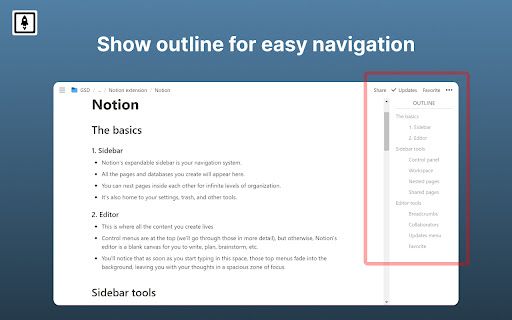


Boost Notion productivity with 20+ customizations like outline, small text full width for all, back to top button etc Make Notion more productive and less distractive. Notion Boost is a lightweight extension to add extra features and tweaks to Notion: ✔️ Show sticky outline (table of contents) for pages that have headings or sub-headings. ✔️ Set full width for all pages by default. ✔️ Set small text for all pages by default. ✔️ Add 'Scroll to top' button. ✔️ Disable AI menu when pressing space key. ✔️ Show full text in table cells on mouse hover. ✔️ Close slash command menu '/' by pressing space key. ✔️ Don't show slash command menu when pressing '/'. ✔️ Hide floating help button for all pages. ✔️ Align document images to left instead of center. ✔️ Show line numbers for code blocks. ✔️ Enable spellcheck inside code blocks. ✔️ Don't show popup menu when pasting external links. ✔️ Hide red notification icon from sidebar. ✔️ Add more height to page by hiding top padding, image cover, & icon ✔️ Make bold text bolder when using Notion in dark mode. ✔️ Truly hide 'Hidden columns' in Kanban board view. ✔️ Hide comments section from all pages. ✔️ Hide backlinks section from all pages. ✔️ Open full pages instead of preview. ✔️ Narrow spacing between list items. ✔️ Add indentation lines to lists. ✔️ Make Rollup URLs clickable. ✔️ Add frame to images. ✔️ Hide placeholder: Type '/' for commands. 🙏 If you found this extension useful then please support it by rating ★★★★★. Notion Boost is also available for Firefox, Brave, and Edge. Follow @NotionBoost (https://twitter.com/NotionBoost) for unique tips, tricks, and free goodies. 1. Visit any notion page. 2. Click on the extension icon (clickable only when you are on a notion page). 3. A popup menu will appear, you can toggle features from there. Notion Boost is made by Gourav Goyal (https://gourav.io). I am a tech founder and productivity freak who relies heavily on Notion to organize things and manage work. I made this extension to make Notion more productive (and less distractive) by filling the gaps which I feel are lacked in the product. I hope you find this extension helpful :) Notion Boost extension is an open-source project and has no ads, no analytics, no trackers, and no use of cookies. Furthermore, Notion Boost extension does not store or send any data from your Notion account. https://github.com/GorvGoyl/Notion-Boost-browser-extension/issues

Notion Style Tweaks
Tweaks for Notion NST is a free and open source Chrome extension aiming to give great granular control over the visual appearance of Notion. If you find any bugs or have any suggestions feel free to open an issue on Github.

Notion - Add to calendar
This extension create a link for save notion event in google calendar You can add simply notion's events in your calendar. For the moment, just google calendar is supported.

Chat to Notion
Save your discussions with ChatGPT, Deepseek, Claude and Mistral directly into Notion! Chat to Notion brings the cleverness of your favorite LLMs into your favorite app! Save your conversations with ChatGPT, Deepseek, Claude and Mistral into Notion in one click! ⭐ FEATURES ⭐ - Save a full conversation in a few seconds - Save an individual answer - Save to any Notion database - Choose page tags when saving - Customize page title when saving - Autosave (only for ChatGPT at the moment) - Save your entire chat history - Supports LaTeX notation 💡 USAGE 💡 On your prefererd LLM's page, you'll notice a new pin icon under each of its answers. You can use it to save specifically that answer and the related prompt to your Notion database of choice. If you want to save the whole discussion, you can do so from the extension popup. You may link as many databases with the extension as you need to, and you can then choose which database to save your discussion to at saving time. ✉️ CONTACT ✉️ Got any suggestion/issue? Check out the extension's GitHub at https://github.com/L-a-r-t/chatgpt-to-notion You may also send me an email at tlartigau.pro@gmail.com :) 🕵️ PRIVACY 🕵️ For security & practical reasons, some data such as your Notion user id and the key that allows us to communicate with your notion workspace (not your credentials, that no one except you has access to) are stored remotely instead of locally where they could be easily compromised. The code for this is open source and can be found on previously linked GitHub. Your data is never shared with any 3rd party. The extension needs to access the following websites : - api.notion.com The saving process means that there is a back-and-forth between the extension and Notion’s API. - chat.openai.com / chat.deepseek.com / claude.ai / chat.mistral.ai The extension needs to access ChatGPT/Deepseek/Claude/Mistral’s page to scrape the chat that you are saving. - chatgpt-to-notion.onrender.com This is the remote server where the access key is stored. The source corde for that remote server can be found on the extension’s GitHub. Take note that removing the extension’s access to your Notion workspace (Settings > My connections) will stop it from being able to access your workspace as long as you don’t reinstall it and redo the authentification process. - theo-lartigau.notion.site As part of the Notion authentification process, you are redirected on a webpage chosen by the Notion integration’s maker. Notion’s API response is url-encoded which means that the extension needs to access the redirect page to fetch it. In the case of this extension, that redirect page is the following : https://www.notion.so/ChatGPT-to-Notion-af29d9538dca4493a15bb4ed0fde7f91 THIS EXTENSION IS DEVELOPED INDEPENDENTLY AND IS NOT AFFILIATED TO EITHER OPENAI OR NOTION

Web Clipper
Web Clipper is an open source extension.You can save anything on the web to anywhere.And you can easily to add any platform. Web Clipper is an open source extension.You can save anything on the web to anywhere.And you can easily to add any platform. Web Clipper is a pluginization extension.Any you can easily to write new plugin. SUPPORTED PLUGIN - BOOKMARK - FULL PAGE - QR CODE - MANUAL SELECTION - SCREENSHOTS - READABILITY
