
oojndninaelbpllebamcojkdecjjhcle
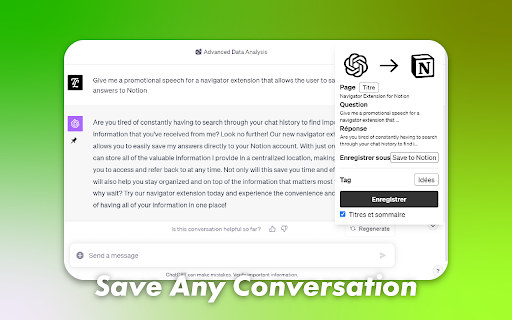


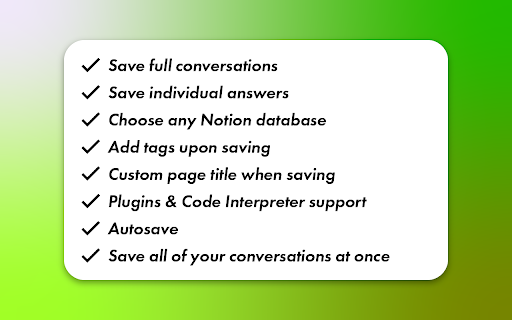
Save your discussions with ChatGPT, Deepseek, Claude and Mistral directly into Notion! Chat to Notion brings the cleverness of your favorite LLMs into your favorite app! Save your conversations with ChatGPT, Deepseek, Claude and Mistral into Notion in one click! ⭐ FEATURES ⭐ - Save a full conversation in a few seconds - Save an individual answer - Save to any Notion database - Choose page tags when saving - Customize page title when saving - Autosave (only for ChatGPT at the moment) - Save your entire chat history - Supports LaTeX notation 💡 USAGE 💡 On your prefererd LLM's page, you'll notice a new pin icon under each of its answers. You can use it to save specifically that answer and the related prompt to your Notion database of choice. If you want to save the whole discussion, you can do so from the extension popup. You may link as many databases with the extension as you need to, and you can then choose which database to save your discussion to at saving time. ✉️ CONTACT ✉️ Got any suggestion/issue? Check out the extension's GitHub at https://github.com/L-a-r-t/chatgpt-to-notion You may also send me an email at tlartigau.pro@gmail.com :) 🕵️ PRIVACY 🕵️ For security & practical reasons, some data such as your Notion user id and the key that allows us to communicate with your notion workspace (not your credentials, that no one except you has access to) are stored remotely instead of locally where they could be easily compromised. The code for this is open source and can be found on previously linked GitHub. Your data is never shared with any 3rd party. The extension needs to access the following websites : - api.notion.com The saving process means that there is a back-and-forth between the extension and Notion’s API. - chat.openai.com / chat.deepseek.com / claude.ai / chat.mistral.ai The extension needs to access ChatGPT/Deepseek/Claude/Mistral’s page to scrape the chat that you are saving. - chatgpt-to-notion.onrender.com This is the remote server where the access key is stored. The source corde for that remote server can be found on the extension’s GitHub. Take note that removing the extension’s access to your Notion workspace (Settings > My connections) will stop it from being able to access your workspace as long as you don’t reinstall it and redo the authentification process. - theo-lartigau.notion.site As part of the Notion authentification process, you are redirected on a webpage chosen by the Notion integration’s maker. Notion’s API response is url-encoded which means that the extension needs to access the redirect page to fetch it. In the case of this extension, that redirect page is the following : https://www.notion.so/ChatGPT-to-Notion-af29d9538dca4493a15bb4ed0fde7f91 THIS EXTENSION IS DEVELOPED INDEPENDENTLY AND IS NOT AFFILIATED TO EITHER OPENAI OR NOTION

Bookmarks to Notion
Sync Browser Bookmarks with Notion Database. Centralize your bookmarks. Bookmarks to Notion is used for syncing your browser bookmarks to Notion databases. It helps centralize your bookmarks into notion databases. Notion is the internet's only all-in-one workspace for essential work tools. By syncing your browser bookmarks with Notion databases. You can easily manage your resources in one place. To do that, you need to connect the extension with your Notion database, choose to use our template, then you can sync your browser bookmarks to Notion with 1 click. Features: ✅ Sync your browser bookmarks to the Notion Database with just 1 click ✅ Sync bookmark icon as Notion page icon ✅ Automatically synchronize additions, removals, or modifications of your local bookmarks to Notion ✅ Support multiple connections ✅ Support bookmark sub-folders ✅ Support multiple Notion workspaces Should you have any issues or feature requests, shoot us an email support@bookmarkstonotion.com

Fast Notion Chrome Extension
Fast Notion の Chrome 拡張機能 Fast Notion は Notion 上に素早くメモを取ることができるツールです。通常テキスト、ToDo、データベースの3種類の投稿モードを選ぶことが可能です。

Bard to Notion
Save your discussions with Bard directly into Notion! Bard to Notion brings the cleverness of Bard into your favorite app! An extension by the maker of ChatGPT to Notion. 💡 USAGE 💡 On Bard's page, you'll notice a new pin icon under each of its answers. You can use it to save specifically that answer and the related prompt to your Notion database of choice. If you want to save the whole discussion, you can do so from the extension popup. You may link as many databases with the extension as you need to, and you can then choose which database to save your discussion to at saving time. ✉️ CONTACT ✉️ Got any suggestion/issue? Check out the extension's GitHub at https://github.com/L-a-r-t/bard-to-notion You may also send me an email at tlartigau.pro@gmail.com :) 🕵️ PRIVACY 🕵️ For security & practical reasons, some data such as your Notion user id and the key that allows us to communicate with your notion workspace (not your credentials, that no one except you has access to) are stored remotely instead of locally where they could be easily compromised. The code for this is open source and can be found on previously linked GitHub. Your data is never shared with any 3rd party. The extension needs to access the following websites : - api.notion.com The saving process means that there is a back-and-forth between the extension and Notion’s API. - bard.google.com The extension needs to access Bard’s page to scrape the chat that you are saving. - bard-to-notion.onrender.com This is the remote server where the access key is stored. The source corde for that remote server can be found on the extension’s GitHub. Take note that removing the extension’s access to your Notion workspace (Settings > My connections) will stop it from being able to access your workspace as long as you don’t reinstall it and redo the authentification process. - theo-lartigau.notion.site As part of the Notion authentification process, you are redirected on a webpage chosen by the Notion integration’s maker. Notion’s API response is url-encoded which means that the extension needs to access the redirect page to fetch it. In the case of this extension, that redirect page is the following : https://theo-lartigau.notion.site/Bard-to-Notion-f0dfe63e7dee485e8d2d7aa5a1102388 THIS EXTENSION IS DEVELOPED INDEPENDENTLY AND IS NOT AFFILIATED TO EITHER GOOGLE OR NOTION

notion-enhancer
An enhancer/customiser for the all-in-one productivity workspace Notion Adds a pinned table of contents, navigation aids, customisable fonts, colours and interface elements, code block line numbers, right to left text, and more to the Notion web client. Please note that this release is currently missing some features available in previous releases. These features will be restored as soon as possible, but as part of an internal overhaul and the Chrome extension's upgrade to manifest v3, the notion-enhancer is being rebuilt from the ground up. For a full feature list and usage guide, check out the notion-enhancer website @ https://notion-enhancer.github.io/
