
jbeooomlnkgbokicnpcabkpnacabjnbm

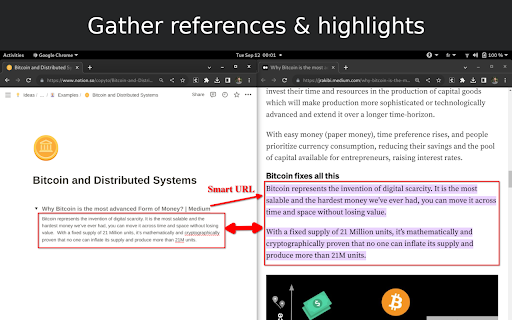

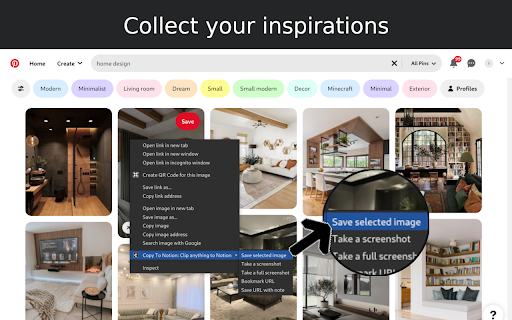

Easily capture, organize, and access all your online clips directly in Notion. Copy to Notion: The Ultimate Web Clipper and Organizer for Notion Save and organize web content seamlessly into Notion with Copy to Notion—the ultimate Chrome extension designed for Notion users. Transform how you collect, organize, and retrieve online content directly into your Notion workspace. ✅ Web Clipper for Notion: Easily save articles, text snippets, screenshots, images, bookmarks, notes, and any webpage elements directly to Notion, preserving original formatting. ✅ Multi-Select Functionality: Select multiple items—text, images, or any webpage elements—and save them to Notion in one go. ✅ Intuitive Notion Integration: Save web clips directly to specific Notion pages or databases, fitting seamlessly into your Notion workflow. ✅ Advanced Highlighting & Screenshots: Capture essential website highlights and full-page screenshots for thorough research documentation. ✅ CSS Selector Feature: Auto-fill your database fields dynamically with data such as images, text, and URLs from web pages using your preset CSS selectors. ✅ Personalized Notes: Add custom notes to your saved clips, capturing your insights and thoughts instantly. ✅ Automatic Link Saving: Each clip includes the source URL for quick reference and citation. ✅ Bookmarking & Embedding Made Simple: Bookmark URLs or embed them within Notion pages for organized access. ✅ Web Clips Manager Template: Utilize our exclusive ready-to-use Notion template to centralize and manage your clippings effectively. ✅ Flexible Saving Options: Choose exactly where in Notion you save your clips, allowing for customized organization. ✅ Right-Click Image Saving: Save images directly to Notion via right-click, streamlining your content gathering process. ✅ Full-Screen Capture: Easily capture and save entire webpage screenshots to Notion for comprehensive reference. ✅ Customizable Saving Options: Tailor how and where your clips are saved within Notion for personalized organization. ✅ Site-Specific Database Forms: Set up unique database forms for different websites, enhancing organization. ✅ Keyboard Shortcuts: Leverage shortcuts for rapid note-taking, bookmarking, and more, enhancing your productivity. ✅ Multi-Workspace Support: Easily switch between multiple Notion workspaces for diverse projects. 👥 Ideal For: ✅ Notion Users Seeking a Web Clipper: Save web content like articles, images, and text snippets directly into Notion. ✅ Researchers and Students: Build a personal knowledge base by capturing design assets, statistics, and research findings. ✅ Content Creators and Designers: Collect inspiration, visuals, and design elements for your projects. ✅ Professionals Tracking Competitive Intelligence: Gather competitor information, pricing, and marketing materials. ✅ Newsletter Curators: Compile content and resources effortlessly for upcoming issues. ✅ Project Managers: Develop project plans and roadmaps by gathering relevant information and resources. ✅ Social Media Managers: Clip quotes, articles, and images for future social media posts. ✅ Language Learners: Save vocabulary words, grammar rules, and learning resources into Notion. ✅ Recipe Collectors: Clip recipes and cooking tips from different websites. ✅ Travel Enthusiasts: Gather information on destinations, attractions, and accommodations. ✅ Anyone Streamlining Online Research: Efficiently collect and organize information from various sources. ✉️ We Value Your Input For assistance or feedback, reach out to us at support@copytonotion.com. We're committed to continually improving Copy to Notion based on your insights.

Notix: Notion Web Clipper
Save the Web to Notion. Use AI to create summaries and auto-prefills. Easily create how-to guides with screenshots in Notion. Finally, a reliable Notion web clipper with all the features you need: 🚀 Templates for Efficiency: Quickly populate properties with pre-defined values or pull info from the current website, like page titles or URLs. 📷 Screenshots Made Simple: Notix lets you effortlessly add screenshots from your current page. You have the flexibility to choose between capturing the visible area or the entire page. You can also copy and paste images from your favorite screenshot tool or from your files. 📝 Effortless Page Editing: Edit page content effortlessly using Notix's extension. It's as intuitive as editing a Notion page, directly from your browser. 🧱 Custom Blocks for Content Prefill: Craft custom blocks in Notix to populate page content effortlessly. It's a one-stop solution – automatically capture a screenshot, insert selected text, include page title or URL, and even employ AI for content summarization. Your content, your way. 🤖 AI-Powered Prefill: Prefill properties, generate page titles, summarize web pages and much more with the power of AI. Try it out for free!

YouTube Notes to Notion with Udemy, Coursera, BiliBili and more by Snipo
Take YouTube notes directly to Notion, generate AI flashcards, capture screenshots, and sync learning courses with Notion 🚀 This extension enables you to: ✅ take clickable timestamped YouTube notes or Video notes ✅ capture screenshots on videos and elevate your learning ✅ generate AI flashcards in one click based ✅ create a flashcard deck and export it to Anki ✅ YouTube transcript to Notion notes ✅ recording YouTube clips to YouTube notes ✅ seamless sync of YouTube videos or Udemy courses with Notion (sync title, chapters, and YouTube playlist) ✅ organize your videos into notebooks with the index for the playlist in Notion ✅ keyboard shortcuts (speed up and down, seek backward and forward, pause, timestamp note, capture screenshot, etc.) ✅ mark as finished on the notion page ✅ supporting custom Notion database for saving YouTube notes ✅ supporting Chrome Side Panel as YouTube notes ✅ More Tech-friendly than ReClipped and Video notebook ✅ More User-friendly than Askify and Transnote ⚡ Snipo is a notebook for online courses, enabling you to learn and study effectively across the web on any platform to Notion. 🌐 Compatible with other great extensions, including Notion Web Clipper, Save to Notion, Tailored-Notion, and ChatGPT to Notion. 😍 Snipo is available on: ★ Youtube ★ Udemy ★ SkillShare ★ Vimeo ★ Coursera and more The latest updates are: 🔹 Supporting Custom Notion Databases 🔹 Supporting Chrome Side Panel for Notion notes 🔹 New Vimeo, Skillshare, and Ted integrations 🔹 New Transcript for Udemy lectures 🔹 New Video Clips and Customizable Settings for your Note-Taking Changelog is available https://snipo.canny.io/changelog 👥 Do you have any questions about Snipo? Join our community: Discord: https://discord.com/invite/dMa6WVEKkw Telegram: https://t.me/snipo_io Twitter: https://twitter.com/snipo_io YouTube: https://www.youtube.com/@SnipoHQ/videos After installing, please reload all tabs for the extension to take effect. For issues/suggestions, please contact us via email: hello@snipo.io ⓘThis Chrome extension is about note taking and has no affiliations with the popular Notion™ or YouTube™ All copyrights belong to their respective owners. Snipo is not owned by, is not licensed by, and is not a subsidiary of Notion or YouTube.

Notion Power
Numerous customization features, enhancing UX/UI for Notion page. Fixed TOC, change theme and font, scroll-to-top button, more... --------------------------------------------------------------------------- Tired of Notion's ugly, boring and inconvenient UI/UX? Notion is: 1. Lack of Fixed Table of Contents 2. Endlessly scrolling through pages to find what you need 3. Only the default theme and font 4. Distracting horizontal scrollbar in board view 5. No Scroll to Top Button 6. Uninspiring UI: The default Notion interface fails to inspire creativity and motivation. --------------------------------------------------------------------------- Why NotionPower? Why use this extension with Notion.so? This extension can help you: - Empower your notion experience with more than 20+ UX/UI features. - Supercharge productivity. - Make notion more attriactive and less boring. - Visualize Your Progress! Track your activity with NotionPower's insightful graphs. - Your data stays safe in your browser. - Increase Line Spacing - Hide Page Properties - Hide Breadcrumb And more...

Flylighter: Capture Articles and Highlights to Notion
Capture bookmarks, article, and highlights with Flylighter – your new favorite web clipper for Notion. Flylighter is your new favorite web clipper for Notion. Easily save anything you discover on the web at super-fast speeds – webpages, highlights, full articles, and more. With Flylighter, you can: ✅ Create Flows that capture web clips to Notion databases or pages ✅ Set property values in Notion databases – tags, dates, Relations, etc. ✅ Capture highlights that retain formatting - lists, headings, tables, and more ✅ Easily append new highlights to a previous capture ✅ Save resources at the speed of thought with Instant Capture mode and keyboard shortcuts Soon, you’ll also be able to save your clips, highlights, and articles to many more platforms – including Obsidian, Zapier, Pipedream, and more. You’ll also be able to save resources and ideas on the go with our upcoming mobile app. Our goal is to give you a set of powerful tools for quickly capturing anything and saving it to the second brain you’re already using, whatever it may be. Flylighter is built and maintained by a small team of passionate Notion nerds, including Thomas Frank (the world’s most-followed Notion expert) and Eli Wimmer (creator of Notion Style Tweaks). After you install, say hi in our Discord!
