
fmnbhafoldgblmdmhflflnjlfjcgpnog

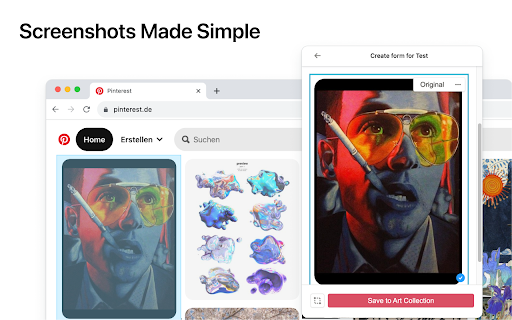
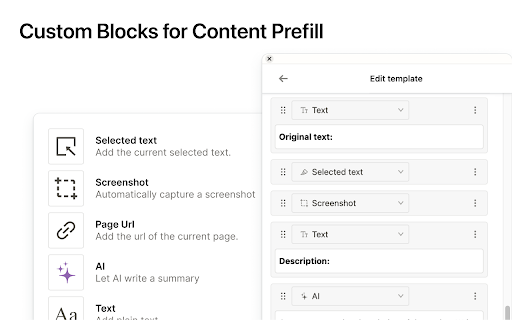
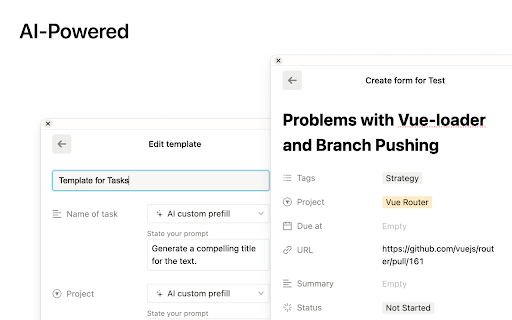
Save the Web to Notion. Use AI to create summaries and auto-prefills. Easily create how-to guides with screenshots in Notion. Finally, a reliable Notion web clipper with all the features you need: 🚀 Templates for Efficiency: Quickly populate properties with pre-defined values or pull info from the current website, like page titles or URLs. 📷 Screenshots Made Simple: Notix lets you effortlessly add screenshots from your current page. You have the flexibility to choose between capturing the visible area or the entire page. You can also copy and paste images from your favorite screenshot tool or from your files. 📝 Effortless Page Editing: Edit page content effortlessly using Notix's extension. It's as intuitive as editing a Notion page, directly from your browser. 🧱 Custom Blocks for Content Prefill: Craft custom blocks in Notix to populate page content effortlessly. It's a one-stop solution – automatically capture a screenshot, insert selected text, include page title or URL, and even employ AI for content summarization. Your content, your way. 🤖 AI-Powered Prefill: Prefill properties, generate page titles, summarize web pages and much more with the power of AI. Try it out for free!

Save to Notion
Save the Web to Notion - 💾 Save web articles, emails, tweets, Youtube videos, Linkedin posts, cooking recipes and more… To read them later in Notion. - 🏷️ Fill database properties (tags, relation, checkbox…), right in the extension. - 📸 Take screenshots & pick images from the web and upload them to Notion. - ✍️ Highlight portions of text directly from the web and send them right to Notion. - 🧠 Automatically Map data on webpages, such as article’s publication date, author name etc… To database properties, so you don't have to copy/paste. - 👑 Create different forms for your various use cases, whether it be for work or personal purposes. Start using Save to Notion today for free! It is helping thousands of individuals everyday to be more productive and enjoy Notion in their personal and professional lives. You have an issue or want to give a feedback / suggestion? Drop me an email :) The extension doesn't collect any data unless you make an account. If you do, it may collect anonymous usage data to help us understand how you use the extension and what features we should work on first.

Add to Notion
Seamlessly save web content to Notion with a single click Add to Notion - Seamlessly Capture and Organize Your Ideas Add to Notion is a powerful Chrome extension designed to enhance your productivity by allowing you to effortlessly save web content directly to your Notion workspace. Whether you're a student, professional, or anyone who loves organizing information, this extension is your perfect companion. ✔️Instant Saving: Quickly save articles, images, and any web content to Notion with just a click. ⭕️Customizable Organization: Organize your saved content into specific Notion pages or databases, making it easy to find and manage later. 📶 Streamlined Workflow: Eliminate the hassle of copy-pasting and switching between tabs. Add to Notion integrates smoothly with your browser for a seamless experience. ✅Enhanced Productivity: Focus on what matters by keeping all your important information in one place, accessible anytime, anywhere. Add to Notion is perfect for anyone looking to enhance their productivity and streamline their workflow. By integrating with Notion, it ensures that your ideas and important content are always at your fingertips, organized the way you want. Whether you're conducting research, planning a project, or simply gathering inspiration, Add to Notion makes it easy to capture and manage your digital life.

Bookmarks to Notion
Sync Browser Bookmarks with Notion Database. Centralize your bookmarks. Bookmarks to Notion is used for syncing your browser bookmarks to Notion databases. It helps centralize your bookmarks into notion databases. Notion is the internet's only all-in-one workspace for essential work tools. By syncing your browser bookmarks with Notion databases. You can easily manage your resources in one place. To do that, you need to connect the extension with your Notion database, choose to use our template, then you can sync your browser bookmarks to Notion with 1 click. Features: ✅ Sync your browser bookmarks to the Notion Database with just 1 click ✅ Sync bookmark icon as Notion page icon ✅ Automatically synchronize additions, removals, or modifications of your local bookmarks to Notion ✅ Support multiple connections ✅ Support bookmark sub-folders ✅ Support multiple Notion workspaces Should you have any issues or feature requests, shoot us an email support@bookmarkstonotion.com

Notion Power
Numerous customization features, enhancing UX/UI for Notion page. Fixed TOC, change theme and font, scroll-to-top button, more... --------------------------------------------------------------------------- Tired of Notion's ugly, boring and inconvenient UI/UX? Notion is: 1. Lack of Fixed Table of Contents 2. Endlessly scrolling through pages to find what you need 3. Only the default theme and font 4. Distracting horizontal scrollbar in board view 5. No Scroll to Top Button 6. Uninspiring UI: The default Notion interface fails to inspire creativity and motivation. --------------------------------------------------------------------------- Why NotionPower? Why use this extension with Notion.so? This extension can help you: - Empower your notion experience with more than 20+ UX/UI features. - Supercharge productivity. - Make notion more attriactive and less boring. - Visualize Your Progress! Track your activity with NotionPower's insightful graphs. - Your data stays safe in your browser. - Increase Line Spacing - Hide Page Properties - Hide Breadcrumb And more...
