
lpeapnpcmiabnlfbclinjkejebpgfnei

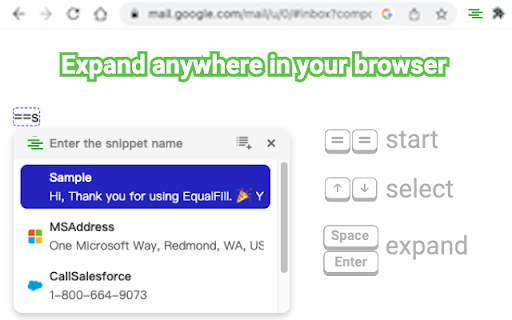
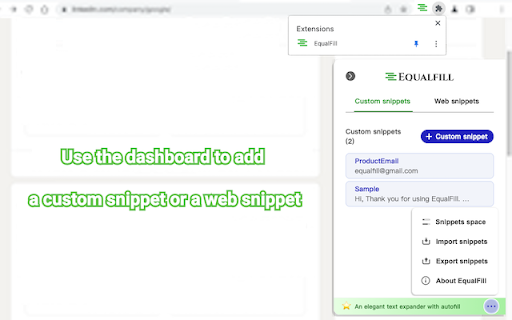
An elegant text expander with autofill. Just press "==". EQUALFILL The purpose of EqualFill is to eliminate repetitive typing or copy-paste. Keep your most-used emails, messages, and even snippets of open web pages within EqualFill. Your snippet can be expanded anywhere in your chrome. FEATURES * It's free. No credit card required. No login account required. * Intelligently retrieves snippets through a friendly user interface, whether you enter full name or abbreviation. * Supports autofill. * Runs offline. USAGE Press the "==" keys to start entering the snippet name. Press the "↑↓" arrow keys to select a snippet. Press the "凵" space key or the "↲" enter key to expand the snippet. Use the dashboard to add a custom snippet or a web snippet. PRIVACY EqualFill keeps your data safe. It does not collect or store your keystrokes. It does not store your snippet data on our server. It does not communicate with our server when the expansion and autofill of snippet occurs locally on your computer. Snippets are stored locally on your computer. When EqualFill is uninstalled, they are erased from your local storage. You can export snippets to a high-strength encrypted file for backup. The encrypted file can be imported to your another computer with the correct password.

Text Expander
Expand a snippet of text to a longer form, using a hotkey (e.g., "so" → "site:stackoverflow.com"). Works in most text inputs, such as search boxes and multi-line comment fields. Adding a text snippet: • Click/open the extension. • In the first box: enter the abbreviated text, without spaces, to be replaced a longer form in the second text box. • In the second box: enter the expanded form, replacing the "prefix" text from the first box. To use a saved snippet: • In any input box, type your prefix text and use the assigned shortcut (default is "Ctrl+Shift+G". • For the expansion to work, the prefix text must be separated from other words by a space. • The caret (blinking text cursor) must be on or around the prefix word. For example, lets say the pipe character (|) is your caret placement: To remove a text snippet: • Click/open the extension. • Check any boxes you'd like removed. • Click the "Remove" button and reopen the extension. Notes and limitations: • Expansion won't work in some input fields. • Expansion won't work in the Omnibox (Chrome's address bar/search bar). • Expansion won't work in the startup page search bar. • The prefix text doesn't need to be highlighted. • The prefix-expansion pair is saved locally on your browser. Change Notes: [1.1.0] • Changes: 2nd input box now changed to to allow multi-line expansions. • Bug fix: Long expansions in the extension are now scrollable. • Bug fix: Removing local storage items doesn't refresh list. Check the source code on GitHub: https://github.com/ssmooncoder/text-expander

TextPie Text Expander and Canned Responses
TextPie is an extension for canned responses and text expansion, allowing you to craft replies once and reuse them with one click. Forget about copy-pasting text from multiple templates. With TextPie, an autofill text expander, you will just need 2 seconds and 1 button. • Reach 100 people with TextPie as you would reach 10 by doing it manually. • Close more vacant jobs or sales deals. • Increase the open rate for cold outreach. • Forget about manually typing names, positions or dates. TextPie will autofill it for you. You need TextPie if you: • Have too much documents with outreach copies. • Spend in average 2 hours on switching between tabs, manually copying each message. • Underperform because you spend to much time on manual rut and make small typos in names and dates. • Feel burnt out because manual tasks affect your motivation. Just use TextPie for any daily work routine and achieve more. 🚀 Upload your text templates and use them on any messaging platform like Linkedin or Gmail. Just type // on your keybord or click on TextPie icon and access multiple of your templates. Pick one you need and it automatically appears on scree, no more copy-paste. Smart automation which is efficient and incredibly addictive Your messages will be personalized by default with our dynamic variables. TextPie automatically adds specific details like names, dates, or other custom information to your messages or emails. No more manual data input or typos, it’s on us. Ready to use templates, no need for a copywriter Explore our Template Gallery to get ready to use templates for any purpose — a work email, cold outreach, cover letter or connection request. Lacking time for copywriting? Just pick your industry or communication goal, we have templates for any need. • TextPie is simple. We’re still surprised that it’s just 1 button and you access hundreds of easily organized templates. • TextPie is secure. We put your data safety first. We protect your templates and personal information from any breach. • TextPie can be used anywhere. Integrate it with all digital platforms like Linkedin, Gmail or Upwork. Transform the way you communicate: we minimize the manual work, you make fewer mistakes and achieve more goals with TextPie. Top case of using TextPie in workflow: 🤝 Prospecting and outreach for Sales • TextPie cuts down the time I spend on prospecting, letting me reach more potential clients faster using templates and variables. • Create templates with dynamic variables for frequently used sales pitches, email templates, or proposals and follow ups. Ideal for multitasking across platforms like LinkedIn, Gmail, and Salesforce, Upwork. TextPie is a must-have for sales professionals looking to streamline operations and enhance productivity 🧑💼 Talent sourcing and Talent acquisition for Recruiters • Send personalized messages fast to keep candidates interested. • Automatically insert the right details like names into your messages to avoid mistakes. • Answer candidates with just one click, making communication swift and easy. TextPie is ideal for recruiters and talent acquisition specialists managing multiple candidates on platforms like LinkedIn, Dribbble, and email, helping you work more efficiently. 👋 Customer support and Customer Success • Personalize and send any repetitive message 10X faster, whether it’s to customers or teammates • Quickly respond to common questions, keeping your replies consistent and your customers happy • Communicate fast and close more customer tickets. 🦄 For Founders, Executives and Startups • Easily customize and send messages to expand your network, connect with investors, or collect user feedback. • Allow your team to quickly handle frequently asked questions on any platform, including email, chat, and social media. 💫 For Marketing and PR specialists • Use templates for common marketing phrases, comments, social media posts, or ad copy. • Send personalized messages to journalists quickly to boost your media outreach. 👩🏫 For Tutors and Educators • Quickly send notes, answer common questions, or send reminders about sessions and meetings. • Set up shortcuts for phrases or feedback comments you use often. This is particularly useful when grading papers or giving repeated instructions. 👨🎓 For Job seekers and Students • Personalize your chats with recruiters using dynamic variables for a custom touch. • Create your elevator pitch once and send it off in one click to impress hiring managers. • Automate your job search tasks, letting you get more done every day. 🤖 For working with AI & ChatGPT • Quickly retrieve your saved prompts whenever you need them without searching through previous chats. • Store any prompts you use often as templates with just a single click. 👩💼 For Lawyers and Legal support • Create shortcuts for commonly used legal terms, clauses, or citations. This speeds up document drafting, research, and answering common client questions. For any questions about TextPie, please email us at

Shortcut Pro: Templates & Snippets
Expand custom shortcuts into predefined text across your browser. Shortcut Pro: Templates & Snippets - Your Ultimate Productivity Booster Revolutionize your typing experience with Shortcut Pro: Templates & Snippets, the game-changing Chrome extension designed to supercharge your productivity and streamline your workflow. Say goodbye to repetitive typing and hello to lightning-fast text expansion that works seamlessly across all websites. 🚀 Boost Your Productivity to New Heights Harness the power of smart text expansions to dramatically reduce your typing time. With Shortcut Pro, you'll be amazed at how quickly you can compose emails, fill out forms, and respond to messages. Our users report saving hundreds of hours annually, transforming the way they work online. ⚡ Lightning-Fast Text Insertion Anywhere Whether you're crafting an email, responding to a customer inquiry, or filling out a complex form, Shortcut Pro has got you covered. With just a few keystrokes, insert pre-defined text templates anywhere you type in Chrome. From simple greetings to complex paragraphs, expand your text instantly and effortlessly. 🎯 Customizable Shortcuts for Every Need Create personalized shortcuts for frequently used phrases, paragraphs, or even code snippets. Tailor your expansions to fit your unique workflow and watch your efficiency soar. With Shortcut Pro, your most-used text is always at your fingertips. 🌐 Universal Compatibility Shortcut Pro works flawlessly with any text field on any website. From Gmail to Twitter, Salesforce to Zendesk, your shortcuts follow you everywhere in Chrome, ensuring a consistent and efficient typing experience across all platforms. 🔒 Enhanced Accuracy, Reduced Errors Eliminate typos and ensure consistency in your communications. By using pre-defined templates, you'll significantly reduce the risk of errors in important messages, legal text, or technical documentation. 📊 Track Your Productivity Gains Watch your efficiency grow with our built-in analytics. Track how many keystrokes you've saved and see the hours you've reclaimed. Let the numbers motivate you as you become more productive day by day. 🔧 Easy Setup, Instant Results Getting started with Shortcut Pro is a breeze. Our intuitive interface allows you to create and manage your shortcuts with ease. Start small and expand your library of shortcuts as you go, continuously optimizing your workflow. 🏆 Join Thousands of Satisfied Users From busy professionals to students, Shortcut Pro has helped thousands of users reclaim their time and boost their productivity. Join our community and experience the power of efficient text expansion. ★Create unlimited custom shortcuts and expansions ★Works on any website within Chrome ★Real-time text expansion as you type ★Easy-to-use shortcut management interface ★Productivity tracking to visualize your time savings ★Secure and private - your data stays on your device ★Regular updates and new features based on user feedback 💼 Perfect for: Professionals handling high volumes of emails or customer support Writers and content creators managing multiple projects Developers looking to streamline code snippet insertion Students writing papers or filling out applications Anyone looking to optimize their online typing experience 🚀 Upgrade Your Chrome Experience Today Don't let repetitive typing hold you back. Join the text expansion revolution with Shortcut Pro: Templates & Snippets. Download now and start experiencing the future of efficient typing. Your keyboard will thank you, and so will your productivity! Remember, with great power comes great responsibility - and great time savings. Shortcut Pro: where every keystroke counts, and every second saved is a second earned. Transform your Chrome browsing into a powerhouse of efficiency. Get Shortcut Pro now and type smarter, not harder!

AI Text Expander: Snippets and Templates
Create clever text expansions to speed up your writing on email, LinkedIn, and millions of websites. Linguix Turbo is your secret weapon to save time on repetitive tasks and boost productivity. Powered by advanced AI, it allows you to create shortcuts for commonly used messages, emails, support replies, and much more—helping your team write smarter and faster. What this extension does for you: ✅ Save up to 1 hour per day by expanding full messages with a single keystroke—whether you're sending client emails, internal updates, or customer support responses. 🖋️ Create reusable writing templates with just a couple of clicks—perfect for building a library of company-approved responses, connection requests, and follow-ups. ⚡️ Instant AI-based grammar and style recommendations—ensuring that your team's expanded text is not only fast but polished, professional, and aligned with your brand's voice. 🗂️ With Linguix Turbo, your team can focus more on meaningful work and less on repetitive writing. Whether you're a sales professional, customer service agent, or part of HR, this AI-powered tool helps you manage large volumes of messages quickly and efficiently. 🥷🏽 Seamless Integration: Linguix Turbo works flawlessly across Gmail, Google Docs, LinkedIn, Zendesk, and other business platforms, streamlining your workflows in any environment. 🏢 Increased Team Efficiency: With just one shortcut, your team can deploy well-crafted responses, sales pitches, or support answers in seconds, giving you a competitive edge. Get ahead of the competition: While others are copying and pasting, Linguix Turbo helps your team deliver personalized, high-quality messages faster than ever. Whether you're improving client communication or engaging leads, our text expander ensures your writing is both efficient and impactful. Download Linguix Turbo today and experience the power of AI-driven shortcuts. Boost your productivity and writing quality while saving time every day.
