
nkmhjacokhapaecpbcbddhjjpajddamf
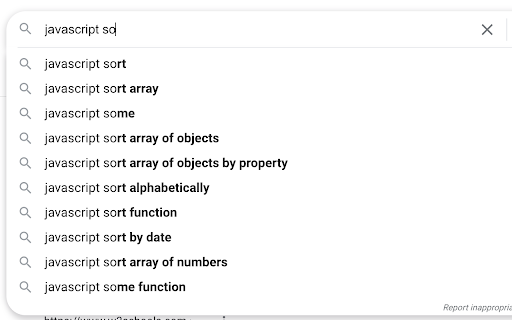
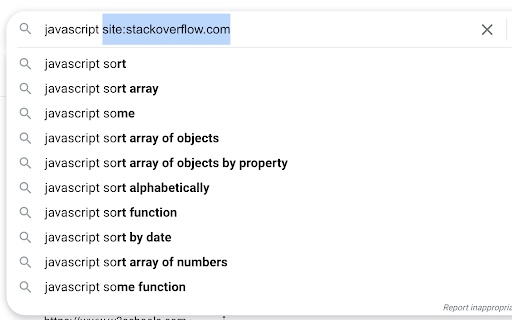
Expand a snippet of text to a longer form, using a hotkey (e.g., "so" → "site:stackoverflow.com"). Works in most text inputs, such as search boxes and multi-line comment fields. Adding a text snippet: • Click/open the extension. • In the first box: enter the abbreviated text, without spaces, to be replaced a longer form in the second text box. • In the second box: enter the expanded form, replacing the "prefix" text from the first box. To use a saved snippet: • In any input box, type your prefix text and use the assigned shortcut (default is "Ctrl+Shift+G". • For the expansion to work, the prefix text must be separated from other words by a space. • The caret (blinking text cursor) must be on or around the prefix word. For example, lets say the pipe character (|) is your caret placement: To remove a text snippet: • Click/open the extension. • Check any boxes you'd like removed. • Click the "Remove" button and reopen the extension. Notes and limitations: • Expansion won't work in some input fields. • Expansion won't work in the Omnibox (Chrome's address bar/search bar). • Expansion won't work in the startup page search bar. • The prefix text doesn't need to be highlighted. • The prefix-expansion pair is saved locally on your browser. Change Notes: [1.1.0] • Changes: 2nd input box now changed to to allow multi-line expansions. • Bug fix: Long expansions in the extension are now scrollable. • Bug fix: Removing local storage items doesn't refresh list. Check the source code on GitHub: https://github.com/ssmooncoder/text-expander

Free Auto Text Expander
Create custom keyboard shortcuts to expand and replace text as you type! Create custom keyboard shortcuts to expand and replace text as you type. Ever get tired of typing out long email addresses, phrases you frequently use, or just looking to save keystrokes as you type? Well fear not! Auto Text Expander is here to solve that -- kinda like TextExpander for Mac or AutoText for Windows, but installed and synced across Chrome browsers! This free extension adds basic javascript to your pages to check if your last set of consecutive keystrokes matches any of any number of custom shortcuts you can define and expands and replaces that text as you type. Save time, typos, and the satisfaction of being extra lazy!

Easyfill: Text Expander and Snippet Manager
Quickly insert saved text snippets anywhere on the web, reducing the need for repetitive typing. Easyfill: Supercharge Your Typing with Smart Text Expansion Easyfill is the ultimate text expansion tool that saves you time and eliminates repetitive typing. With over a million keystrokes saved, it's the perfect companion for professionals, students, and anyone looking to boost their productivity. ✓ Snippet Management - Create, edit, and delete text snippets effortlessly ✓ Category Organization - Keep your snippets neatly organized for quick access ✓ Lightning-Fast Expansion - Use customizable trigger symbols to instantly expand your text ✓ Powerful Search - Find any snippet in seconds with our built-in search feature ✓ Import/Export Functionality - Easily backup and restore your snippets and categories ✓ Auto-detect Mode - Let Easyfill automatically recognize your snippet triggers ✓ Customizable Trigger Symbol - Set your preferred symbol for snippet expansion ✓ Dynamic Date and Time - Insert current date and time using {date} and {time} variables Easyfill works seamlessly across all websites, making it the perfect tool for: 📧 Email Composition - Insert common phrases, signatures, or entire email templates 📝 Content Creation - Quickly add frequently used text blocks or formatting 💼 Customer Support - Respond faster with pre-written answers to common questions 🎓 Academic Writing - Insert citations, formulas, or standard paragraphs with ease 💻 Programming - Expand code snippets or documentation comments instantly ★ User-Friendly Interface: Get started in minutes with our intuitive design ★ Works Anywhere: Use Easyfill in any text field across the web ★ Boost Productivity: Save hours each week by eliminating repetitive typing ★ Reduce Errors: Ensure consistency and accuracy in your communications ★ Customizable: Tailor Easyfill to your specific needs with flexible options == Privacy and Security == Your privacy is our top priority. Easyfill operates locally on your device and does not collect or transmit any of your personal data or snippet content. Easyfill needs the permission to "access data on all websites" to work on all the text fields/inputs in any website. == Get Started with Easyfill == Transform your typing experience today! Install Easyfill and start saving time with every keystroke. Whether you're a busy professional, a student, or anyone who types regularly, Easyfill is your key to enhanced productivity. For questions, support, or feedback, please contact us at easyfillapp@gmail.com. Visit our website for more information and documentation: https://easy-fill.vercel.app/ Enjoying Easyfill? Please rate us 5 stars and spread the word!

LiquidEMR Auto Text Expander
Create custom keyboard shortcuts to expand and replace text as you type! Streamline Your Typing with Ease! Say goodbye to repetitive typing and hello to efficiency with LiquidEMR Auto Text Expander for Google Chrome. This powerful yet simple extension allows you to create custom text shortcuts that expand into full phrases, sentences, or blocks of text with just a few keystrokes. Ideal for professionals, students, and anyone who frequently types the same text, this extension will help you save time and reduce typing errors.

EqualFill: Free Text Expander
An elegant text expander with autofill. Just press "==". EQUALFILL The purpose of EqualFill is to eliminate repetitive typing or copy-paste. Keep your most-used emails, messages, and even snippets of open web pages within EqualFill. Your snippet can be expanded anywhere in your chrome. FEATURES * It's free. No credit card required. No login account required. * Intelligently retrieves snippets through a friendly user interface, whether you enter full name or abbreviation. * Supports autofill. * Runs offline. USAGE Press the "==" keys to start entering the snippet name. Press the "↑↓" arrow keys to select a snippet. Press the "凵" space key or the "↲" enter key to expand the snippet. Use the dashboard to add a custom snippet or a web snippet. PRIVACY EqualFill keeps your data safe. It does not collect or store your keystrokes. It does not store your snippet data on our server. It does not communicate with our server when the expansion and autofill of snippet occurs locally on your computer. Snippets are stored locally on your computer. When EqualFill is uninstalled, they are erased from your local storage. You can export snippets to a high-strength encrypted file for backup. The encrypted file can be imported to your another computer with the correct password.
