
fgmjocdnkiodkbofeoapmjifpholkhlj
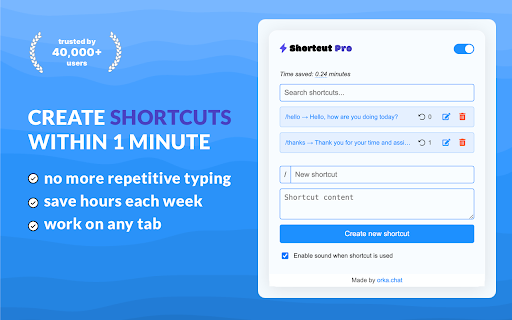
Expand custom shortcuts into predefined text across your browser. Shortcut Pro: Templates & Snippets - Your Ultimate Productivity Booster Revolutionize your typing experience with Shortcut Pro: Templates & Snippets, the game-changing Chrome extension designed to supercharge your productivity and streamline your workflow. Say goodbye to repetitive typing and hello to lightning-fast text expansion that works seamlessly across all websites. 🚀 Boost Your Productivity to New Heights Harness the power of smart text expansions to dramatically reduce your typing time. With Shortcut Pro, you'll be amazed at how quickly you can compose emails, fill out forms, and respond to messages. Our users report saving hundreds of hours annually, transforming the way they work online. ⚡ Lightning-Fast Text Insertion Anywhere Whether you're crafting an email, responding to a customer inquiry, or filling out a complex form, Shortcut Pro has got you covered. With just a few keystrokes, insert pre-defined text templates anywhere you type in Chrome. From simple greetings to complex paragraphs, expand your text instantly and effortlessly. 🎯 Customizable Shortcuts for Every Need Create personalized shortcuts for frequently used phrases, paragraphs, or even code snippets. Tailor your expansions to fit your unique workflow and watch your efficiency soar. With Shortcut Pro, your most-used text is always at your fingertips. 🌐 Universal Compatibility Shortcut Pro works flawlessly with any text field on any website. From Gmail to Twitter, Salesforce to Zendesk, your shortcuts follow you everywhere in Chrome, ensuring a consistent and efficient typing experience across all platforms. 🔒 Enhanced Accuracy, Reduced Errors Eliminate typos and ensure consistency in your communications. By using pre-defined templates, you'll significantly reduce the risk of errors in important messages, legal text, or technical documentation. 📊 Track Your Productivity Gains Watch your efficiency grow with our built-in analytics. Track how many keystrokes you've saved and see the hours you've reclaimed. Let the numbers motivate you as you become more productive day by day. 🔧 Easy Setup, Instant Results Getting started with Shortcut Pro is a breeze. Our intuitive interface allows you to create and manage your shortcuts with ease. Start small and expand your library of shortcuts as you go, continuously optimizing your workflow. 🏆 Join Thousands of Satisfied Users From busy professionals to students, Shortcut Pro has helped thousands of users reclaim their time and boost their productivity. Join our community and experience the power of efficient text expansion. ★Create unlimited custom shortcuts and expansions ★Works on any website within Chrome ★Real-time text expansion as you type ★Easy-to-use shortcut management interface ★Productivity tracking to visualize your time savings ★Secure and private - your data stays on your device ★Regular updates and new features based on user feedback 💼 Perfect for: Professionals handling high volumes of emails or customer support Writers and content creators managing multiple projects Developers looking to streamline code snippet insertion Students writing papers or filling out applications Anyone looking to optimize their online typing experience 🚀 Upgrade Your Chrome Experience Today Don't let repetitive typing hold you back. Join the text expansion revolution with Shortcut Pro: Templates & Snippets. Download now and start experiencing the future of efficient typing. Your keyboard will thank you, and so will your productivity! Remember, with great power comes great responsibility - and great time savings. Shortcut Pro: where every keystroke counts, and every second saved is a second earned. Transform your Chrome browsing into a powerhouse of efficiency. Get Shortcut Pro now and type smarter, not harder!

Text Blaze: Templates and Snippets
Create smart text expansions to get more done and streamline your work. Billions of keystrokes saved! 5-star rated, free text expander loved by over 700,000 users in more than 60,000 companies—easy to use, powerful and secure. Save hours and avoid mistakes by eliminating repetitive typing using customizable templates. Insert standard greetings, commonly used phrases, canned responses, text, calendar links, and signatures. Format and style your templates - change color and size, add pictures, links, and lists. ★ Works anywhere you work Text Blaze works with text fields on any website. Wherever you are in Chrome, the Text Blaze Chrome Extension is there to help you save time. ★ Trusted by over 500,000+ users across the world Support and sales teams, teachers, health-care professionals, HR, lawyers, students, writers, real estate agents, and users in other roles across the world trust Text Blaze to help them supercharge their work. ★ Use placeholders in your templates - Text Fields, drop down menus and more Build forms with fill fields that you can edit when you insert the templates. Form fields include text fields, dropdown menus, dates, toggles, and more. ★ Make your template dynamic with the current date, formulas or more Automatically insert the current date, perform date calculations, including website information, and much more! ★ Supercharge your team with sharing and collaboration Collaborate on shared snippets to ensure your team always hits exactly the right notes in your messaging. Everyone's snippets are updated automatically when changes are made, keeping team communication consistent. ★ Tab between form fields and select menu options with AutoPilot Automate form filling or any other workflow you can perform with your keyboard by simulating key presses. For example, you can simulate Tab key to move between form fields. ★ Easily search your templates from any web page Quickly search your templates from anywhere with the Text Blaze Assistant or right click on any web page to insert a template from a menu. Text Blaze works for everyone, everywhere. Here’s a few examples: 🤝Customer Support: create shortcuts for frequently used responses, troubleshooting tips, or knowledge base articles. This can be especially helpful when handling multiple tickets at once, on customer support sites like Zendesk, Freshdesk, and Intercom. 🎓Teachers: create shortcuts for frequently used phrases or feedback comments. This can be especially helpful when grading papers on educational sites like Google Classroom, Blackboard, Canvas, and Edmodo. 🩺Healthcare Professionals: doctors and nurses, including veterinarians, can create shortcuts to save time on healthcare sites like Epic, Cerner, Athenahealth, and Allscripts. 💼Recruiting: create shortcuts for frequently used interview questions, email templates, or job descriptions. This can be especially helpful when working on multiple job openings at once, on recruiting sites like LinkedIn, Greenhouse, JazzHR, and Workable. 💰Sales: create shortcuts for frequently used sales pitches, email templates, or proposals. This can be especially helpful when working on multiple deals at once, on sales sites like Salesforce, HubSpot, Pipedrive, and Zoho CRM. 📊Marketing: create shortcuts for frequently used marketing messages, social media updates, or ad copy. This can save time when creating campaigns or managing multiple accounts, on marketing sites like Hootsuite, Buffer, Sprout Social, and SEMrush. 🏛️Lawyers: create shortcuts for frequently used legal terms, clauses, or citations. This can save time on legal sites like LexisNexis, Westlaw, Clio, and MyCase. 🏠 Real Estate: create shortcuts for frequently used phrases or listing descriptions. This can save time when creating listings or responding to inquiries, on real estate sites like Zillow, Realtor.com, and Redfin. Text Blaze has a lot of other great features, but it's time to give it a try. Simply install the extension to get started! ★ Text Blaze In the News: Fast Company: “This keyboard shortcut secret is a huge time saver in Gmail—and beyond” Tech Crunch: “Fell in love with the product,” adding that he “wanted to invest as soon as I tried the product.” Android Police: “Text Blaze is a tool that can save you a ton of time when you need to type the same words over and over.” For questions about Text Blaze, please email us at More information and documentation: Privacy policy:

Snippet Buddy: Text Expander for Chrome
The ultimate text expander for Chrome! Whether you're sending emails, filling out forms, or typing repetitive messages, Snippet Buddy helps you save time by inserting your custom text and email templates on any website. How it works: Create your own shortcuts for frequently used text. Type shortcuts on any website and Snippet Buddy instantly expands them into full content. 📄 Customize snippets with fields, rich-text formatting, links 📁 Organize your snippets into folders 🌐 Works on any website 🔐 Secure and privacy-first – your data stays on your device ☁️ Cloud sync (optional) for backup and access across devices Perfect for anyone tired of typing the same thing over and over! ✅ Install Snippet Buddy now and start typing smarter, not harder.

TextExpander: Keyboard Shortcuts & Templates
Create and expand repetitive text anywhere on the web with custom keyboard shortcuts. OVERVIEW: TextExpander boosts productivity by cutting the repetitive typing that creeps into every task. Customizable and shareable Snippets let you and your team fly through repetitive tasks with just a few keystrokes, and AI-powered Snippet Recommendations surfaces the right Snippet exactly when you need it, so you spend less time searching and more time working. DETAILS: Get TextExpander and use it on all your devices, Chrome, Mac, Windows, iPhone, iPad, and Android. BENEFITS: Join amazing teams at companies like yours who have expanded millions of snippets worldwide and experienced these benefits: ⏳Time-saving power Streamline and speed up everything your team types: store common customer responses, signatures, and even forms in TextExpander, and anyone on the team can access them with just a few keystrokes. 📍Use anywhere you type TextExpander works on any system, any device, within any app, online or offline. Use it in any app or website where you already work like Gmail, Zendesk, LinkedIn and thousands more. 👥Share with your team Speak the same language and eliminate mistakes by sharing snippets across teams. Use data-driven insights to improve team productivity and time savings. 🛞Get started quickly No need to reinvent the wheel—subscribe to public groups for free snippets and templates created by the TextExpander community. 🔒Your data is secure TextExpander is SOC 2, GDPR, and CCPA compliant, so your team’s data is safe and secure. It never stores your keystrokes, and data is encrypted. ⭐Make it yours Customize each message you send using TextExpander features like fill-in fields, drop down menus, popup menus, and optional fields. TEXTEXPANDER FOR TEAMS: Customer Support: Less repetition, more customer delight ➡️ Resolve customer requests more quickly and consistently ➡️ Allow every rep to communicate like your best rep without losing personalization ➡️ Create a knowledge base that expands with just a few keystrokes ➡️ Reduce burnout and onboard new reps in a fraction of the time Recruiting: faster sourcing without losing the human touch ➡️ Respond to candidates quickly within any platform ➡️ Align & optimize your communication with candidates ➡️ Eliminate repetitive copy & paste responses across platforms ➡️ Access answers to FAQ’s with a quick keystroke or inline search Sales: More prospects = more closed deals, faster ➡️ Send cold emails and follow up with leads in a flash ➡️ Get repetitive administrative work out of the way ➡️ Train new sales agents and keep messaging consistent ➡️ Create sales docs in record time

Web Text Expander: Text Shortcuts & Snippets
Work smarter and type faster with text shortcuts! Use text expander to turn text snippets into words or sentences anywhere online Elevate Your Productivity with Web Text Expander: Text Shortcuts & Snippets! Are you tired of repetitive typing while browsing the web? Our Web Text Expander Chrome extension is here to make your daily tasks smoother and more efficient. This extension is your ultimate companion for quick access to text snippets and effortless text expansion. A text expander is a powerful and efficient extension that simplifies typing tasks. It allows you to create shortcuts or abbreviations for frequently used words, phrases, or whole paragraphs. When you type these shortcuts, the text expansion tool automatically changes them into the full content, saving you time. Whether you're responding to emails, filling out forms, or working on various web-based tasks, our free text expander Chrome extension streamlines your workflow, making your digital life more efficient and productive. 1. Install our text expander in Chrome. 2. Create your shortcut and enter the corresponding expanded message in the dashboard 3. When you need to use the snippet, just type your shortcut, and the message will expand automatically. 4. Open the extension to quickly add, edit, and delete text shortcuts. - Text snippets - Instant shortcut expansion - Filtering by tags - Current date placeholders - Caret position control - Quick add - Quick search - Insertion of the current date/time - Designed for Chrome browser - Gmail snippets integration - User-friendly - Private and secure 💡 Unleash the Power of Text Snippets Seamlessly create, manage, and utilize text shortcuts. Say goodbye to typing out the same phrases or addresses repeatedly. With shortcuts, your frequently used phrases are at your fingertips. This feature alone can save you hours! Works like magic: automatically detects your pre-defined snippet, instantly inserting your message. No delays. No additional actions. Whether you're composing emails, filling out forms, or updating social media, Web Text Expander is ready to assist. It seamlessly integrates into your Chrome browser, providing a consistent and user-friendly experience across most websites. Efficiently organize and manage your text snippets with our filtering by tags feature. Assign tags to your snippets for easy categorization, allowing you to quickly find the right snippet when you need it. Whether you have hundreds of snippets or just a few, tags make it simple to keep everything organized and accessible. 💡 Insertion of the Current Date/Time Save time on routine tasks with the ability to insert the current date and time into your snippets automatically. Perfect for time-stamping emails, forms, or logs, this feature ensures that you always have up-to-date information without manually typing it out. Just create a snippet with the date/time placeholder, and let the extension do the rest. 💡 Control of the caret position after expansion Position the caret precisely where you need it once a snippet is expanded. Using a special placeholder within your snippet, the extension will automatically place the cursor at the designated spot, allowing you to start typing right where it matters. This feature eliminates the need to reposition your cursor manually, enabling faster and more efficient workflows. Easily locate the shortcuts and expanded texts you need with the intuitive quick search box. Simply type a keyword, and the extension will instantly surface matching snippets, ensuring you find the right one in seconds. Insert the snippet seamlessly with a single button press. Quickly fill in custom details using Placeholders before expanding. This feature lets you tailor your text with names, numbers, or notes in the moment, so your messages stay personal without slowing you down. Add a shortcut instantly from any webpage with just a right-click. This feature lets you create text expander shortcuts on the fly, so you never lose your flow. Integrate your Gmail snippets into our Chrome extension. Speed up your email communication and enhance your productivity while using Gmail. No need to spend hours learning complex software. You'll be up and running in just a few clicks, saving precious time. 💡 Privacy and Security We take your privacy seriously. Your data is stored securely and never shared with third parties. 🖍 Use Cases: Unlock the Potential of Text Shortcuts Web Text Expander isn't just a convenient tool; it's a game-changer for various scenarios in your digital life. Here are some real-world examples of how you can leverage this Chrome extension for maximum efficiency: In professional life, quick and accurate email responses are crucial. You can set shortcuts for frequently used email templates, signatures, or responses. No more copying and pasting – just a few keystrokes, and your message is ready. 📌 Managing Prompts for LLMs If you often work with AI tools like ChatGPT or Gemini, text shortcuts can make prompt management much easier. You can save your best-performing prompts, style guides, or structured queries as shortcuts. Instead of rewriting the same context every time you start a new chat, just type a few characters and your full prompt appears instantly. This keeps your workflow consistent across different AI platforms and saves time. 📌 Online Forms and Surveys Filling out online forms and surveys can be tedious, especially when they ask for the same information repeatedly. Use shortcuts to input your name, address, or other details. 📌 Code and Programming Web developers and programmers can streamline their workflow using shortcuts for frequently used code snippets. This minimizes the chances of errors and accelerates the coding process. Whether you're a social media professional or an avid user, craft consistent and engaging messages across various platforms (LinkedIn, Facebook, WhatsApp Web, and others) with snippets for hashtags, replies, or product promotions. Students and researchers can create text shortcuts for complex terminology or commonly used phrases. It's a valuable aid for maintaining consistency in academic writing. Customer support agents can improve response times and accuracy by creating shortcuts for canned responses to frequently asked questions. Provide top-notch service without the repetitive typing. 📌 Blogging and Content Creation Bloggers and content creators can maintain a consistent writing style and save time using shortcuts for standard introductions, conclusions, or product recommendations. Streamline your note-taking during meetings using shortcuts for common phrases like "action items," "follow-ups," or meeting agendas. 🚀 Unlock Your Potential with Web Text Expander No matter your digital activities, you should work smarter, not harder. These use cases are just the beginning. With a bit of creativity and customization, you can adapt Web Text Expander to your specific needs, making it an invaluable tool in your daily online life. Say goodbye to unnecessary typing and hello to a more streamlined and productive browsing experience. If you’re looking for an efficient free text expander to make your life easier, install Web Text Expander today and start saving time with every keystroke! Do you have questions, suggestions, or feature requests? Feel free to send a message to info@webtextexpander.com anytime. Let us know what you think! Thank you.
