
lpcaedmchfhocbbapmcbpinfpgnhiddi
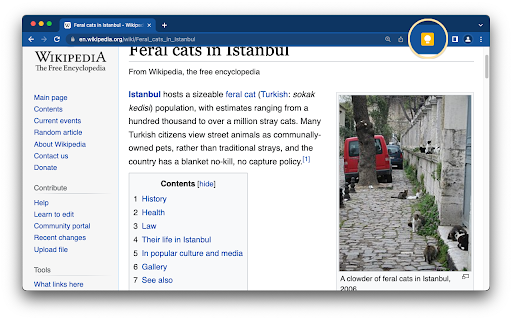


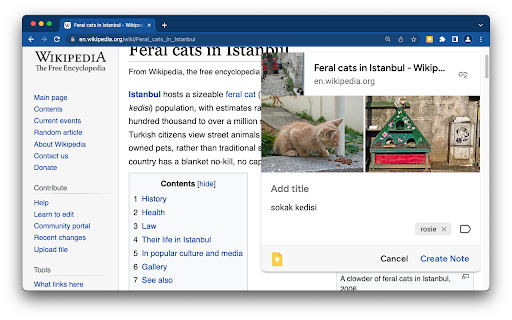
Found a webpage, image, or quote that you want to save for later? With the Google Keep Chrome Extension, easily save the things you care about to Keep and have them synced across all of the platforms that you use — including web, Android, iOS, and Wear. Take notes for additional detail and add labels to quickly categorize your note for later retrieval. Features: • Save URLs, text, and images • Take notes on saved content • Add labels to your notes • Automatically saves to Google Keep Try Google Keep on the web at https://keep.google.com, on your Android device at https://g.co/keep, and on your iOS device at https://itunes.apple.com/us/app/google-keep-your-thoughts/id1029207872.

Checker Plus for Google Calendar™
See your next events, get meeting notifications and snooze events without opening the Google Calendar page! Stay on top of your schedule with powerful desktop and voice reminders, quick event creation, and deep Google Calendar integration — all without opening the calendar page. Why this extension? ⭐ 100x More Powerful than standard calendar extensions 🗣️ Voice + Desktop Notifications like Outlook 🖱️ Snooze Events, Add Quickly, and Customize Everything 🌍 Trusted developer of 1,000,000+ users worldwide 💬 Excellent support & fast responses ✅ Packed with Features: • Quick-add events multiple ways: • Type naturally (e.g. “Lunch with Mom 11am Sunday”) • Highlight text on any page and right-click to save it • Add from Gmail or websites with a right-click • Use the Chrome address bar with the keyword cal • Automatically import from Facebook event pages 🔔 Powerful Notifications: • Desktop popups like Outlook with snooze & voice alerts • Add timers like “Take out pizza!” • Great accessibility for the visually impaired 📅 Calendar Customization: • Popup views: month, week, day, agenda, year, or your own layout • Show current date, next event time, or countdown on icon • Drag and drop events in the calendar view • Offline reminders when you're not connected 🔧 Bonus Goodies: • Supports for Google Tasks and the side panel • Gray out past days or highlight weekends • Show Birthday and Family calendars • Extra features are available upon contributing any amount • I'll add your suggestions Click "Website" or visit jasonsavard.com for more info.

checklist for Google Tasks™
Access and manage all your Google Tasks™ directly in Chrome Provide an interface to Google Tasks™ via an easy-to-use Chrome extension. List of tasks and the ability to quickly add a task are a keyboard shortcut away. * fast access to tasks from Chrome * ability to add a page, or text from a page, as a task directly via right-click menu and keyboard shortcuts * great for use with gmail to make a task out of an email; adding a page as a task stores the URL of that page for quick access later * support for multiple lists and consolidated view of all lists

Any.do
Any.do helps you remember everything you have to do. Get Organized with Any.do for Chrome Join millions who use Any.do to keep track of everything—from daily tasks to team projects—all in one place. With Any.do for Chrome, stay productive and organized with ease. Seamlessly Manage Tasks: • Quickly create tasks and reminders • Drag and drop to organize your to-dos • Mark tasks complete right from the extension • Save web pages as tasks or notes to track articles, research, and follow-ups • Customize your browsing by setting Any.do as your default new tab Stay on Top of Your Day: • Capture tasks the moment they come to mind • Set one-time and recurring reminders • Collaborate on projects with team members • Assign tasks to others and manage shared responsibilities • Sync your calendar for a clear view of your schedule

Save to Google Drive
Save web content or screen capture directly to Google Drive. The Save to Google Drive Chrome extension helps you save web content or browser screenshots to your Google Drive. * Adds a browser action to save the current page. * Adds a right-click context menu to save hyperlinks and media. * Configurable through an options page. * Save a PDF of the current page via the Chrome Print menu This extension allows you to save web content directly to Google Drive through a browser action or context menu. You can save documents, images, and HTML5 audio and video all by right clicking and selecting 'Save to Google Drive'. You can save the currently viewed page using the 'Save to Google Drive' browser action or as a PDF from the Chrome Print menu.. The directory location and format of saved HTML pages can be controlled with the extension's options page (Choice of Entire image (default), Visible image, Raw HTML, MHTML, or Google Doc). You can automatically convert Microsoft Office files or comma separated files to Google Docs format. After your content is saved, the progress dialog allows you to open the file, rename, or view the file in the Google Drive document list. From the document list, you can organize and share your new document. To save a file:// URLs, or to enable in incognito mode, go to chrome://extensions/ and enable the associated checkbox. Due to security restrictions, this extension cannot capture chrome:// pages or Chrome Web Store pages. New in Version 2.3.2: * Fixes a bug where certain PDF files would save without an extension name. New in Version 2.3.1: * Bug fixes. * Allows for the printing of the current page from Google Chrome to Google Drive, as a PDF. Note: Currently Google Chrome provides this feature natively, but this native feature will soon be replaced fully by this Chrome Extension's similar feature. New in Version 2.1: Authorization now requires you to be signed into Chrome. In order to save to a different Google Drive account, you must change Chrome profiles. New in Version 2.0.1: Bug fix for Authentication page redirecting to about:blank after clicking Accept. New in Version 2: * Uses OAuth2 authentication flow, so you will need to re-authenticate on first use * Ability to choose destination folder (configured in Options page) * Support for high devicePixelRatio (Chrome Pixel & Retina displays) * Clicking saved folder name displays the newly uploaded file in the destination directory * Options are stored in shared storage, so are synchronized across browsers if Chrome Sync is enabled. By installing this item, you agree to the Google Terms of Service and Privacy Policy at https://www.google.com/intl/en/policies/.
