
fibjmnmjpbbfidpemmpjbofecnkhbeno
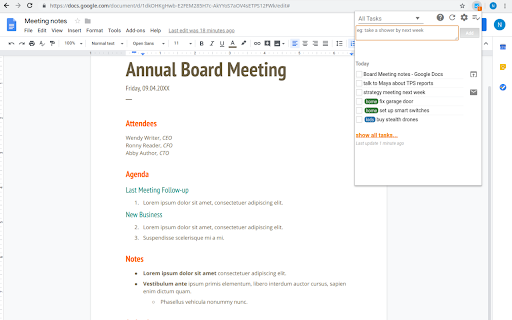


Access and manage all your Google Tasks™ directly in Chrome Provide an interface to Google Tasks™ via an easy-to-use Chrome extension. List of tasks and the ability to quickly add a task are a keyboard shortcut away. * fast access to tasks from Chrome * ability to add a page, or text from a page, as a task directly via right-click menu and keyboard shortcuts * great for use with gmail to make a task out of an email; adding a page as a task stores the URL of that page for quick access later * support for multiple lists and consolidated view of all lists

Stopwatch for Google Chrome™
A simple and portable Stopwatch for Google Chrome™ Need to use an accurate stopwatch to measure an experiment? Use your Chrome browser today to act as a stopwatch once you install this software extension. Here is how you can begin using this stopwatch software 2) Click on the extension icon 3) Press the start button to start the stopwatch 4) Press the stop button to stop the stopwatch This is a free and simple stopwatch software. Try using it today.

Extensions Manager for Google Chrome™
FREE! Easily manage all installed extensions in the browser directly from the chrome window. Manage extensions, Quickly enable/disable your extensions. - Enable/Disable extensions by checking/unchecking the ticked box - Find out whether the extension is running on this current website - Sort through your extensions via the scroll bar - Go to the options page of each extension - Go to the details page of each extension Use this manager software to enable/disable your extensions quickly. Disclaimer: Please note this extension is NOT made by Google and is made by an independent development team. All copyrights belong to their respective owners. Google doesn’t endorse or sponsor this extension. This extension is not owned by, it is not licensed by and is not a subsidiary of Google Inc.

Desktop app for Google Tasks
Standalone Desktop app for Google Tasks. Export and share your Google Tasks lists in one click. The TasksBoard Chrome extension let you add a task to your Google Tasks in one click from any page on Google Chrome. ✅ TasksBoard lets you manage, edit and share your Google Tasks on a full-screen interface. 👥 Collaborate with your team in real-time with the option to share the lists. ✨ TasksBoard offers a Premium plan with additional features such as unlimited shared lists, customisable boards, tags and more. 👌 Increase your productivity: Drag and drop your tasks from one list to another 🤝 Collaborate with your team: Share your Google Tasks lists with anyone 🗄️ Keep everything organized: Create multiple boards for each of your projects 🌈 Better Task management: Set highlight color to your lists to find them instantly 🏷️ Easily organize and prioritize your tasks with custom labels 📁 Attach documents from Google Drive directly to your tasks ✉️ Make emails actionable by turning them into tasks from within your Gmail inbox 💻 Access your Google Tasks directly on the desktop by installing the desktop app 🔑 Ensure secure sign-on with your team's existing Google credentials through Single-Sign-On authentication Need a helping hand? Have a look to our extensive guides, the documentation on https://tasksboard.com/support and/or contact us at contact@tasksboard.app TasksBoard has individual and enterprise Premium plans available. Check our pricing options: https://tasksboard.com/pricing By design, your data stays at all times on Google servers. We have no access to your data, and we never copy your tasks on our server.. Here's all the data we need in order to make TasksBoard work: - Your email address - to know who you are - Campaigns sent metadata (spreadsheet name, date of sending - that's all) - Emails sent metadata (date of sending, open / clicks events - that's all again) TasksBoard / TaskBoard complies with privacy laws (especially GDPR) to protect your data. Check out the full privacy policy on this page https://tasksboard.com/privacy

Free Time Clock for Google Chrome™
Free! This extension will help you keep track of time spent on projects/specific tasks. Need a free and simple method of tracking time for projects/payroll. Begin using this free extension to do time tracking. Simply write down the project title and press start Our time tracker will begin the time. Once you finish the project, press stop and the time tracking will stop for this project You can start and pause projects whenever you want. Once you have finished your time tracking, its possible to export this data out in CSV format so you can prepare the data for clients/show the time taken for each task. Disclaimer: Please note this extension is NOT made by Google and is made by an independent development team. All copyrights belong to their respective owners. Google doesn’t endorse or sponsor this Chrome extension. Free Time Clock is not owned by, is not licensed by and is not a subsidiary of Google Inc.
