
bhcdneenlaehgbonacefkpjddbomfpkj

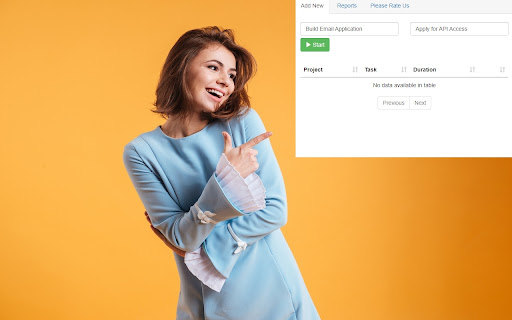
Free! This extension will help you keep track of time spent on projects/specific tasks. Need a free and simple method of tracking time for projects/payroll. Begin using this free extension to do time tracking. Simply write down the project title and press start Our time tracker will begin the time. Once you finish the project, press stop and the time tracking will stop for this project You can start and pause projects whenever you want. Once you have finished your time tracking, its possible to export this data out in CSV format so you can prepare the data for clients/show the time taken for each task. Disclaimer: Please note this extension is NOT made by Google and is made by an independent development team. All copyrights belong to their respective owners. Google doesn’t endorse or sponsor this Chrome extension. Free Time Clock is not owned by, is not licensed by and is not a subsidiary of Google Inc.

Just a Clock - the Minutes
A simple digital clock for the toolbar. This is JUST THE MINUTES. Pair with the hours for an awesome readable clock in your toolbar! Just a clock, in your Chrome toolbar; Nice and big and simple. There are 2 extensions, one for the Hours and one for the Minutes. I built this because I usually have a full screen app/game/video going on my main monitor and can't see the clock. My browser is usually on my 2nd monitor and now I can always see the time at a glance! This is JUST THE MINUTES and meant to be paired with the "Just a Clock - The Hours" extension in your toolbar and positioned to its RIGHT. Remember to also install the HOURS: https://chrome.google.com/webstore/detail/agglgohcegmeeaccikjfmehncfomccpg -- Now with High Res images! -- White numbers for dark themes are available in Options If you like it please let me know in the comments. If you have any suggestions or requests please also let me know.

Clockify Time Tracker
Track time from anywhere on the web and improve productivity. Track time from anywhere on the web with one click. Later, analyze and export time at https://clockify.me/reports/summary • Integrates with 50+ web apps • Idle detection • Reminders • Pomodoro timer • Automatically start/stop timer • Start a timer from selected text • Start/stop timer shortcut (Ctrl+Shift+U) • Default project for new time entries Q: Why does the extension need access to "read and change all your data on the websites you visit"? A: We use the "Read and change all your data on the websites you visit" permission only for putting a timer button on other websites and taking the task's names as a description for the timer. If you don't wish to see the button on other websites, you can disable it in extension's Settings>Integrations. The code for this extension is open source. Feel free to examine it and contribute on Github: https://github.com/clockify/browser-extension For more information on how Clockify works, check out our help article https://clockify.me/help/apps/chrome-extension If you have any issues or feedback, send us an email at support@clockify.com Clockify is a time tracker that allows you to track the time you spend on projects and analyze your productivity. You can use Clockify on the web, desktop, and mobile – all your tracked data is synced in real time so you can seamlessly switch between devices. - Free and simple online timer - Analyze time in reports and export data - Invite team and track time together - Manage projects and monitor progress

Clock with Seconds
Lightweight toolbar clock that shows a live digital badge and smooth analog face. Time is the most universal resource we share, yet most operating-system clocks hide in tiny corners, drop seconds, or disappear entirely when you enter full-screen mode. Clock with Seconds fixes that: it places a live digital badge directly on your toolbar and pairs it with a smooth, full-frame. There is no access to tabs, browsing history, clipboard, location, or network. Many time-tracking add-ons quietly request excessive rights because they ship generic boiler-plate; Clock with Seconds was designed for a single purpose and stays inside its lane. Everyday benefits Developers & sysadmins – Need to time a server restart, cache flush, or script execution? A per-second badge lets you confirm events happened when scheduled, even if your task bar is hidden. Teachers & presenters – Share-screen in Google Meet or Zoom without showing the system clock; students can still see exactly how much time remains in a quiz or talk. Stock & crypto traders – Monitor last-second price ticks while reading news in another tab; the badge changes every second, so it is easy to double-check your PC isn’t lagging. Focus enthusiasts – Combine the clock with a browser-based Pomodoro tool; when the seconds hit :00 you know it’s time to switch tasks without disruptive notifications.

Just a Clock - the Hours
A simple digital clock for the toolbar. This is JUST THE HOURS. Pair with the minutes for an awesome readable clock in your toolbar! Just a clock, in your Chrome toolbar; Nice and big and simple. There are 2 extensions, one for the Hours and one for the Minutes. I built this because I usually have a full screen app/game/video going on my main monitor and can't see the clock. My browser is usually on my 2nd monitor and now I can always see the time at a glance! This is JUST THE HOURS (12 or 24 hour modes available) and meant to be paired with the "Just a Clock - The Minutes" extension in your toolbar and positioned to its LEFT. Remember to also install the MINUTES: https://chrome.google.com/webstore/detail/pgmgkfgcnigcopcjhilfabbdgmjmkogj -- Now with 24 hour support because you asked for it! -- And Desktop Notifications upon the hour can be turned on in Options -- Also, white numbers for dark themes are available in Options If you like it please let me know in the comments. If you have any suggestions or requests please also let me know.
