
pgmgkfgcnigcopcjhilfabbdgmjmkogj
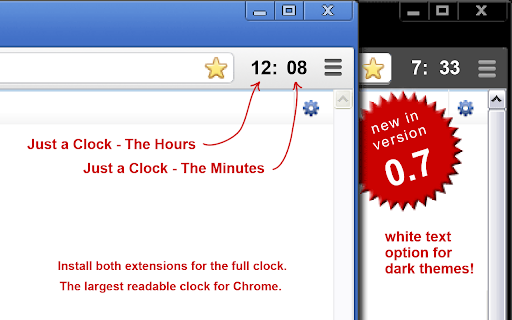
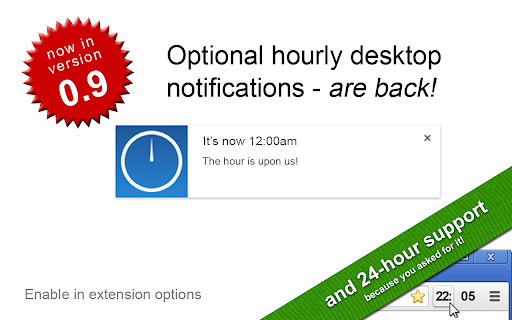


A simple digital clock for the toolbar. This is JUST THE MINUTES. Pair with the hours for an awesome readable clock in your toolbar! Just a clock, in your Chrome toolbar; Nice and big and simple. There are 2 extensions, one for the Hours and one for the Minutes. I built this because I usually have a full screen app/game/video going on my main monitor and can't see the clock. My browser is usually on my 2nd monitor and now I can always see the time at a glance! This is JUST THE MINUTES and meant to be paired with the "Just a Clock - The Hours" extension in your toolbar and positioned to its RIGHT. Remember to also install the HOURS: https://chrome.google.com/webstore/detail/agglgohcegmeeaccikjfmehncfomccpg -- Now with High Res images! -- White numbers for dark themes are available in Options If you like it please let me know in the comments. If you have any suggestions or requests please also let me know.

Minimal New Tab Clock
A simple, ultra-lightweight clock to replace your tab menu. V1.8.1 - Added rudimentary ability to change the clock's font V1.7.0 - Updating colour picker to include HEX and HSL input - Added ability to close menus with 'Escape' key - Fixing issue with analogue clock hands not being styled correctly on custom theme - Updating style scripts to reduce the amount of 'flash-of-unstyled-content' V1.6.1 - Adding additional icon sizes for hdpi screens V1.6.0 - Fixed an issue with the second hand glitching - Clock face size is a bit more responsive - Improved performance & memory leaks - Improved keyboard controls - Menu now stays open after making selections - Trimmed unneeded code and other files - Use locale-specific dates instead of hardcoded English V1.5.0 - Add scaling to clock, fade out menu, and performance improvements V1.4 - Added a theme picker - Custom colour can be picked from the theme picker - Current day now updates when your system clock changes to the next day - Minor performance improvements V1.3.1: - Fixed an issue with 12hr format clock and AM/PM display - Performance improvements - Fixed keyboard interaction issues - Added a link to colour change functionality questionnaire V1.3: - Removed leading zero on 12hr format - Moved second hand to the top of the stack V1.2: - Dark theme (click the lightbulb to use) - Analogue clock - 12 hour digital clock

New Tab Clock
Replaces the New Tab page with a simple customizable clock. ABOUT Bring focus to every new tab you open. No frills or distractions – just the time and date. PRIVACY POLICY This extension has no ads, trackers, or analytics. It requires no permissions. No information is transmitted to or from the extension to any server. All settings are saved locally on your computer. SETTINGS Click on the gear in the bottom left to customize the background color, font, or 12/24 clock setting.

Date Time
Displays the day, date, and time for This simple extension places a small stylish clock next to the website address box. Get the date & time instantly when you press on our stylish clock icon at the top right corner of the Google Chrome browser. To begin using this software, simply click on the clock icon at the top right corner after installation. You can copy the current time and paste it to another software application. Disclaimer: Please note this extension is NOT made by Google and is made by an independent development team. All copyrights belong to their respective owners. Google doesn’t endorse or sponsor this Chrome extension. Date Time is not owned by, is not licensed by and is not a subsidiary of Google Inc.

Toolbar Clock
Stylish analog clock in your browser toolbar. Toolbar Clock is a browser add-on that renders a stylish analog clock in the toolbar popup and also a simple analog clock as the toolbar icon. To see the clock, please click on the toolbar icon to open the popup. There are few settings at the bottom of the UI to adjust the clock. There is also a reload button to refresh the clock UI in case an unexpected error happens. Please note that this add-on does not have any options or settings to adjust. All you need is available in toolbar popup UI. If you want to report a bug or have a feature request, please fill the bug report form in the add-on's homepage (https://mybrowseraddon.com/toolbar-clock.html).
