
ljpapphpgkmigobbbakmnfoohclifanm


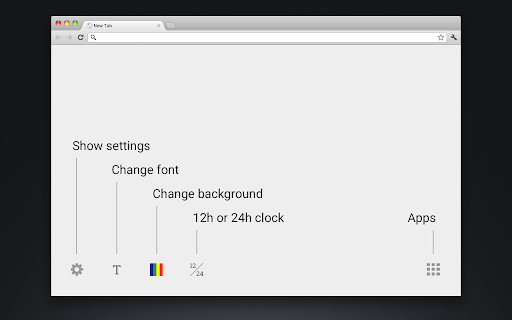
Replaces the New Tab page with a simple customizable clock. ABOUT Bring focus to every new tab you open. No frills or distractions – just the time and date. PRIVACY POLICY This extension has no ads, trackers, or analytics. It requires no permissions. No information is transmitted to or from the extension to any server. All settings are saved locally on your computer. SETTINGS Click on the gear in the bottom left to customize the background color, font, or 12/24 clock setting.

Embark - New Tab Page
A minimalistic new tab page. Embark replaces Chrome's default new tab page with a pared back design and beautiful photography allowing you to focus on what matters. There's a handful of features but each one is highly customisable through the options page: - 60+ inspirational photographs - A 12 or 24 hour clock - The date Embark loads blazingly fast and uses almost zero resources.

Date Today for Google Chrome
The best clock to see the current day and time at a glance, with an option to display a digital clock. Stay organized and never lose track of time with Date Today, the perfect browser extension for displaying an analog clock in your toolbar bar. In a single blink, effortlessly access the current date and time, helping you manage your schedule seamlessly. Date Today is a lightweight and useful add-in designed to know the current time in hours and minutes. With the current day of the week, day number and current month. Are you asking yourself 'what day is it today' or 'what is the time today'? With one single click on the button you get this information, and if you click again in the popup window. You copy the current timestamp in your clipboard. So, you can paste it in your online Google Doc, Microsoft Word Document or your new Gmail email message. Browser extension features: ◆ Popup Panel: View the current date and time in a convenient popup window for quick reference. ◆ Clock format: Choose between a 12-hour or 24-hour clock system to suit your preference. ◆ Browser Button Options: Opt to showcase either the Analog or Digital Clock in the browser button for added flexibility. ◆ Customize Day Theme: Personalize the color of the hour and minute hands to match your style. ◆ Customize Night Mode theme Activate Night Mode for a visually comfortable clock display during darker hours. ◆ Color Personalization: Make it yours by customizing the number and text color to reflect your unique taste. ◆ Font Family Customization: Modify the font family with options such as Arial, Impact, Sans-serif, Times New Roman, and Verdana. ◆ Picture-in-Picture Mode: Experience enhanced visibility with the Picture-in-Picture mode, showcasing the Date Today panel in a convenient floating popup window. Stay informed about the date and time without disrupting your browsing experience. ◆ Badge Customization: - Current Date Badge: Enhance your experience with the inclusion of a Current Date badge, prominently displaying the current date in a clear and concise format. - Current Time Badge: Keep track of the current time with a dedicated badge, providing quick access to this essential information. - Day Number and Month Badge: Display a customized badge featuring the day number, seamlessly integrated with the month. Choose whether to position it at the top or bottom, depending on your web browser's layout. - Day Name of the Week Badge: Elevate your toolbar with the inclusion of a dynamic Day of the Week badge. Stay informed about the current day effortlessly, ensuring you are always in sync with your schedule. - Customizable Badge Color: Personalize your badges by selecting your favorite colors. Choose hues that resonate with your style and preferences, ensuring a visually appealing and cohesive browsing experience. ◆ Tooltip: Easily monitor the current date and time (hours:minutes:seconds) directly in the toolbar. ◆ Context Menu: Right-click menu functionality to paste the current timestamp in text boxes, text fields, and the address bar. ◆ Support for Dark Mode Project Information: https://www.stefanvd.net/project/date-today/browser-extension/ Required Permissions: ◆ "contextMenus": Add web browser context menu to paste the current timestamp. ◆ "activeTab": This to execute the context menu action on the currently open tab. ◆ "alarms": This to run the clock time in the background. ◆ "storage": Save settings locally and sync with your web browser account. >> Unlock an option feature to protect your eyes at night and focus on the video player, such as YouTube™, by installing Turn Off the Lights browser extension for YouTube and Beyond. https://chromewebstore.google.com/detail/turn-off-the-lights/bfbmjmiodbnnpllbbbfblcplfjjepjdn

Humble New Tab Page
Redesigned new tab page featuring your bookmarks, apps, most visited, and recently closed in a custom layout. Features: • Simple, clean design • Highly customizable • Fast loading and lightweight This extension replaces the default new tab page. Drag and drop folders to create new columns or reorder them. The font, colors, spacing, and more can be customized from the options menu. The source code is available under the MIT license github.com/ibillingsley/HumbleNewTabPage Version 1.26 - July 2, 2023 • Added font-weight option • Replaced Apps folder with a link to chrome://apps Version 1.23 - December 2, 2018 • Added tooltips for truncated text • Added option to remember open folders Version 1.14 - May 11, 2014 • Reduced memory usage • Added option to set number of items for recently closed, recent bookmarks, and most visited • Added option for background image size • Added link to bookmark manager in folder context menu Version 1.12 - August 18, 2013 • Reorder apps via drag and drop Version 1.11 - August 3, 2013 • Fixed launching packaged apps (Google Keep) • Fixed launching file:/// and chrome:// URLs • Fixed Mobile Bookmarks folder not being removable • Disable weather if geolocation is denied • Default layout changed to 2 columns • Uninstall apps from the context menu • Hide Google Wallet Service from apps Version 1.9 - December 30, 2012 • Uses geolocation for weather by default • Fixed bug with drag and drop • Added Chrome Web Store to apps Version 1.8 - November 9, 2012 • Redesigned options panel • Added several new settings • Performance tweaks • Source code released under the MIT license Version 1.7 - September 8, 2012 • Added custom CSS field for advanced users • Added option to hide Bookmarks bar and Other bookmarks • Added option to open links in new tabs • Support local file for background image • Weather errors fixed Version 1.4 - August 10, 2012 • Added option to disable the weather and other special folders • Minor bug fixes Version 1.2 - August 8, 2012 • Added apps, most visited, recently closed, and weather • More flexible layout with unlimited columns • Open all links in folder from context menu • Color themes and new default style • Added smooth animation and highlight shadow • Drag and drop to reorder folders and columns • Background image support • Bug fixes • New name (formerly New Tab + Bookmark Tree)

Awesome New Tab Page
Enhance your New Tab Page with ultimate customizability and power. Awesome, like you. [ANTP] Awesome New Tab Page transforms your Chrome new tab into a personalized dashboard with apps, shortcuts, and widgets you'll actually use. Features: - Interactive widgets that display real-time information - Fully customizable layout - add, remove, and resize tiles - Create personalized shortcuts to your favorite sites - Direct search from shortcuts - Flexible resizing for apps and widgets Awesome New Tab Page is a privacy-oriented extension. It does not track your browsing activity or sell it or in any way share it with third parties. Awesome New Tab Page is 100% ad free and completely customizable. Current Widgets: - Weather - xkcd Comic - Cryptocurrency Price Trackers (BTC, XRP, ETH) - More crypto widgets coming soon with enhanced features! Have suggestions? Contact us at hi@antp.co How to Use: 1. Unlock the grid with the padlock icon 2. Open the widgets drawer and drag a widget out onto the grid 3. Customize to your heart's content 4. Lock the grid when finished FAQ Q: How can I add my own links and images? A: Unlock the grid, then click on an empty tile. This will create a custom shortcut and open the tile editor, allowing you to start customizing. Q: Can I remove tiles from my dashboard? A: Yes! Unlock the grid, click the "X" on any tile, then lock again to use your dashboard. Q: Can I change the background image or color? A: Yes! Click the settings icon and use the color picker to select any background color. Q: How do I go back to the default Chrome new tab page? A: Uninstall the extension through Chrome's extension management. Thanks for trying it, and please share any feedback you have! It would mean a lot if you would like and share on Bluesky: https://bsky.app/profile/antp.co Use License: Permission granted for personal, non-commercial use only. This license prohibits: - Modifying or copying materials - Commercial use or public display - Reverse engineering - Removing copyright notices - Redistributing materials Disclaimer: Awesome New Tab Page is provided "as is." Awesome HQ, LLC makes no warranties regarding merchantability, fitness for purpose, or non-infringement of rights. We do not guarantee accuracy, results, or reliability of materials within Awesome New Tab Page. Widgets may display content from third-party sources including weather services, cryptocurrency data providers, and other external sources. Awesome HQ, LLC is not responsible for the accuracy, content, or availability of these third-party services. User-created shortcuts, bookmarks, and custom content are the sole responsibility of the user who created them.
