
lobpcflajoikohefjjdndofbfikadpfb


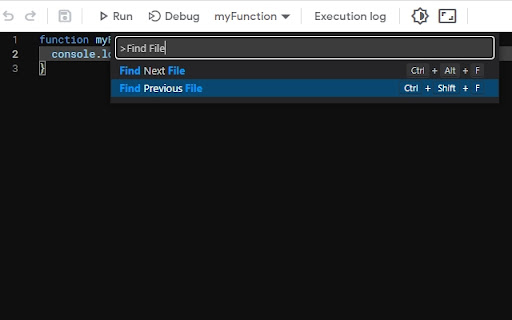
This extension brings new functionality to the Google Apps Script Monaco Editor Search globally - now with hotkeys! Peek, find all references and goto definition now works across multiple files Choose the theme that suits you best or use your own Hide extra elements Apply styles for the outer panels Manage loads of editor options Use pre-defined snippets and compose yours Diff Editor - side by side live comparison Try a new editor that uses VS Code TextMate grammars as the syntax tokenization engine Folders support to group files, simply use slash in the filename (Many thanks to JeanRemiDelteil/appsScriptColor!) This functionality is unstable (due to dynamic page behavior). If you experience any issues, just refresh the page or disable the folder tree view Take care and enjoy coding 😌

Google Apps Script Tools Mod
Enhances Google Apps Script editor with advanced search and replace. Based on extension 'Google Apps Script Tools' by Rubén Sánchez. ### Bug Fixes - Fixed Alt+S and Alt+R hot keys calls to open Advanced search / replace dialog. - Fixed replace all bug with no made replacement and scrap in 1st project file. - Fixed blinking "caret" at right of found occurencies on switch to other file with part of found. ### New Features - Added the ability to add the word in cursor position as text to search in search dialog. ### Bug Fixes - Fixed incorrect denial of working with Container-Bound Google Apps Script projects in legacy code. - Fixed the selection of the current file disappearing incorrectly while navigating search results. - Fixed selection colors in the Careless Whisper Bright and Careless Whisper Light color themes. - Fixed palettes for the Borland Pascal and Turbo Basic themes. ### New Features - Added the ability to automatically use the selected text in the current file as the search term in the Advanced Search/Replace dialog. - Added the ability to create multiple selections where each selection matches the currently selected text. - Added a highlight style for the current text selection. - Added the ability to select the entire line containing the current selection occurrence. ### Bug Fixes - Fixed issues in 'Replace' and 'Replace All' functionalities for case-insensitive search/replace, whole words matching, and regular expression search/replace. - Fixed an issue where replacement was incorrectly denied when the replacement string is empty. - Fixed an issue where search was incorrectly denied when the length of search string is less than 3 characters. - Fixed an issue with positioning to next search result after single 'Replace' operation with multiple occurencies. ### Bug Fixes - Fixed issue where the full search results list would open even when the "Show List" checkbox was unchecked, upon finding results. ### New Features - Added hotkeys for search and replace functionality: - **Search Dialog**: Alt+S (Windows) / Option+S (macOS) - **Replace Dialog**: Alt+R (Windows) / Option+R (macOS) - **Close Dialog**: Esc - **Perform Search**: Ctrl+Shift+F (Windows) / Cmd+Shift+F (macOS) - **Case Sensitive**: Alt+1 (Windows) / Control+1 (macOS) - **Whole Word**: Alt+2 (Windows) / Control+2 (macOS) - **Regular Expression**: Alt+3 (Windows) / Control+3 (macOS) - **Toggle Results List**: Alt+4 (Windows) / Control+4 (macOS) - **Replace Current**: Ctrl+Shift+E (Windows) / Cmd+Shift+E (macOS) - **Replace All**: Alt+Shift+A (Windows) / Control+Shift+A (macOS) - **Previous Result**: Shift+PgUp (Windows) / Shift+Option+ArrowUp (macOS) - **Next Result**: Shift+PgDn (Windows) / Shift+Option+ArrowDown (macOS)

NitroGAS
A feature-packed tool aimed at enhancing your coding capabilities on the Google Apps Script editor. Welcome to the first-ever AI-Powered Chrome Extension built specifically to help you write code faster and more efficiently in Google Apps Scripts. NitroGAS's AI Co-pilot is specifically trained on the best practices for creating scripts and apps in Google Apps Script - helping you automate Google Sheets, Forms, Docs, Slides, and more. In addition to our flagship AI Co-pilot feature, you'll get access to some Quality of Life features such as: Dark/Light themes, quick links to recent Apps Script projects, and a free collection of code snippets that'll help code faster. This NitroGAS Chrome Extension is a featured packed tool built by Bootstrapping Tools to help make writing code in Google Apps Script easier and faster. If you're familiar with our Youtube Channel, you know that we're big fans of creating custom solutions for Google Sheets, Docs, Slides, and more. NitroGAS was built to help us build scripts faster so we know that it'll help you as well! Paid Features (w/ license key) - NitroGAS Co-pilot - - Trained specifically to help you automate Google Sheets, Docs, Forms, Slides, Calendar, and more using Google Apps Scripts - - Will output code comments and instructions to help you manage the code moving forward - - NOT SUBSCRIPTION BASED, the last thing you need is another subscription. To make it more affordable, we've designed a pass model where you buy access for a week, a month, or a year w/o any auto-renewals. One-time payments with no recurring charges. It's a breath of fresh air isn't it?

Apps Script Libraries
This extension allows you to search for Apps Script libraries and install them directly from Apps Script IDE this extension will help you streamlines the process of discovering and installing Google Apps Script libraries right from the Apps Script IDE. With an integrated search functionality, you can quickly find libraries, view details, and install them into your project with ease. Save time and enhance your development workflow by managing external libraries without leaving the IDE.

GAS Prettier + AI Completion
Google Apps Script Prettier Formatter Chrome Extention with AI Completion GAS Prettier integrates the popular Prettier code formatter directly into the Google Apps Script editor, allowing you to easily format both your HTML and Google Apps Script (GAS) files with a single click. Some key features of GAS Prettier: - Registers Prettier as the default formatter for the GAS editor. - Supports formatting of both HTML and GAS files. - Provides a warning message if there are any errors during the formatting process. - Ai completion (working good on small google script file) - Open source, so the community can contribute and help improve it. How to Format Document? Just use current Format Command (Ctrl + Shift + F) or Click Right Click it will show format button and just click format button. This extension aims to streamline the development workflow for GAS developers by ensuring consistent code formatting across your project. No more manual formatting or fighting with different editor settings - just hit the format button and let Prettier do the work. The GAS Prettier extension is available for free on the Chrome Web Store. I encourage you to check it out and let me know what you think! If you have any feedback or would like to contribute, the project is open source on GitHub.
