
lnlodalopnihdjkilbkpijndkddfoemc
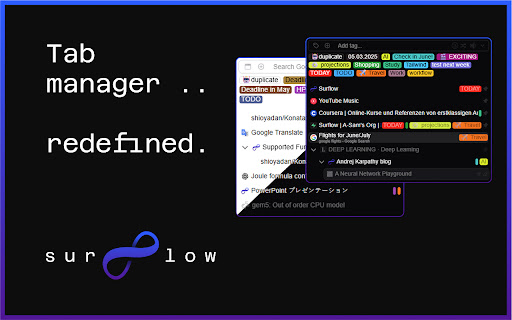


Surflow is a tab manager that allows you to manage your tabs in a tree view and tags. 🌀 Surflow Tab Manager, with Tree View and Tags Surflow is a sidebar tab manager that replaces rigid browser tab groups with flexible tagging - designed to adapt to your workflow, not the other way around. 🔖 Tag-Based Organization • 🏷️ Assign multiple tags to any tab • 😀 Emoji support for quick visual cues • 🔄 No single-category limits — one tab, many tags 🗂️ Full Tab Control • ✏️ Rename tabs for clarity • 🧩 Tag, pin, edit, sleep, close - all in one place • 📦 Batch operations across tabs • 🖱️ Drag-and-drop to organize easily 🔍 Efficient Search & Discovery • 🔎 Quick-access search bar for tabs/tags • 🎨 Filter tags by name, color, or date • 🌐 Built-in search engines: Google, Bing, more • ⚡ Fast tab discovery and switching 🧘 Minimal, Functional Design • 📐 Compact, distraction-free UI • 🌓 Light and dark themes • 🚀 Built for speed and usability 🛠️ Power Features for Advanced Users • 🐞 Feedback and bug reporting built-in • 🧪 Early access to new tools (optional) 👥 Who It’s For Developers, researchers, students - anyone juggling more than a handful of tabs.

Notab: Vertical Tab and Group Manager
The World’s Best Vertical Tab and Group Manager! ✅ Notab is a tab and tab group management tool built on the principles of First Principle (FP). It is simple to use, with a clean interface, designed to boost productivity by reducing tab clutter and achieving a "No Tab" experience. ⚫️ Focus on Your Starting Point How does First Principle work? By leveraging Chrome's tab group feature. When you search using a search engine in your browser, Notab automatically creates a tab group based on keywords. Any new tabs opened within this group are automatically assigned to it, helping you organize and focus with ease. Once you've found the information or answer you were looking for, you can close the group with a single click or save your research collection, keeping your workspace clear and orderly. ⚫️ Notab Features: 1. 🔹 Automatic Grouping: Every search creates a group based on keywords (if no group exists). 2. 🔧 Tab Management: When Chrome's tab count gets overwhelming, making the interface unmanageable and laggy, Notab handles the clutter effortlessly. 3. 📁 Tab Group Management: Notab creates groups and offers better group management for you. 4. 🖥️ Interface: 4.1 🚀 Drag and Drop Sorting: Freely drag and sort between multiple windows, groups, and tabs. 4.2 👀 Multiple Views: Floating window, sidebar, and standalone window (adjustable and accessible anywhere). If you have multiple monitors, you can place the standalone window on your working screen, enabling easy control no matter which browser you're using. 4.3 🌓 Dark Mode. 4.4 🙈 Privacy Mode: Focus better with the sidebar while protecting your privacy. 4.5 🔎 Global Search: Manage all tabs and groups in one place. 4.6 ⌨️ Keyboard Shortcuts: Quickly access the windows you need for tab management. 4.7 🔗 Global Copy Title-Link in Markdown Format: Easily copy from any page with a single click, supporting editor-friendly format. 4.8 🌟 Bookmarks: Bookmark management has been supported since version 0.0.9 ✅ If you are currently using Notab or have stopped using it, we would love to hear your feedback: https://forms.gle/vuHLX63Xrj7GnHKZ8

VertiTab – Vertical Tab Manager | Sessions, AI Groups & Bookmark Sync
Manage all your tabs & bookmarks from a sidebar. Tree view, workspaces, one-click save & restore, organize everything across devices Never lose a tab again. VertiTab turns your browser's side panel into a tree-style tab dashboard — search, sort, and batch-close hundreds of open tabs at a glance. ⭐ SMART TAB MANAGEMENT • Vertical tab sidebar – see all your tabs at a glance • Multi-select with drag selection, Ctrl+Click, and batch operations • Close, reload, or suspend all same-site tabs in one click • Customizable right-click menus, hover buttons, and 60+ keyboard shortcuts • Rename tabs with custom icons, colors, and URL-based rules 🖱️ BROWSER RIGHT-CLICK MENU (NEW) • 40+ tab actions in the browser's native right-click menu – no panel needed • Right-click any tab, page, link, or extension icon to manage tabs instantly • Hibernate, close, group, sort, snapshot, split view – all from the context menu • Tab strip right-click menu support (Chrome 150+, Edge, Firefox) • Fully customizable: per-item toggle, drag-to-reorder, per-context settings 🤖 AI-POWERED GROUPING • Auto-group tabs by content with AI – supports custom rules and emoji labels • Domain-based grouping with flexible format options • New tabs auto-join the right group based on context • Merge groups, customize group colors, auto-collapse inactive groups 📸 SESSION SAVE & RESTORE • Save complete browser sessions as snapshots – manually, on schedule, or automatically • Restore with full control: window positions, tab groups, lazy loading • Crash recovery – automatically restores your last session on startup • Import from Session Buddy, Toby, and Tab Session Manager 📋 WORKSPACES (TAB PANELS) • Create custom workspaces to organize tabs by project or task • Drag tabs between panels, auto-cleanup empty workspaces • Built-in smart panels: All Tabs, Active Tabs, Recently Accessed • Workspaces sync across devices and are included in snapshots 🌳 TREE TABS • Auto-build parent-child tree based on how tabs were opened • Close a parent tab to close the entire subtree 🔖 BOOKMARK MANAGEMENT • Cloud bookmark sync with conflict-free CRDT architecture • Bookmark snapshots with diff comparison and one-click restore • Sync spaces: sync bookmarks across devices or browse bookmarks from other browsers • Convert bookmark folders to tab groups in one click 🔍 UNIVERSAL SEARCH • Search across open tabs, history, bookmarks, reading list, and snapshots • Use @ commands for quick source switching • AI chat: send questions directly to ChatGPT, Claude, and more 🤖 AI ASSISTANT • Agent mode: control your browser with natural language commands • Q&A mode: summarize, translate, and explain current page content • Multi-provider: OpenAI, Gemini, Claude, DeepSeek, and built-in on-device models 🔒 TAB LOCK & PRIVACY • Lock tabs to prevent accidental closure with URL lock • Per-site privacy: auto-clear cookies and data when closing tabs • Developer debug mode: clear site data + force reload ⚡ AUTOMATION • Auto-suspend/close inactive tabs with smart protection rules • Scheduled tasks per tab: timed refresh, suspend, or close • Site-level config: auto-join groups, auto-refresh, privacy clearing 🎨 40+ THEMES & CUSTOMIZATION • Color-blind accessible themes (Okabe-Ito palette) • Deep theme editor with component-level control and custom CSS • Tab styling: index numbers, colored dots, discarded indicators 🪟 WINDOW & SPLIT VIEW • Split View: arrange tabs side by side or top-and-bottom for easy comparison • Customize window name, icon, and color – save as style presets • Smart tab routing: auto-assign tabs to specific windows by URL rules ☁️ CLOUD SYNC • Sync tabs, settings, bookmarks, snapshots, and workspaces • AES-GCM local encryption – your password never leaves your device • Flexible sync modes: upload only, download only, or full sync Four ways to use VertiTab: 🎯 Browser Sidebar – Vertical tabs in Chrome's native side panel ⚡ Popup Window – Independent tab management window 💡 In-Page Sidebar – Trigger from any webpage edge 🖱️ Right-Click Menu – Manage tabs from the browser's native context menu Install VertiTab – the smartest way to manage your browser tabs.

Flow - Tab Manager
A new way to manage chrome tabs and windows easily. Flow is your ultimate solution for managing tabs and windows in Chrome. Whether you’re a power user or just someone who wants to keep things tidy, Flow streamlines your browsing experience. Here’s why you’ll love it: Effortless Tab Management • Create Sessions: Start fresh by initiating a new session. A dedicated Chrome window opens, marking the beginning of your focused browsing journey. • Automatic Saving: Flow takes care of your tabs in the background. Close a window without hesitation; your tabs are securely saved. • Resume Seamlessly: Reopen any session whenever you need to pick up where you left off. • Unsaved Windows: Add any open window to your sessions directly from the ‘Unsaved Windows’ section. Boost Your Workflow with Additional Features • Main Session: Designate a session as your ‘Main Session.’ When you launch Chrome, all other windows close, leaving only your essential workstream active. • Backups: Create local backups of your sessions. Flow auto-generates a backup before deleting any session, ensuring you never lose your work. • Dark Mode: Enjoy a sleek dark mode that’s easy on the eyes during late-night browsing. • Resizable Interface: Customize the extension’s size by simply dragging the bottom right corner to fit your screen and preferences. • Simplicity: Flow keeps things straightforward. • Speed: It’s fast and reliable. • Organization: Say goodbye to tab overload. Give Flow a try and experience a clutter-free browsing environment. Your feedback is invaluable in making Flow even better! What's new? 1.2.8 • Added session badge • Removed the unsaved window popup 1.2.7 • Added sessions details to view tabs and move tabs between sesssoin • Added move tabs to session in chrome context menu • Added permission view to review optional permissions for certain settings 1.2.5 • Now Discarding tabs after title is load to improve search and visibility. • Clicking on the open sessions will bring them to front. • Bug fixes. 1.2.1 • Organizing settings and added a few more settings in additional settings • Bug fixes 1.1.0 • Sessions can be opened in the current window. • Project is open source now. see about us in extension settings for more info. • Pinned tabs will be saved now. • Alert will be shown if a window is not saved as session. • Performance improvements.

Vertical Tabs Side Panel
★ Simplicity defines us - NOW WITH TREE VIEW and AUTOMATIC GROUPING! ★ Open shortcut, CTRL + i (windows), COMMAND + e (macOS) and… ★ Simplicity defines us - NOW WITH TREE VIEW and AUTOMATIC GROUPING! ★ Open shortcut, CTRL + i (windows), COMMAND + e (macOS) and CTRL + q (linux) Vertical Tabs View allow you to easily access and search your tabs, using a vertically stacked UI. It also allows you to open, sort and close individual or a group of tabs. This extension is very useful for those who end up with many tabs open without knowing the last time you even interacted with them, allowing one to easily get rid of old tabs. It also makes it easy to spot duplicated tabs and to navigate to recently opened ones. See https://www.youtube.com/watch?v=8ow6f5zWRLI for details on how to use it. Note: Chrome shows a scary popup regarding Vertical Tabs View accessing your browser history. We do react to new tabs as a way to store LOCALLY the last time you interacted with them. However, nothing is ever sent to a server, nothing ever leaves your computer, this extension is completely private. Feel free to check the code at the website link. ★ White and dark mode ★ Search bar that allows to search for title or url. ★ Sort tabs by url and staleness. ★ See the number of open and duplicated tabs. ★ Delete duplicated tabs with one click. ★ Open shortcut, CTRL + i (windows), COMMAND + e (macOS) and CTRL + q (linux) ★ Navigate your tabs using the arrow or TAB (on your keyboard) ★ Open a tab via Enter key. ★ Easily close a specific or multiple tabs. ★ Click on the sort icon to sort by either, url, title or staleness. ★ If you have duplicated tabs, click on the menu to highlight them or get rid of them.
