
nelmjkbalflkmcnnnhjgiodpndcebfgo


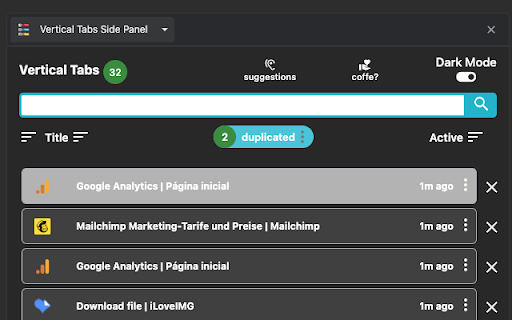

★ Simplicity defines us - NOW WITH TREE VIEW and AUTOMATIC GROUPING! ★ Open shortcut, CTRL + i (windows), COMMAND + e (macOS) and… ★ Simplicity defines us - NOW WITH TREE VIEW and AUTOMATIC GROUPING! ★ Open shortcut, CTRL + i (windows), COMMAND + e (macOS) and CTRL + q (linux) Vertical Tabs View allow you to easily access and search your tabs, using a vertically stacked UI. It also allows you to open, sort and close individual or a group of tabs. This extension is very useful for those who end up with many tabs open without knowing the last time you even interacted with them, allowing one to easily get rid of old tabs. It also makes it easy to spot duplicated tabs and to navigate to recently opened ones. See https://www.youtube.com/watch?v=8ow6f5zWRLI for details on how to use it. Note: Chrome shows a scary popup regarding Vertical Tabs View accessing your browser history. We do react to new tabs as a way to store LOCALLY the last time you interacted with them. However, nothing is ever sent to a server, nothing ever leaves your computer, this extension is completely private. Feel free to check the code at the website link. ★ White and dark mode ★ Search bar that allows to search for title or url. ★ Sort tabs by url and staleness. ★ See the number of open and duplicated tabs. ★ Delete duplicated tabs with one click. ★ Open shortcut, CTRL + i (windows), COMMAND + e (macOS) and CTRL + q (linux) ★ Navigate your tabs using the arrow or TAB (on your keyboard) ★ Open a tab via Enter key. ★ Easily close a specific or multiple tabs. ★ Click on the sort icon to sort by either, url, title or staleness. ★ If you have duplicated tabs, click on the menu to highlight them or get rid of them.

Thready - Vertical Tabs
Vertical tabs, bookmarks, history and readling list in side panel. Tired of tab overload? Meet your new browser best friend! 🚀 This extension offers a seamless all-in-one experience. ⚛️ Light weight, Fast and Free! Features: ⭐️ All in One Tab Manager Manage everything in one place! Our side panel tab manager keeps your tabs, bookmarks, reading list, and history easily accessible with a single click. No more switching between windows or menus. ⚡️ Blazing Fast Search Find what you need instantly! Search across tabs, bookmarks, and history with our lightning-fast search function. We're confident it's the smoothest search you'll experience. ⭐️️ Effortless Mouse Control: Take command with powerful mouse gestures Double-Click: Effortlessly pin or unpin tabs for quick access. Middle Click: Close tabs with a single, satisfying click. One-Click Actions: Mute/unmute tabs and pin/unpin them on the fly. Drag and Drop: Easily reorder tabs in your list for ultimate organization. 🚀 Modern UI design Enjoy a beautiful and intuitive interface that makes managing your browsing a pleasure, not a chore. 🌓 Dark/Light mode switch Switch seamlessly between light and dark mode to match your style and preference, or to reduce eye strain during long browsing sessions. Tips: ⭐️ Side Panel appearance (left or right side) -> chrome://settings/appearance ⭐️ Shortcut CMD + B (Macos) and Ctrl + B (Windows) ⭐️ Custom shortcut key -> chrome://extensions/shortcuts. CHANGE LOG: - 0.3.17 * Recent closed tabs and tabs other devices - 0.3.16 * Archive and restore tabs and groups - 0.3.14 * Tab group auto collapse - 0.3.5 * Options page - 0.3.1 * Bookmarks, reading list and history in side panel * Better UI design - 0.2.9 * Join and leave group, Edit group name and colors - 0.2.7 * Tab suspense, Tab groups * Right click (context menu) - 0.2.2 * upgrade architecture - 0.1.32 * new mouse actions - 0.1.30 * tab drag and drop - 0.1.27 * search tab - 0.1.24 * better favicon - 0.1.23 * tab pinner support - 0.1.17 * improve dark mode theme * add default shortcut key (CMD + B / CTRL + B)

Side Copilot - AI Agent: Research, Organize & Automate | Claude Assistant
AI Agent takes action for you: manage tabs & windows, automate tasks, summarize & research. Arc-style vertical tabs sidebar. Side Copilot – Vertical Tabs, Spaces & AI Agent for Chrome Alternative to Arc Sidebar, Dia's Sidebar, Edge Vertical Tabs, Brave vertical tabs, Vivaldi Window Panel, and Zen Browser sidebar. Side Copilot is an Arc-style vertical tabs sidebar for Chrome with an AI agent that helps you organize tabs, manage windows, summarize content, and automate browsing workflows. If Chrome’s default tab bar feels messy, Side Copilot gives you a cleaner way to work. Move tabs into a sidebar, organize them into Spaces, sync them across browsers, and use AI to take action on your browsing context. Research, summarize, organize, and take action, browse less, more action. Side Copilot works inside your browser side panel to help you manage tabs and windows, group related pages, search browsing history, summarize open tabs, chat with files, and automate repetitive browser workflows. Chrome still lacks a native vertical tabs experience that feels complete. Side Copilot fills that gap with a fast, focused sidebar designed for people who live with dozens of tabs open. Whether you are a student, marketer, developer, creator, designer, or researcher, Side Copilot helps you reduce tab clutter and stay in control of your workspace. • 🧭 Vertical Tabs Sidebar for Chrome View and manage your tabs in a clean vertical layout that is easier to scan than the default horizontal tab bar. • 🗂️ Spaces for Tab Organization Create separate Spaces for work, study, research, shopping, reading, or side projects. Keep different contexts organized without losing your place. • 💾 Save, Restore, and Reorder Tabs Save sessions, restore tabs and tab groups, and reorder everything with drag and drop. • ☁️ Sync Across Browsers and Devices Sign in once to sync your Spaces across Chrome and compatible browsers, so your tabs stay available wherever you work. • 🔎 Fuzzy Search for Tabs and Spaces Find the tab, group, or Space you need in seconds, even when you have a large number of tabs open. • 🧹 Suspend Tabs to Save Memory Reduce browser memory usage by suspending inactive tabs when you need a lighter workspace. • 📚 Tab Group Management Manage tab groups more efficiently from the sidebar, including grouping, moving, restoring, and organizing related tabs. • 🔗 Group Guard and Auto Grouping Automatically group tabs based on URL rules, domain patterns, or custom categories. • 💬 AI Copilot Chat Mode Chat with your current page or open tabs. Ask Side Copilot to summarize, explain, compare, or organize what you are browsing. • 🤖 AI Copilot Agent Mode Go beyond chat. Ask AI to take action for you, such as managing tabs, grouping windows, searching browser history, and helping with browsing workflows. • 📄 Chat with Files Talk with PDFs, documents, images, and other files directly from your browser workflow. • 📺 Chat with YouTube Summarize videos, extract key points, and understand content faster without switching tools. • 🌙 Dark Mode Use Side Copilot comfortably day or night with dark mode support. • 📦 Backup Options Export your session data as JSON and keep a reliable backup of your Spaces. 🗂️ Built for Heavy Tab Users Side Copilot is especially useful if you: - want vertical tabs in Chrome - miss Arc’s sidebar on Chrome - need a better tab manager for research and multitasking - want to organize tabs into Spaces - need browser sync across devices - want AI to help summarize, research, and automate browsing tasks Default Chrome tabs get crowded fast. Titles shrink, groups become hard to scan, and switching context becomes frustrating. Side Copilot gives you: - better tab visibility - easier tab switching - cleaner session management - stronger focus with Spaces - faster research workflows with AI - a more modern sidebar browsing experience If you like the idea of Arc Browser’s sidebar, Edge vertical tabs, Brave vertical tabs, Vivaldi’s Window Panel, or Zen Browser’s sidebar, Side Copilot brings that experience to Chrome, with added AI tools for browsing, research, and organization. 💅 Made for modern browsing So you can do more than store tabs. You can actually work with them. Try Side Copilot if you want a better Chrome sidebar for vertical tabs, smarter tab management, and an AI agent that helps you browse with less chaos and more control.

SideTab Pro - Vertical Tabs, Bookmarks and Reading List
One-stop Vertical Tabs, Bookmarks, and Reading List manager in the sidepanel 🔐 Sign-In Support – Sign in to unlock upcoming features and improvements. ✨ Refreshed UI – A cleaner, more polished interface. 📑 Vertical Tabs in the Side Panel – Organize and navigate your tabs effortlessly. 📖 Reading List Integration – Access and manage saved articles quickly. 🔖 Bookmark Manager – Browse and organize bookmarks without leaving the panel. 📂 Tab Group Support – Keep related tabs neatly grouped together. 🔎 Instant Tab Search – Find any tab in seconds. 🖱️ Multi-Tab Selection – Select and manage multiple tabs at once. 📌 Drag & Drop Tabs – Rearrange tabs with ease. ⚙️ Flexible Side Panel Placement – Move the panel to the left or right (Settings → Appearance → Side Panel) 🌗 Automatic Theme Sync – Matches your system’s light or dark theme. 🛡️ Privacy First – Your data stays on your device and is never shared. 🗑️ Remove Duplicate Tabs – Detect and close duplicate tabs instantly. 🔗 Auto-Group by Domain – Automatically organize tabs from the same website. ⚡ Quick Actions – Close, group, or duplicate multiple selected tabs. ⌨️ Keyboard Shortcut • Mac: Command + Shift + P • Windows: Ctrl + Shift + P (Customizable in Chrome Extension settings) 🖱️ Middle-Click to Close Tabs – Close tabs quickly with a middle click. SideTab Pro is a powerful vertical tab manager built to make browsing faster and more organized. With instant search, smart tab management, and powerful multi-tab actions, you can stay focused and navigate your tabs effortlessly.

Link Map
Link Map is a browser tab sidebar that is designed for heavy information consumers. With Link Map, even if you have a large number of tabs and windows, you can manage and classify them in a logical and clear way using the tree view structure, forming your own link collection. Have you used Tabs Outliner before? Now you can import your data to Link Map and start a new journey. **What can Link Map do?** 🌲 Tree-shaped vertical tab sidebar, but with more levels: you can use drag-and-drop to quickly complete more tab operations 💾 Close and save for later reading: clear your workspace and focus on current work, they will remain in the list 🔒 Backup/restore: backup and restore your data in a universal format (JSON) 🔧 Tabs Outliner import: supports importing data from Tabs Outliner We do need to operate more tabs and windows, but at the same time, we can also keep them organized. Install Link Map and start building your tag collection to make your information consumption more efficient.
