
jappgmhllahigjolfpgbjdfhciabdnde


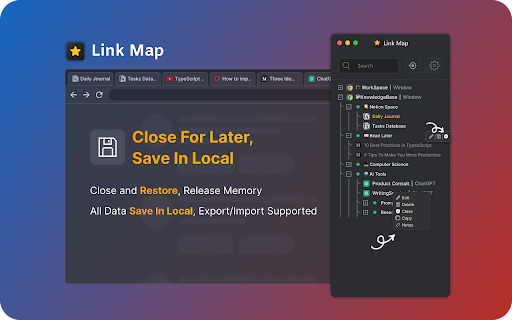


Link Map is a browser tab sidebar that is designed for heavy information consumers. With Link Map, even if you have a large number of tabs and windows, you can manage and classify them in a logical and clear way using the tree view structure, forming your own link collection. Have you used Tabs Outliner before? Now you can import your data to Link Map and start a new journey. **What can Link Map do?** 🌲 Tree-shaped vertical tab sidebar, but with more levels: you can use drag-and-drop to quickly complete more tab operations 💾 Close and save for later reading: clear your workspace and focus on current work, they will remain in the list 🔒 Backup/restore: backup and restore your data in a universal format (JSON) 🔧 Tabs Outliner import: supports importing data from Tabs Outliner We do need to operate more tabs and windows, but at the same time, we can also keep them organized. Install Link Map and start building your tag collection to make your information consumption more efficient.

Tab Nodes Tree - Vertical Tree Style Tabs in Side Panel
Effortlessly navigate and organize your tabs with an intuitive tree-style view Web browsing often involves opening multiple child pages from a single website. Traditional horizontal tab rows fail to effectively display these parent-child relationships. Tab Nodes Tree solves this problem with its vertical, tree-structured layout, allowing you to instantly grasp the hierarchy of your open pages at a glance. With drag-and-drop functionality, you can effortlessly rearrange and restructure your tab hierarchy as needed. Moreover, horizontal tabs frequently truncate page titles due to limited space, making it challenging to locate specific open tabs. With Tab Nodes Tree, you can see full page titles, significantly enhancing your ability to navigate between tabs. This extension is particularly beneficial for power users who regularly work with 50 or more open tabs. It's also ideal for those with widescreen displays, as it makes efficient use of extra horizontal space that often goes unused. Experience a more organized and intuitive way to manage your tabs with Tab Nodes Tree! Features: ⭐ Light/Dark theme, or follow the System setting. ⭐ Native Chrome Tab Bar Feature Parity: Move, Reload, Duplicate, Pin, Mute, Group, Move to Another Window. ⭐ Multi-Tab Node Selection Actions: Move, Reload, Duplicate, Pin, Mute, Group, Move to Another Window. ⭐ Two-Way Sync with Chrome's Native Tab Row. ⭐ Effortlessly Build a Tab Nodes Tree Structure with Drag and Drop. ⭐ Collapse and Expand Node Trees. ⭐ A Range of Node Tree Settings. ⭐ "Create a new tab at the same level" shortcut: (Windows: Alt+A, Mac: Ctrl+Shift+A). ⭐ "Create a new tab as a child" shortcut: (Windows: Alt+S, Mac: Ctrl+Command+A). 🌟 (Pro) Quick Navigation Panel: Helps you rapidly jump between Groups and Branch Tab Nodes without getting lost in a sea of tabs. Default shortcut: (Windows: Alt+Q, Mac: Ctrl+Q). 🌟 (Pro) Search Tab Nodes: Quickly find any open tab by title. Supports regular expression search and keyboard shortcut navigation through results. 🌟 (Pro) Customize Tab Node Tree Theme. 🌟 (Pro) Unread, discarded style settings including text styles: bold, italic, underline, line through. adjustable opacity for border, background, text, icon. Available for dark, light and customized themes. 🌟 (Pro) Tree Structure Branch Tab Node - Superior to Native Grouping, grouping tabs with a tree structure. 🌟 (Pro) Advanced Node Tree Settings. 🌟 (Pro) "Add to Branch" shortcut: (Windows: Alt+B, Mac: Ctrl+Command+B). ⭐ And more to come! Revolutionize your tab management experience. Download Tab Nodes Tree today!

TabFern tab manager and backup tool
Save and restore your tabs and windows, and navigate tabs in a vertical view. -------------------------------------------------------------------------- NOTE TF has been updated to Manifest V3 --- please report any issues at https://github.com/cxw42/TabFern/issues . As always, back up early and often! Thanks! -------------------------------------------------------------------------- TabFern organizes your browsing life. It shows all your open windows and tabs in one place, for immediate access. With one click, you can close a window, and then bring it back any time with one more click. With two clicks, you can backup all those URLs to a text file, or restore a backup. No need to login to copy browsing sessions between computers! With TabFern, switching between projects is a breeze, and you can leave a task behind without worrying about losing the pages. TabFern is perfect for researchers, the perpetually curious, and anyone who winds up with way too many tabs open at once! TabFern is under active development, so please do not hesitate to report bugs or provide feedback via GitHub. TabFern is offered AS-IS, and with NO WARRANTY — see the license on the Web site for full details. However, the primary author uses TabFern almost 365 days a year, so bug reports should receive a quick response :) . If you would like to contribute to TabFern's development, feel free — we welcome pull requests and would be happy to help you get started. Permissions: The "Read your browsing history" permission permits TabFern to access the URLs and titles of pages you visit, so that it can help you manage your tabs. TabFern stores that data only on your computer, and does not send it anywhere. TabFern is inspired by the Tabs Outliner extension by Vladyslav Volovyk. However, TabFern is a completely separate extension, and is not affiliated with Tabs Outliner or with Vladyslav in any way.

Tree Tab Sidebar
Let's keep tabs tidy with tree-style sidebar!! "hey, why chrome can't organize tabs in sidebar in tree-style...?" We've heard this line again and again. And enough is enough. New experience of tab has started just now from HERE. [for Japanese] chromeでもタブをツリーで整理する時代が来た!

Vertical Tabs Side Panel
★ Simplicity defines us - NOW WITH TREE VIEW and AUTOMATIC GROUPING! ★ Open shortcut, CTRL + i (windows), COMMAND + e (macOS) and… ★ Simplicity defines us - NOW WITH TREE VIEW and AUTOMATIC GROUPING! ★ Open shortcut, CTRL + i (windows), COMMAND + e (macOS) and CTRL + q (linux) Vertical Tabs View allow you to easily access and search your tabs, using a vertically stacked UI. It also allows you to open, sort and close individual or a group of tabs. This extension is very useful for those who end up with many tabs open without knowing the last time you even interacted with them, allowing one to easily get rid of old tabs. It also makes it easy to spot duplicated tabs and to navigate to recently opened ones. See https://www.youtube.com/watch?v=8ow6f5zWRLI for details on how to use it. Note: Chrome shows a scary popup regarding Vertical Tabs View accessing your browser history. We do react to new tabs as a way to store LOCALLY the last time you interacted with them. However, nothing is ever sent to a server, nothing ever leaves your computer, this extension is completely private. Feel free to check the code at the website link. ★ White and dark mode ★ Search bar that allows to search for title or url. ★ Sort tabs by url and staleness. ★ See the number of open and duplicated tabs. ★ Delete duplicated tabs with one click. ★ Open shortcut, CTRL + i (windows), COMMAND + e (macOS) and CTRL + q (linux) ★ Navigate your tabs using the arrow or TAB (on your keyboard) ★ Open a tab via Enter key. ★ Easily close a specific or multiple tabs. ★ Click on the sort icon to sort by either, url, title or staleness. ★ If you have duplicated tabs, click on the menu to highlight them or get rid of them.
