
iglmibjneogoognfbjpmionndflakpeh
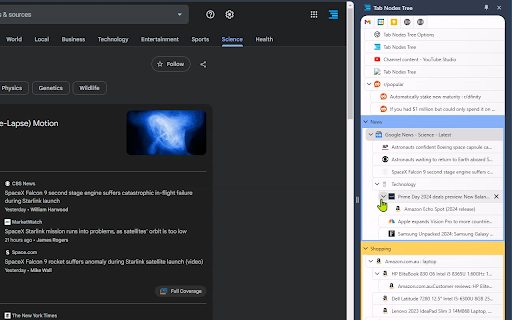


Effortlessly navigate and organize your tabs with an intuitive tree-style view Web browsing often involves opening multiple child pages from a single website. Traditional horizontal tab rows fail to effectively display these parent-child relationships. Tab Nodes Tree solves this problem with its vertical, tree-structured layout, allowing you to instantly grasp the hierarchy of your open pages at a glance. With drag-and-drop functionality, you can effortlessly rearrange and restructure your tab hierarchy as needed. Moreover, horizontal tabs frequently truncate page titles due to limited space, making it challenging to locate specific open tabs. With Tab Nodes Tree, you can see full page titles, significantly enhancing your ability to navigate between tabs. This extension is particularly beneficial for power users who regularly work with 50 or more open tabs. It's also ideal for those with widescreen displays, as it makes efficient use of extra horizontal space that often goes unused. Experience a more organized and intuitive way to manage your tabs with Tab Nodes Tree! Features: ⭐ Light/Dark theme, or follow the System setting. ⭐ Native Chrome Tab Bar Feature Parity: Move, Reload, Duplicate, Pin, Mute, Group, Move to Another Window. ⭐ Multi-Tab Node Selection Actions: Move, Reload, Duplicate, Pin, Mute, Group, Move to Another Window. ⭐ Two-Way Sync with Chrome's Native Tab Row. ⭐ Effortlessly Build a Tab Nodes Tree Structure with Drag and Drop. ⭐ Collapse and Expand Node Trees. ⭐ A Range of Node Tree Settings. ⭐ "Create a new tab at the same level" shortcut: (Windows: Alt+A, Mac: Ctrl+Shift+A). ⭐ "Create a new tab as a child" shortcut: (Windows: Alt+S, Mac: Ctrl+Command+A). 🌟 (Pro) Quick Navigation Panel: Helps you rapidly jump between Groups and Branch Tab Nodes without getting lost in a sea of tabs. Default shortcut: (Windows: Alt+Q, Mac: Ctrl+Q). 🌟 (Pro) Search Tab Nodes: Quickly find any open tab by title. Supports regular expression search and keyboard shortcut navigation through results. 🌟 (Pro) Customize Tab Node Tree Theme. 🌟 (Pro) Unread, discarded style settings including text styles: bold, italic, underline, line through. adjustable opacity for border, background, text, icon. Available for dark, light and customized themes. 🌟 (Pro) Tree Structure Branch Tab Node - Superior to Native Grouping, grouping tabs with a tree structure. 🌟 (Pro) Advanced Node Tree Settings. 🌟 (Pro) "Add to Branch" shortcut: (Windows: Alt+B, Mac: Ctrl+Command+B). ⭐ And more to come! Revolutionize your tab management experience. Download Tab Nodes Tree today!

VertiTab – Vertical Tab Manager | Sessions, AI Groups & Bookmark Sync
Manage all your tabs & bookmarks from a sidebar. Tree view, workspaces, one-click save & restore, organize everything across devices Never lose a tab again. VertiTab turns your browser's side panel into a tree-style tab dashboard — search, sort, and batch-close hundreds of open tabs at a glance. ⭐ SMART TAB MANAGEMENT • Vertical tab sidebar – see all your tabs at a glance • Multi-select with drag selection, Ctrl+Click, and batch operations • Close, reload, or suspend all same-site tabs in one click • Customizable right-click menus, hover buttons, and 60+ keyboard shortcuts • Rename tabs with custom icons, colors, and URL-based rules 🖱️ BROWSER RIGHT-CLICK MENU (NEW) • 40+ tab actions in the browser's native right-click menu – no panel needed • Right-click any tab, page, link, or extension icon to manage tabs instantly • Hibernate, close, group, sort, snapshot, split view – all from the context menu • Tab strip right-click menu support (Chrome 150+, Edge, Firefox) • Fully customizable: per-item toggle, drag-to-reorder, per-context settings 🤖 AI-POWERED GROUPING • Auto-group tabs by content with AI – supports custom rules and emoji labels • Domain-based grouping with flexible format options • New tabs auto-join the right group based on context • Merge groups, customize group colors, auto-collapse inactive groups 📸 SESSION SAVE & RESTORE • Save complete browser sessions as snapshots – manually, on schedule, or automatically • Restore with full control: window positions, tab groups, lazy loading • Crash recovery – automatically restores your last session on startup • Import from Session Buddy, Toby, and Tab Session Manager 📋 WORKSPACES (TAB PANELS) • Create custom workspaces to organize tabs by project or task • Drag tabs between panels, auto-cleanup empty workspaces • Built-in smart panels: All Tabs, Active Tabs, Recently Accessed • Workspaces sync across devices and are included in snapshots 🌳 TREE TABS • Auto-build parent-child tree based on how tabs were opened • Close a parent tab to close the entire subtree 🔖 BOOKMARK MANAGEMENT • Cloud bookmark sync with conflict-free CRDT architecture • Bookmark snapshots with diff comparison and one-click restore • Sync spaces: sync bookmarks across devices or browse bookmarks from other browsers • Convert bookmark folders to tab groups in one click 🔍 UNIVERSAL SEARCH • Search across open tabs, history, bookmarks, reading list, and snapshots • Use @ commands for quick source switching • AI chat: send questions directly to ChatGPT, Claude, and more 🤖 AI ASSISTANT • Agent mode: control your browser with natural language commands • Q&A mode: summarize, translate, and explain current page content • Multi-provider: OpenAI, Gemini, Claude, DeepSeek, and built-in on-device models 🔒 TAB LOCK & PRIVACY • Lock tabs to prevent accidental closure with URL lock • Per-site privacy: auto-clear cookies and data when closing tabs • Developer debug mode: clear site data + force reload ⚡ AUTOMATION • Auto-suspend/close inactive tabs with smart protection rules • Scheduled tasks per tab: timed refresh, suspend, or close • Site-level config: auto-join groups, auto-refresh, privacy clearing 🎨 40+ THEMES & CUSTOMIZATION • Color-blind accessible themes (Okabe-Ito palette) • Deep theme editor with component-level control and custom CSS • Tab styling: index numbers, colored dots, discarded indicators 🪟 WINDOW & SPLIT VIEW • Split View: arrange tabs side by side or top-and-bottom for easy comparison • Customize window name, icon, and color – save as style presets • Smart tab routing: auto-assign tabs to specific windows by URL rules ☁️ CLOUD SYNC • Sync tabs, settings, bookmarks, snapshots, and workspaces • AES-GCM local encryption – your password never leaves your device • Flexible sync modes: upload only, download only, or full sync Four ways to use VertiTab: 🎯 Browser Sidebar – Vertical tabs in Chrome's native side panel ⚡ Popup Window – Independent tab management window 💡 In-Page Sidebar – Trigger from any webpage edge 🖱️ Right-Click Menu – Manage tabs from the browser's native context menu Install VertiTab – the smartest way to manage your browser tabs.

Vertical Tabs
1. The horizontal tab bar cannot be hidden when using the extension. 2. The side panel has a minimum width and cannot be resized smaller than Chrome's allowed dimensions. 💡 How to Get Started: Activate Vertical Tabs with just a click on the extension icon. Pin it for quick access and utilize the shortcut Alt+B (modify from chrome://extensions/shortcuts). 🚀 Discover a new dimension of tab management with Vertical Tabs, a Chrome extension aiming to enhance your browsing experience. 🎯 Effortless User experience: Vertical Tabs elegantly organizes your tabs and groups them seamlessly within Chrome's side panel, simplifying your browsing experience. 🌟 Seamless Integration: Crafted specifically for Chrome, Vertical Tabs seamlessly integrates, becoming an intuitive extension of your browsing experience. 🔍 Swift Tab Access and Search: Navigate your tabs effortlessly and find what you need quickly with the intuitive search functionality. 🔄 Intuitive Tab Management: Easily organize your tabs with drag-and-drop functionality, and streamline your workflow by selecting and managing multiple tabs at once. 🌘 Dark Mode: Dark Mode intelligently aligns with your system theme, ensuring a comfortable browsing experience without any manual adjustments. 📍 Change Position: Personalize your browsing setup by choosing to position Vertical Tabs on either the left or right side of your screen. Simply head to Chrome Settings > Appearance > Side Panel and make it your own. 🛡️ Privacy-First Approach: Your tab information stays private, no tab data is sent to any servers. Enjoy organized tabs while keeping your data secure. Get ready to streamline your browsing, boost productivity, and enjoy a visually stunning interface with Vertical Tabs. Download now and discover the future of tab management!

Tree Style Tab Manager
Organize Chrome tabs in a tree. Save & restore sessions, drag & drop, instant search, site exclusions, and recover closed tabs. Tree Style Tab Manager — Hierarchical tabs, powerful snapshots, and seamless organization for Chrome. Tree Style Tab Manager transforms Chrome's tab bar into a clean, hierarchical tree in the native side panel. Tabs opened from other tabs automatically nest as children — revealing the natural structure of your browsing. Now with full Snapshot Sessions to save, restore, and manage entire workspaces. ✅ Tree View — Visual parent-child hierarchy with expand/collapse controls ✅ Snapshot Sessions — Save your entire tab workspace and restore it anytime ✅ 3-Zone Drag & Drop — Drop tabs above, into, or below any target with precision ✅ Never Lose Tabs — Closed tabs stay recoverable for up to 7 days (or never expire) ✅ Instant Search — Find any tab by title or URL, filtered live as you type ✅ Multi-Window Restore — Reopen snapshots in new windows with monitor-aware placement ✅ Site Exclusions — Keep specific sites out of the tree ✅ Privacy First — 100% local storage, zero tracking, no external servers 🎯 PERFECT FOR • Researchers juggling articles, references, and rabbit holes • Developers navigating docs, PRs, and localhost tabs • Students organizing study material by topic • Anyone with 20+ tabs who wants to stay sane 📊 Hierarchical Tree View Tabs automatically nest under the tab that opened them. Expand or collapse entire branches. Visual connectors show depth at a glance. 💾 Snapshot Sessions (New) Save your entire open workspace as a named snapshot. Restore later with three modes: replace current tabs, open in new windows, or merge with what's open. Undo a restore instantly. Monitor-aware window placement puts each window back where it belongs. Overwrite a snapshot with your current tabs or rename it anytime. 🚫 Site Exclusions (New) Keep your tree clean by excluding specific domains. Excluded sites won't appear in the tree at all — perfect for localhost, internal tools, or any high-frequency site you don't want cluttering your hierarchy. 🗂️ Save & Close Save a session and close all its tabs in one action — great for winding down a research session without losing your work. 🔄 Precision Drag & Drop (Upgraded) Three-zone dropping: hover the top edge to insert before, the middle to nest as a child, or the bottom edge to insert after. A dedicated drag handle prevents accidental drags. Auto-scroll kicks in when dragging near the panel edges. 🔍 Instant Search Live filtering by title or URL — the tree updates as you type, smoothly and without lag. ⏱️ Smart Virtual Tabs Closed tabs remain visible and restorable. Set the expiry window from 12 hours to 7 days — or choose Never Expire. Clock badges show time remaining at a glance. 🎨 Themes & Accessibility Multiple themes with fully consistent highlight and hover colors. Full keyboard accessibility with aria-live toasts, labeled icon buttons, and accessible theme swatches. 🔒 Complete Privacy All data lives on your device. No analytics, no cloud sync, no external servers. Data is deleted on uninstall. • Click the extension icon to open the side panel • Your tabs appear as a live tree — new tabs nest under their opener automatically • Save your workspace as a named snapshot anytime • Search, drag, reorganize, or collapse branches as needed • Restore any snapshot later — full workspace, one click Tree Style Tab Manager gives your browser the structure your workflow deserves. Install it and never lose a tab — or a session — again.

Vertical Tabs Side Panel
★ Simplicity defines us - NOW WITH TREE VIEW and AUTOMATIC GROUPING! ★ Open shortcut, CTRL + i (windows), COMMAND + e (macOS) and… ★ Simplicity defines us - NOW WITH TREE VIEW and AUTOMATIC GROUPING! ★ Open shortcut, CTRL + i (windows), COMMAND + e (macOS) and CTRL + q (linux) Vertical Tabs View allow you to easily access and search your tabs, using a vertically stacked UI. It also allows you to open, sort and close individual or a group of tabs. This extension is very useful for those who end up with many tabs open without knowing the last time you even interacted with them, allowing one to easily get rid of old tabs. It also makes it easy to spot duplicated tabs and to navigate to recently opened ones. See https://www.youtube.com/watch?v=8ow6f5zWRLI for details on how to use it. Note: Chrome shows a scary popup regarding Vertical Tabs View accessing your browser history. We do react to new tabs as a way to store LOCALLY the last time you interacted with them. However, nothing is ever sent to a server, nothing ever leaves your computer, this extension is completely private. Feel free to check the code at the website link. ★ White and dark mode ★ Search bar that allows to search for title or url. ★ Sort tabs by url and staleness. ★ See the number of open and duplicated tabs. ★ Delete duplicated tabs with one click. ★ Open shortcut, CTRL + i (windows), COMMAND + e (macOS) and CTRL + q (linux) ★ Navigate your tabs using the arrow or TAB (on your keyboard) ★ Open a tab via Enter key. ★ Easily close a specific or multiple tabs. ★ Click on the sort icon to sort by either, url, title or staleness. ★ If you have duplicated tabs, click on the menu to highlight them or get rid of them.
