
lnhnebkkgjmlgomfkkmkoaefbknopmja
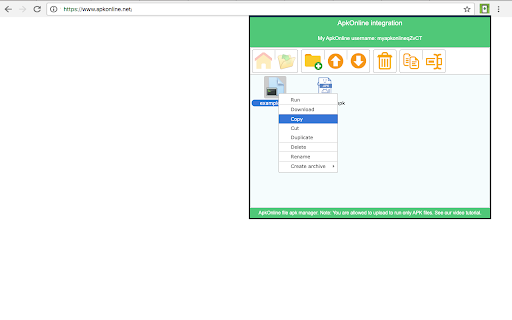

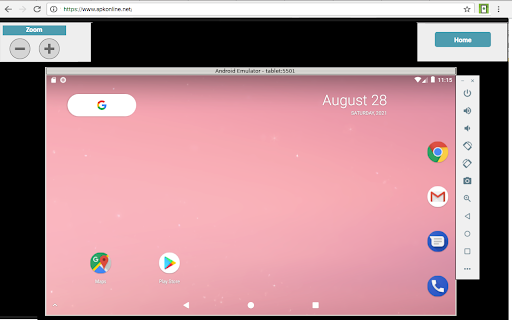
Manager that allows to handle APK files that are run with the ApkOnline android emulator platform This extension scans browsed URLs to identify android APK or other files for our Android emulator online. The APK and files are presented in a list within the extension popup. This popup is sourced from our servers so the browsed URL are collected and reported to our cloud server. This is then a dynamic file manager to handle APK and other files for the android online emulator provided by ApkOnline. It also allows users to upload APK that can be renamed, copied, deleted and even executed using an API integration with ApkOnline. As a result of that, this extension speeds up the APK management and execution using the ApkOnline android online emulator, which has the following features: * Android Virtual Device (AVD). * Tablet skin configuration with Oreo 8.0, although you can request a higher version. * Test your android applications without access to the real hardware with only your web browser. * Internet access from the Android emulator. * Google Play Store app preinstalled. * Other apps like Chrome, Email, ... also preinstalled. * Basic emulated features for APK developments: device rotation, ... IMPORTANT NOTE: The scanning process to detect APK and files when browsing in the Internet occurs on our servers so the URL are reported there. In this process, no personal data is collected. Of course, users can opt to disable this scanning via a checkbox in the extension popup. However, note that disabling this functionality severely limits the extension's functionality while browsing through the Internet.

Apk Downloader manager for Android
APK downloader to search & download Android APK integrated with ApkOnline. This extension is an APK downloader to search and download any Android APK. It is mainly design to facilitate the Android development of any app. When the extension is clicked, it opens a window where users can search for its desired app. After that, our internal engine searches for the best apps that match the keywords entered. These apps appear in a list where the users can click from to initiate the APK download having as a reference the Google Play Store apkid, which is sent to our website. * Search for Android APKs. * Download Android APKs. * Use the apkid of the Google Play Store as reference.

Android developer Cordova online
Editor to create Android Cordova app that are run with the ApkOnline android emulator platform This extension is an Android Cordova online editor that allows you to create Android applications online to be run on the android emulator ApkOnline. The extension provides an HTML text area, a CSS text area, and a JavaSCript text area to build your Android Cordova application. These text areas can be edited and any change appear automatically in a preview area that shows the final composition of the application that will be created using HTML, JS and CSS. You must take into account that Cordova Android is an Android application library that allows you to create Cordova-based projects for the Android platform. Cordova-based applications are essentially applications written with web technology: HTML, CSS, and JavaScript. Note that Apache Cordova allows software developers to create hybrid web applications for mobile devices using CSS3, HTML5, and JavaScript, rather than relying on platform-specific APIs such as Android. In fact, it allows you to complete the CSS, HTML and JavaScript code. It extends the functionality of HTML and JavaScript to work with the device. The resulting applications are hybrid, which means that they are neither truly native mobile applications nor purely web-based. They are not native because all design rendering is done through web views rather than the platform's native UI framework. They are not web applications because they are packaged as applications for distribution and have access to native device APIs. With this extension, you do not need to install Android Studio to work due to the fact that Apache Cordova (formerly PhoneGap) is a mobile app development framework that can be used with any Android IDE. Watch our video to know how to use our extension.

Smart TV Emulator
The Smart TV Emulator enables any developers to test and debug their HTML5 apps for the Smart TV App Store. The Smart TV Simulator enables any developers to test and debug their HTML5 apps for the TV App Store. It emulates Smart Core version 4.0 and later which powers millions of Smart TVs, Blu-ray players and set-top boxes across the world. Installation instructions: - Install and enable the extension using Browser for computers - Type in the URL you want to test and debug in the address bar - Press the small extension icon to start the emulation so it turns red - Start testing and debugging Features: - Functional key mappings - VK_KEY button emulation, including directional, enter, back and colour buttons (r,g,b,y). - User agent - Add or update multiple custom user agent strings. - Overscan support - Overscan is a common problem on TVs, where some parts of the app UI is not displayed on the TV screen. This option shows the safe area on the TV screen where the app UI will always be shown. - Draggable popup with information appears when window.close function is called. This is useful for testing window.close behaviour in your app. - localStorage disabled - In the Vewd App Store environment, localStorage support is disabled due to little memory available on the devices. If localStorage is used, a popup message appears warning the developer. To use navigation, color keys, playback control keys (VK_PLAY etc.) with the keyboard please consider the following mapping: Tips and tricks: - After the installation is finished you can check "Allow access to file URLs" to emulate local files - e.g file://foo/bar/index.html - By default, the extension will only work with the URLs you enabled it for, and not for all tabs. The extension is automatically starting for the URL you enabled it for

Ubuntu free online linux server
Run the Linux Ubuntu, Kubuntu, Lubuntu and Xubuntu from the OnWorks free servers hosting provider This extension scans browsed URLs to identify and used files for our Ubuntu OS online. The files are presented in a list within the extension popup. This popup is sourced from our systems so the browsed URL are collected and reported to our cloud server. This is then a dynamic file manager to handle files for our Ubuntu OS online. It also allows users to upload files that can be renamed, copied and deleted using an API integration with Ubuntu online. It also allows to run online Linux Ubuntu versions using your web browser. This extension provides the following OSs: Ubuntu GNOME, Kubuntu, Lubuntu and Xubuntu. All of them run using an integration with our "OnWorks" free servers hosting provider: 1. This Ubuntu online is one of the most well known Linux versions, and comes equipped with the GNOME desktop. Although the previous Unity desktop was evaluated we have opted for GNOME. It has a classic desktop style with icons, a panel on the left mimicking its traditional look and feel. This Ubuntu online comes preinstalled with the most common System tools, Office utilities, Graphic programs and so on. 2. This Kubuntu online inherits all the core features of Ubuntu but it looks different. It includes the KDE Plasma, a desktop environment that a lot of users prefer. This KDE desktop provides access to programs and files clicking a left-bottom K-button (Kickoff Application Launcher), which is similar to the typical Start button. As with Ubuntu GNOME online, it has preinstalled applications like LibreOffice, Okular Document Viewer, Kontact, Rekonq, Amarok, and Dragon player. It must be also noted that our Kubuntu online offers an user interface easier to use for people that comes from Windows and Mac OS. 3. This Xubuntu online also provides a lot of Ubuntu features but without compromising the performance and aesthetics. For that reason Xubuntu provides a desktop with a lot of bells and whistles while still striving not to impact too much on the PC system’s resources. This Xubuntu online comes with the XFCE desktop, which is lighter when compared to GNOME, Unity or KDE. 4. This Lubuntu online provides the lighter desktop based on the LxQt(LxDE) desktop environment. LxQt(LXDE) is a desktop environment to be run on system with poor resources. The desktop is simple and allows for you to place icons. It also supports a right-click menu. There are no desktop effects or animations. Moreover, Lubuntu achieves to be lighter with applications and software that come packed with this particular distro. Instead of LibreOffice or something similar, end users are provided with Gnumeric and Abiword. Note that all of these Ubuntu online versions are integrated with the file manager that are provided by the "OnWorks" free hosting provider. This file manager can be used to save and load the files handled inside the OnWorks online workstations. IMPORTANT NOTE: The scanning process to detect files when browsing in the Internet occurs on our servers so the URL are reported there. In this process, no personal data is collected. Of course, users can opt to disable this scanning via a checkbox in the extension popup. However, note that disabling this functionality severely limits the extension's functionality while browsing through the Internet. The search queries of the URLs scanned are not collected.
