
ldolgfmfhlgpgnmplmblipcdmojfhbld

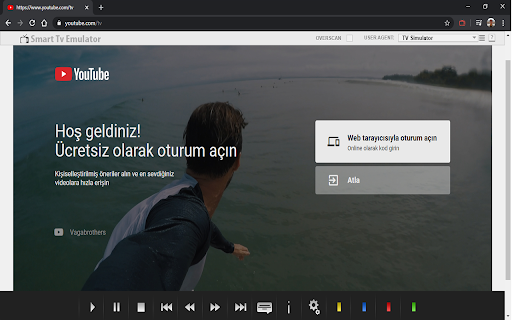
The Smart TV Emulator enables any developers to test and debug their HTML5 apps for the Smart TV App Store. The Smart TV Simulator enables any developers to test and debug their HTML5 apps for the TV App Store. It emulates Smart Core version 4.0 and later which powers millions of Smart TVs, Blu-ray players and set-top boxes across the world. Installation instructions: - Install and enable the extension using Browser for computers - Type in the URL you want to test and debug in the address bar - Press the small extension icon to start the emulation so it turns red - Start testing and debugging Features: - Functional key mappings - VK_KEY button emulation, including directional, enter, back and colour buttons (r,g,b,y). - User agent - Add or update multiple custom user agent strings. - Overscan support - Overscan is a common problem on TVs, where some parts of the app UI is not displayed on the TV screen. This option shows the safe area on the TV screen where the app UI will always be shown. - Draggable popup with information appears when window.close function is called. This is useful for testing window.close behaviour in your app. - localStorage disabled - In the Vewd App Store environment, localStorage support is disabled due to little memory available on the devices. If localStorage is used, a popup message appears warning the developer. To use navigation, color keys, playback control keys (VK_PLAY etc.) with the keyboard please consider the following mapping: Tips and tricks: - After the installation is finished you can check "Allow access to file URLs" to emulate local files - e.g file://foo/bar/index.html - By default, the extension will only work with the URLs you enabled it for, and not for all tabs. The extension is automatically starting for the URL you enabled it for

m3u8 Sniffer TV - Find and Play HLS Streaming URLs
Grabs m3u8 webRequests from visited web pages and provides options for using them. Important Note: This extension will NOT help you access videos from sites like YouTube or Netflix. The extension does not provide any video streaming content of its own, it only makes it easier to find and use links for video streams that are already publicly available. The extension intercepts visited web page's network requests and identifies all m3u8 video stream URLs. When a m3u8 URL request is found, it is displayed in a box that overlays the visited web page (see images above) from which you can copy the m3u8 URL or play the video stream. Also, you can open the extension's popup window to view the first and last m3u8 URLs found for each site, as well as to set a variety of extension options. This extension does NOT provide functionality to download the actual video streams. There are already quite a few other extensions and programs for that. For example, I use this extension mostly to identify video streams from live TV news streaming pages. If they use m3u8 files for the stream, I can play them with the extension's integrated video player, or copy the links to the clipboard to use with other video playing and recording programs like VLC, Kodi, or Jaksta Media Recorder. Please visit the extension's companion web site for the complete documentation at: https://sniffertv.com/docs/

Netclicker
Turn Your Laptop into a Smart TV You Can Control from Your Phone We believe watching shows and movies on your laptop shouldn’t mean hovering over a trackpad, squinting at the screen, or constantly getting up to pause. You should be able to lean back, relax, and stay in control—without leaving the couch. Netclicker turns your phone into a powerful remote for your laptop. 📱 Control playback, volume, and navigation from your phone ⏭️ Auto-skip intros, recaps, and delays between episodes 🧠 Keep your watchlist smart and synced across platforms 🪄 Move the mouse with gestures or precision touchpad mode 👀 See everything better from the sofa with enhanced viewing distance Netclicker works best when these three parts come together: 📱 Remote App – Your phone becomes the controller 🖥️ TV App – Installed on your laptop or desktop 🧩 TV Extension – Optimises Netflix, YouTube, Prime Video & more Install the extension, download the TV app, and connect your phone over Wi-Fi. That’s it. No sign-up. No cost. Just better streaming. ❤️ The Netclicker Team

Android developer Cordova online
Editor to create Android Cordova app that are run with the ApkOnline android emulator platform This extension is an Android Cordova online editor that allows you to create Android applications online to be run on the android emulator ApkOnline. The extension provides an HTML text area, a CSS text area, and a JavaSCript text area to build your Android Cordova application. These text areas can be edited and any change appear automatically in a preview area that shows the final composition of the application that will be created using HTML, JS and CSS. You must take into account that Cordova Android is an Android application library that allows you to create Cordova-based projects for the Android platform. Cordova-based applications are essentially applications written with web technology: HTML, CSS, and JavaScript. Note that Apache Cordova allows software developers to create hybrid web applications for mobile devices using CSS3, HTML5, and JavaScript, rather than relying on platform-specific APIs such as Android. In fact, it allows you to complete the CSS, HTML and JavaScript code. It extends the functionality of HTML and JavaScript to work with the device. The resulting applications are hybrid, which means that they are neither truly native mobile applications nor purely web-based. They are not native because all design rendering is done through web views rather than the platform's native UI framework. They are not web applications because they are packaged as applications for distribution and have access to native device APIs. With this extension, you do not need to install Android Studio to work due to the fact that Apache Cordova (formerly PhoneGap) is a mobile app development framework that can be used with any Android IDE. Watch our video to know how to use our extension.

Smart LG TV Remote Controller
This extension provides remote controller for LG Smart TVs. Remote controller extension for LG Smart TV. This is an excelent Remote control application on Chrome Browser.
